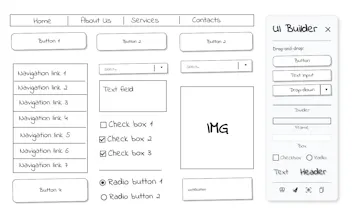
UI Builder is a Chrome extension for quick, sketch-style wireframes directly in your browser. Drag buttons, inputs, headers onto any page or blank canvas. Edit text, resize, screenshot, and share — perfect for fast feedback, live demos, and client calls.
Intercom — Startups get 90% off Intercom + 1 year of Fin AI Agent free
Startups get 90% off Intercom + 1 year of Fin AI Agent free
Promoted
Honestly, I really love how simple and straightforward this extension is. It does exactly what it promises. No fluff, no friction.
Super clean experience in my opinion.
Congrats on the launch, Aleksandr! I'm sure a lot of people will find this incredibly useful and use it daily :)
Report
I tried UI Builder and it’s been a game-changer for quick mockups — dragging elements onto a live page feels super natural, and it’s perfect for real-time feedback during client calls. Fast, lightweight, and actually fun to use.
Hey Product Hunt! Write it from my heart - without AI :)
I’m an IT analyst, and the idea for UI Builder came during one of those classic Zoom calls with a client while discussing design changes in a CRM system.
I realized how tricky it can be to quickly show what a new button or checkbox might look like - right there, in the browser. Sometimes I used screen drawing tools (not bad, but clunky), or I’d just sketch something later and send it for review after the call.
But being able to test and agree on a rough idea live, during the conversation - really speeds things up.
So I built this: ➤ Drag and drop UI elements onto any webpage or blank canvas ➤ Edit text in place, resize blocks, rearrange things ➤ Take screenshots or copy to clipboard ➤ Works locally, no data tracking, no login
I searched around and couldn’t really find a Chrome extension that does this - most are just drawing tools or annotation overlays.
Have you seen a tool like this before? Would love your thoughts or similar examples you’ve used.
Honestly, I really love how simple and straightforward this extension is. It does exactly what it promises. No fluff, no friction.
Super clean experience in my opinion.
Congrats on the launch, Aleksandr! I'm sure a lot of people will find this incredibly useful and use it daily :)
I tried UI Builder and it’s been a game-changer for quick mockups — dragging elements onto a live page feels super natural, and it’s perfect for real-time feedback during client calls. Fast, lightweight, and actually fun to use.