
UI Builder - Mockup tool
Sketch UI mockups directly on live websites in Chrome
334 followers
Sketch UI mockups directly on live websites in Chrome
334 followers
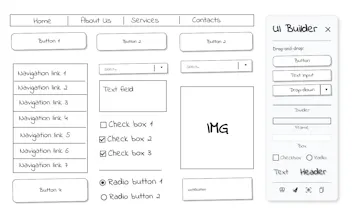
UI Builder is a Chrome extension for quick, sketch-style wireframes directly in your browser. Drag buttons, inputs, headers onto any page or blank canvas. Edit text, resize, screenshot, and share — perfect for fast feedback, live demos, and client calls.




UI Builder - Mockup tool
Hey Product Hunt! Write it from my heart - without AI :)
I’m an IT analyst, and the idea for UI Builder came during one of those classic Zoom calls with a client while discussing design changes in a CRM system.
I realized how tricky it can be to quickly show what a new button or checkbox might look like - right there, in the browser.
Sometimes I used screen drawing tools (not bad, but clunky), or I’d just sketch something later and send it for review after the call.
But being able to test and agree on a rough idea live, during the conversation - really speeds things up.
So I built this:
➤ Drag and drop UI elements onto any webpage or blank canvas
➤ Edit text in place, resize blocks, rearrange things
➤ Take screenshots or copy to clipboard
➤ Works locally, no data tracking, no login
I searched around and couldn’t really find a Chrome extension that does this - most are just drawing tools or annotation overlays.
Have you seen a tool like this before? Would love your thoughts or similar examples you’ve used.
Congratulations on the launch Aleksandr!
I find this idea very clever. People in my team have struggled with the same problem of sketching UI ideas after meetings. Your drag and drop approach seems a great fit.
Any plans for adding collaboration features for teams?
UI Builder - Mockup tool
@pranay12 Thanks so much! Glad to hear it resonates with your team - that’s exactly the kind of workflow we built it for.
Collaboration features aren’t available yet, but they’re definitely on the roadmap.
UI Builder - Mockup tool
@pranay12 Appreciate the kind words! Collaborative use cases are definitely something we want to explore soon.
Meet Kai, the AI Trading Wizard
Wow, this is super handy! I’ve spent way too much time alt-tabbing to a design app mid-call or sketching on paper. Can’t wait to try it. Love that there’s no login required. Any chance of adding custom component libraries down the road?
UI Builder - Mockup tool
@hugors00 Thanks so much! Really glad it solves a pain you’ve felt - that was exactly the idea.
And yes, custom or expanded component libraries are definitely in the plans. I’m aiming to ship updates roughly once a month, so stay tuned!
UI Builder - Mockup tool
@hugors00 Great point! A custom library system is something we've talked about internally — definitely coming in future releases.
Congrats to the launch, @aleksandr_heinlaid !
Not sure if I am doing something wrong, but after installed the extension, nothing showed up. Any guidance?
UI Builder - Mockup tool
@fullstack_x Thank you! Just activate it on any website other than the Chrome Web Store.
UI Builder - Mockup tool
@aleksandr_heinlaid @fullstack_x thanks! let us know if you won't manage the problem
@aleksandr_heinlaid @lembit_hunt Thanks both! It worked after following the guidance. Nice job!
Easy to use and lightweight, congratulations. Is there an option to add another person to an existing sketch/project?
UI Builder - Mockup tool
@eljo_prifti Thanks, really appreciate it!
At the moment, there's no option for real-time collaboration - it's a solo tool for now.
But that’s a great idea, and I ll definitely add it to the backlog for future updates!
Lookverse.ai
This makes so much sense, I’ve been in that exact spot on calls and it always feels clunky trying to mock something up on the fly. Curious, how fast is the flow from capture to editing? Feels like speed is everything here
UI Builder - Mockup tool
@alagerrka Thanks, totally get that - we've felt the same pain during calls. The flow is built to be instant: just click the icon, and you're dragging elements within seconds. No setup, no menus. Speed was a top priority from the start.
UI Builder - Mockup tool
@alagerrka thanks a lot, Oxana
DocsHound
@aleksandr_heinlaid Congrats on the launch. Definitely worth trying!
UI Builder - Mockup tool
@k_piotr thanks!
UI Builder - Mockup tool
@aleksandr_heinlaid @k_piotr Thanks Piotr glad you’re giving it a try