
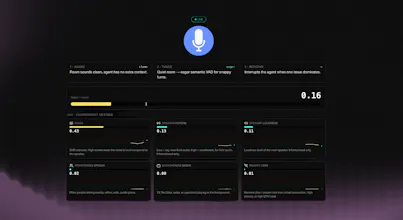
Tyto is a lightweight model that runs on your audio stream and predicts whether the audio reaching your agent will cause downstream failures. It outputs a single score plus a breakdown across six dimensions: noise, speaker reverb, speaker loudness, interfering speech, background media speech, packet loss. Try it here: https://ai-coustics-tyto-demo--ph.modal.run/



Forum Threads


Resources for Tyto Audio Insight
It's been some time since we launched Tyto (getting #15 on PH!). Now we would like to hear from you - did you get a chance to try it yourself already? If not, what was the blocker, how can we help you to get there, what are you missing?
Let us know!
--
Additionally, I've compiled here the list of top currently available resources on Tyto and ai-coustics SDK to help you get started.
Tyto documentation
Launch blog with samples
Post-call analysis tutorial
Live demo app
Tyto - first thoughts
We're launching our recently released new Audio Intelligence product on Product Hunt tomorrow.
Ahead of the launch day, you can check out the release blog and try it out via our SDK (get a key here).
Looking forward to first feedback from you!

Hi everyone, I'm Fabian, co-founder at ai-coustics.
The launch page covers very well what our newest product does but let me add here why we built it.
Voice agents are moving into the real world, where audio is messy: think cars, call centers, kitchens, noisy streets. And in the real world they fail in ways the transcript never shows. Especially competing voices - like a TV in the background or a far-field speaker - and artifacts like packet loss on a bad connection can throw off agent's performance. Teams see the bad outcome but have no idea the cause was audio. That blind spot is where trust in production voice AI breaks down.
Tyto (Audio Insight) is the solution for that blind spot. It analyses the input audio and scores it: how noisy, how reverberant, how much interfering speech, how likely the agent is to mishear. It's a signal you can actually act on.
It works in two modes: real-time monitoring so you catch failing calls as they happen or adjust the agent flow, and post-call analysis so you can finally answer what went wrong. And it runs on the same on-device ai-coustics SDK that's already shipped in production by voice AI teams.
Easiest way to feel it: point Tyto at a recording of one of your worst calls and watch it highlight exactly where the audio fell apart. Full write-up here. Link to documentation here.
We built this for the people shipping voice agents into hard environments. Tell us what's missing, we're reading every comment. 🙌
Congrats on the launch! I'm curious what specific agent flow adjustments can Tyto trigger automatically when it detects interfering speech mid-conversation?
@crystalmei TLDR: Tyto gives you the raw metrics on how much interfering speech there is and gives Voice AI builders the flexibility to threshold those values and emit tags, which can be propagated to the LLM or voice agent to intervene.
Deeper Dive: Tyto outputs two interfering speech quality metrics respectively for in-the-room interfering speakers and devices playing content containing speech. They are both numerical values that go from 0 (clean audio) to 1 (lots of interfering speech). Crucially they are agent agnostic to give builders control over how they leverage them.
The flow we would recommend is to run Tyto over your user audio and threshold the interfering speech metrics at 0.35 (medium) and 0.6 (poor). These bands can then be used realtime to propagate information (e.g. textual tags like "High Background Speech" or "TV/radio/device detected") to your Voice Agent or LLM.
You can also preemptively flush the agent's turn when the threshold is exceeded and have it tell the user to move somewhere quieter. We've seen use cases like these with some customers, which is pretty cool.
Hope that helps! You can find lots more information in the Tyto guide in the ai-coustics docs :)
This is a useful blind spot to solve. In sales and support voice agents, transcripts often hide the real reason trust broke down. Do you see Tyto feeding a live confidence/risk signal into the agent policy, like switching to confirmation mode, slowing down, or escalating to a human when audio quality crosses a threshold?
@rahulbhavsar Exactly this. Tyto's major value add is that it gives you the headline Risk Score in realtime so you can trigger an intervention when it crosses a critical threshold.
It leaves you the flexibility to choose your intervention downstream and indeed that could be routing to a human, asking the user to turn off a TV or switching from automatic to manual turn-taking, for example. You can tailor the intervention based on the six more granular audio quality dimensions Tyto offers (interfering speech, media playing in the background, noise etc.)
Sales is a demanding use case for voice agents so this kind of acoustic awareness is exactly the edge Tyto aims to provide.
@anilkeshwani That last line lands — 'Sales is a demanding use case.' In SMB environments specifically, noisy audio isn't an edge case, it's the default. A rep calling from a home office, a customer answering from a busy restaurant. The six-dimension breakdown makes sense because not all noise degrades trust equally. One question: is the threshold configuration static, or does Tyto learn what a 'normal' noise floor looks like for a given agent over time?
@rahulbhavsar The thresholding is currently static and we recommend calibrating this on your traffic, but automatic or dynamic calibration is something we can both provide recipes for and work to build directly into a future release. I'd love to hear about AI Xccelerate's use cases for Tyto, if you want to share more details here or reach out directly.
Upstream
Looks great! Does running on-device add latency to the live call, or is the scoring free?
@louislecat In the 'real-time' mode, Tyto scans chunks of audio (depends how you set it, but for example 5 seconds progressively) and sends the scores after analyzing. It doesn't add latency to the call itself.
Mailwarm
Any plans to ship this as a small SDK for mobile apps, or is it mainly for web and call center setups?
@thamibenjelloun we have C/C++/Rust support for Android and iOS :)
Hey hey, Mila from ai-coustics here - I'm looking forward to seeing what you all think!
If you want to try it in your own infrastructure right away, you can get your SDK key here 😊
You can find full docs here: https://docs.ai-coustics.com/
@ai_mila really cool launch!
@marcosvalera Thank you (on behalf of the whole team) Marcos!
Straighty.app
It basically feels like the Voice AI agents are not deaf anymore! I think there was some degree of the Audio Intelligence in some of the STT engines such as understanding certain sounds etc but the acoustics awareness is a whole new level!