
Launched this week

TypeBoost
Your personal AI writing toolkit. Inside any app.
455 followers
Your personal AI writing toolkit. Inside any app.
455 followers
Turn your prompts into a personal AI writing toolkit. Use it inside any app on macOS. No copy-paste. No switching tools. Apply custom AI actions directly to selected text, see and control every change, and write faster while still sounding like you. Fully customizable prompts, model choice, voice input, and learning over time. Better writing. Faster. Still yours.


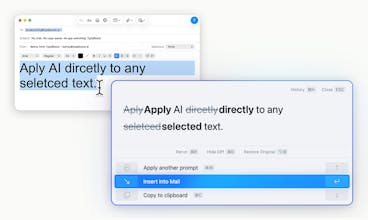


The "apply custom AI actions directly to selected text" is exactly what's missing from most AI writing tools. I'm constantly copy-pasting between Claude and my editor when writing docs or blog posts. Quick question — does it support custom shortcuts for specific prompts (e.g., ⌘+Shift+E for "explain technical concept simply")?
sliiidea
@dronidev I'm happy you like the idea! Yes, it exactly makes things like this faster, easier, and your workflow more efficient.
Currently, there are just two shortcuts (Text Mode & Voice Mode). The process of selecting a prompt is really fast.
But of course, I could put custom shortcuts for specific prompts on the roadmap for the future :) Would that be something you're interested in?
@bennyqp Yeah, custom shortcuts would be huge. I have 5-6 prompts I use constantly ("simplify for non-tech audience", "make this more concise", "add code examples") and having ⌘+1, ⌘+2 etc would save so much time vs opening the prompt selector each time. Definitely interested if it makes the roadmap)
sliiidea
@dronidev Alright awesome, it's a pretty cool idea, I like it! It's noted and I hope to be able to ship it as soon as possible. Thank you Andrey!
Product Hunt
sliiidea
@curiouskitty Thanks for the question. This was actually one of the core design decisions.
On macOS, TypeBoost only requires Accessibility permission (and Microphone if you want to use Voice Mode). There’s no background scraping, no passive monitoring.
The app only reads text you’ve explicitly selected at the moment you trigger it. Nothing else. It doesn’t scan documents, emails, or apps in the background.
The line I drew very clearly was this:
TypeBoost does not:
Monitor your screen
Read entire documents automatically
Store or analyze text without you triggering it
Access anything without a deliberate action
The tradeoff is intentional: instead of trying to be "magically aware" of everything happening on your system, TypeBoost stays event-based and user-triggered.
That keeps it predictable, minimal, and fully under your control.
This looks interesting.
The real friction with AI isn’t the model quality anymore, it’s workflow breakage. The constant context switching, rewriting prompts, and losing flow between apps is what kills productivity.
What I like about this approach is the “your rules, your prompts” angle. That turns AI from a generic assistant into something more like a personal writing OS.
The granular accept/reject edits is also underrated. Transparency builds trust, especially when AI touches your actual words.
Congrats on shipping this. Native workflow tools > browser tab juggling every time.
Will definitely give it a try!
sliiidea
@dkspeaks Thanks! Yes, you nailed it with your comment; that's what makes TypeBoost special. Really glad you appreciate the concept :)
Hey there, happy launch day!
What's been the biggest technical hurdle in making it work reliably across any app (e.g., permissions, text selection in sandboxed apps, or shortcuts/hotkeys conflicts)? And how do you make onboarding feel instant without overwhelming new users?
Also, have you seen users combining voice dictation with text selection for hybrid workflows (like dictating into emails/docs then refining selected parts)?
sliiidea
@cathcorm Thanks Catherine, these are great questions.
The biggest technical hurdle was definitely making text extraction reliable across apps using the macOS Accessibility API. Yeah, especially with sandboxed apps and edge cases. I ended up implementing multiple fallback strategies to make it stable across different environments.
On onboarding: I obsessed over making it feel intentional, not overwhelming. Permissions are requested exactly at the moment they make sense ... not all at once (was like that at one point). The goal was: explain why, then ask. I also embedded short videos directly in the flow so users never feel stuck.
And yes, the hybrid workflow is actually one of my favorite use cases. And a lot of users do it.
If you select text and trigger Voice Mode, you can dictate an instant instruction for that specific text. So instead of using a predefined prompt, you can say something like: "Make this shorter and more direct." That combination, selection + voice instruction, is surprisingly powerful.
To really feel the magic, you kind of have to try it. That’s usually when it clicks :)
Happy to dive deeper if you’re curious about any specific part.
@bennyqp Hey! Thanks for the detailed dive, it's super insightful, and very clear you poured a ton of thought (and battle-testing) into making this rock-solid 💛
sliiidea
@george_esther Thank you, Esther!
Shared prompt actions for teams are really awesome. Right now, the main focus, however, is on individual users, but that's something I would love to add soon. I heard from so many teams that keeping brand voice consistent across everyone is a big challenge. This is such a great use case for TypeBoost.
Yeah, I definitely want to position it in the market, so let's stay in touch :)
sliiidea
Hi Product Hunt 👋
I’m Benny, the maker of TypeBoost.
I use AI a lot. But it often felt messy: copy-pasting text, switching to ChatGPT, rewriting the same instructions, juggling Gemini, Claude, Apple Intelligence, or whatever. Plus, the better the prompt, the better the result. Which meant: you’d better write a good one. That felt wrong.
What I really wanted was AI inside my workflow. Right inside any app. And full control over how my text is improved. My actions. My style. My prompts. My rules.
So I built TypeBoost for macOS.
It’s not "just another AI assistant".
It’s a personal, fully customizable AI writing toolkit that lets you apply your own prompts directly to selected text, see exactly what changed, accept/reject edits on a granular level. All without breaking focus. Voice input included 🎙️
Once it becomes a habit, it’s insanely productive.
There’s also an iOS app that stays fully in sync. E.g. capture ideas by voice on the go, and they’re waiting for you on your Mac later. Or what ever you need.
I genuinely hope TypeBoost helps you as much as it helps me.
If you’ve got questions, ideas, or feedback — I’m here 😊
Cheers
Benny
@bennyqpYou did a really amazing job building TypeBoost, been using it for the past 6 months, and it is a real part of my stack!
sliiidea
@victormignone This is awesome to hear, Victor. It makes me genuinely happy that something I built became part of your daily workflow and actually makes you more productive!
Very cool - nice to see something using ai personalized and helping get better instead of automated ai spamming on different channels. Is it bring your own key or use yours as saas?
sliiidea
@daniele_packard Yes exactly, that's one of the key ideas. To use AI to write faster, but with your actual thoughts and words and not let ai bots produce slop that just annoys everyone. At the moment it's only working as saas with my api key.