Tooltip Tutorial

Tooltip Tutorial

Onboarding tutorials in a few clicks

5.0
1 review

177 followers

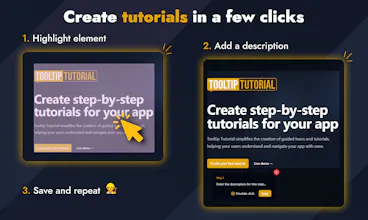
Tooltip Tutorial simplifies the creation of guided tours and tutorials for web apps. With just a few clicks and no coding, you can help users navigate your app seamlessly, enhancing onboarding and boosting engagement with step-by-step, customizable guides.
Tooltip Tutorial gallery image
Payment Required
Launch tags:Customer SuccessSalesSaaS
Launch Team / Built With
Anima - Vibe Coding for Product Teams
Build websites and apps with AI that understands design.
Promoted

What do you think? …

Bogdan Stan
Hello Product Hunt community, In April 2024, I launched my first app, in which people faced difficulties navigating it. Therefore, something had to be done in that regard. My first idea was to make a blog, in which I could present the app’s features so people would get a better understanding of it. However, that did not work, as people simply did not have the time to read all of the long and detailed instructions on how everything works. As this first experiment failed, I decided to add Knowledge Bases, where I took the content of the blogs and basically made them shorter so it would be easier to follow. However, users had difficulties following the instructions as they were simply too boring. It was still a difficult task for the user, as they had to remember each step, and if they forgot something along the way, they had to go back to the Knowledge Base and redo all the steps. At this point, I decided to step things up by creating video tutorials for each of the previous posts I had created. At that time, in my opinion, that had to be the end of the issue: I was literally showing the user what buttons to click step by step. However, despite it being an improvement, it did not solve the problem. People still had issues with finding the same buttons, especially if they were using different devices such as tablets or phones. I realized the solution was close; the only issue now was that the tutorials were hard to follow on different devices. I got tired of googling solutions and decided to create my own tool. The first idea was to directly mark the elements in the code and display pop-ups for each of them. As you may have thought, this was a tedious task because I needed to find the specific elements in my codebase and insert some attributes on them, not to mention that if I needed to use the same element for two different tutorials, I had to mark them differently. That said, I came up with the idea of creating a tool where you had a “Record” button, and once you start a recording, you just click the elements you want to highlight and type a description. With this, I finally had the solution to my problem. It was easy for me to set up, and it was just as easy for the user to follow. After seeing the results, I decided to make a standalone tool that could potentially help others. This is how Tooltip Tutorial was born. It’s very simple to use, it saves a lot of time, and right now it also has comprehensive analytics, which will help with optimizing the onboarding process for your apps. I am eager to see your opinion on this, and if there is anything I can do better, please let me know, and I will do my best to meet those requirements. Thank you!
Bogdan Stan
@owenfar Thank you for your feedback! I will try to change the background of the live demo tooltip to yellow, maybe that will help.
Bogdan Stan
@owenfar I changed the background a little bit, let me know what you think!
Bogdan Stan
@owenfar Well it’s part of the product features :)
Mitia
Hey Bogdan, I really like your idea and product! Just a quick suggestion, as @twoheads already pointed out...the demo works smoothly, but the tooltips don’t quite stand out from the rest of the website.
Bogdan Stan
@mitia Hi! I just changed the background, let me know what you think!
Mitia
@bogdan_stan I don’t want to come off as a pain in the a.., but personally, I would choose a more distinct color. Don’t get me wrong, it’s beautiful, but when I navigate the site quickly, I can barely see the tutorial pop-up.
Bogdan Stan
@mitia No problem! I will play with the design a little bit more! Thank you very much for your honesty!
Mitia
@bogdan_stan anytime!
Two Heads
We LOVE these kind of tools! So niche, so lightweight. Great job and congrats on the launch! One design remark; the demo works great, but the tooltips itself don't really stand out from the website. I guess giving the tooltips a white or yellow background would make them stand out way more.
Bogdan Stan
@twoheads Thank you for your feedback! I will play with the customization settings to make them more visible.
Ali Jan
Congrats on the launch of Tooltip Tutorial! 🎉 The no-code, step-by-step guided tours are a fantastic way to enhance user onboarding and engagement. Excited to see how it simplifies the user experience!
Nikola Djordjevic
Congrats, @bogdan_stan ! Tooltip looks like a fantastic solution to improve user onboarding. The simplicity of recording and highlighting elements is a great touch. Looking forward to seeing how it helps streamline app navigation!
Bogdan Stan
Nicole Park
Great idea! It would be great if you could support a mobile SDK like Flutter in the future. :)
Bogdan Stan
@nicolepark Noted! I will do my best to achieve that!
Kyrylo Silin
Hey Bogdan, I'm curious about how customizable the tooltips are. Can users adjust things like positioning, timing, or appearance? Have you considered integrating with popular web frameworks to make implementation even easier? Congrats on the launch!
Bogdan Stan
@kyrylosilin Hi! Position is calculated automatically to prevent tooltips from showing out of screen. Timing you can't control right now. And for the appearance, you can control paddings, text sizes, font weights, borders, backgrounds, spacings and so on.
123
Next
Last