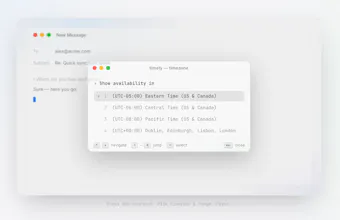
Pull your availability from connected calendars, with a single keystroke, within whichever timezone suits your recipient best. No opening the calendar, no timezone maths, and it handles multiple execs too. It's completely private and sits locally on your machine, connecting only to Outlook and Google.
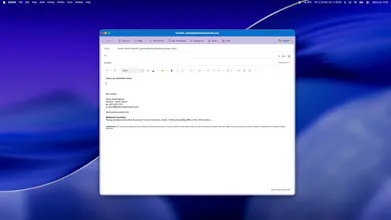
I spent much of my days in meetings, many of which I have to schedule myself - across timezones. I was tired of pulling up outlook, looking at open slots, trying to convert to my recipients timezone, and then manually typing out which times I was available.
Calendly wasn't a fit for me either, since my clients do not want to feel as though they're having to do the leg work.
So I built this tool for myself really - until realising how useful it might be for others who book their own meetings, but also executive and personal assistants, who book on behalf of their principals.
So here it is... dead simple, solves a very boring problem, and most importantly reduces the 'find my availability' task down to seconds.
Report
@james_ketteringham its amazing Gmail hasn't solved for this. in, fact I couldn't even tell you where the icon is to add my cal. this is a great idea. I like the / aspect. Maybe think from from a sentence aware aspect for future improvements.
Report
@james_ketteringham Congrats on the launch. Small typo "pressing its number" should probably be "their number" (referring to the exec).
Congrats James! I coordinate daily between a US and India team, so my life is IST-to-PT conversion math and I felt this launch personally. One thing I didn’t see asked: when Timely pulls my free slots, can I set rules on what counts as available? My calendar shows 7am free, but I never want that offered. Working-hours boundaries per calendar would be the difference between raw free slots and slots I’d actually accept. Is that in there or on the roadmap?
@ridhwikvinod Absolutely - if you head into the settings tab, you can set safety limits to ensure you're never offering a time that would be inappropriate for the recipient. Image below.
Report
The part I keep coming back to is that it runs locally and talks straight to Outlook and Google with no server in between. Doing calendar OAuth fully client-side is more painful than it looks, holding and refreshing tokens with no backend is the annoying bit, so respect for shipping it that way instead of the easy route of proxying everyone's calendar through your own server. Does the local app refresh tokens silently in the background, or do I have to re-auth every so often?
@dipankar_sarkar Thanks! Yes - it's fully client-side, no proxy. Both Outlook and Google refresh tokens are stored encrypted in the OS keychain and refreshed silently in the background (MSAL's silent flow for Microsoft; refresh-token exchange for Google), so you don't re-auth periodically. You'd only need to reconnect if you change your password, revoke access, or your org's admin policy forces a re-login.
Report
💡 Bright idea
What happens if one calendar connection fails temporarily? A quick status indicator could help users know which availability data is being used.
@darly_selby Great question! At the moment, if the connection fails, the affected calendar won't appear as an option when selecting which calendar you'd like to pull availability from. You've made a great suggestion though, rather than it being hidden, we should show an indicator encouraging them to reconnect their calendar. This would drastically improve UX.
Report
Really smart to make the timezone the recipient’s, not yours — that’s the part everyone gets wrong. Right now you pick it from the list; any plans to infer it from the thread (the recipient’s email/domain or their past replies) so even that step disappears? Congrats on the launch!
@andrei_rebrov1 Thank you! It's customisable too - depending on which timezone you want to send availability in. Inferring from domain is super smart - we'll look into how we can achieve this.
Report
@james_ketteringham Glad the domain-inference idea resonated — that’d be a slick final touch once it lands. Congrats again on the launch!
Report
congrats on the launch. booking on behalf of someone else is where the timezone pain doubles, so the assistant use case makes a lot of sense. when an EA sets up timely for their execs, does the exec have to grant anything on their side?
@vollos Thank you! When adding someone else's calendar, the exec will either have to share their calendar with your account - or you'll need to log in to your executives account. Both options work, depending on how the exec is currently setup.
Report
@james_ketteringham got it, thanks james. shared calendar or logging in as the exec, whichever way the office already runs. enjoy the rest of the launch.
Report
This is a nice narrow fix for a genuinely annoying task. The timezone-for-the-recipient part is the detail most tools skip. Does it handle back-to-back meetings or blocked focus-time the same as free/busy, or does it only pull the raw calendar state?
@omri_ben_shoham1 Thank you! Yes it'll handle back-to-back meetings and blocked slots. You can set buffers too, to protect time in between meetings already on the calendar.
Timely
@james_ketteringham its amazing Gmail hasn't solved for this. in, fact I couldn't even tell you where the icon is to add my cal. this is a great idea. I like the / aspect. Maybe think from from a sentence aware aspect for future improvements.
@james_ketteringham Congrats on the launch. Small typo "pressing its number" should probably be "their number" (referring to the exec).
Great concept otherwise!
Timely
@nikita_upadhayay Thank you for highlighting the typo - i'll fix!
Timely
@ridhwikvinod Absolutely - if you head into the settings tab, you can set safety limits to ensure you're never offering a time that would be inappropriate for the recipient. Image below.
The part I keep coming back to is that it runs locally and talks straight to Outlook and Google with no server in between. Doing calendar OAuth fully client-side is more painful than it looks, holding and refreshing tokens with no backend is the annoying bit, so respect for shipping it that way instead of the easy route of proxying everyone's calendar through your own server. Does the local app refresh tokens silently in the background, or do I have to re-auth every so often?
Timely
@dipankar_sarkar Thanks! Yes - it's fully client-side, no proxy. Both Outlook and Google refresh tokens are stored encrypted in the OS keychain and refreshed silently in the background (MSAL's silent flow for Microsoft; refresh-token exchange for Google), so you don't re-auth periodically. You'd only need to reconnect if you change your password, revoke access, or your org's admin policy forces a re-login.
What happens if one calendar connection fails temporarily? A quick status indicator could help users know which availability data is being used.
Timely
@darly_selby Great question! At the moment, if the connection fails, the affected calendar won't appear as an option when selecting which calendar you'd like to pull availability from. You've made a great suggestion though, rather than it being hidden, we should show an indicator encouraging them to reconnect their calendar. This would drastically improve UX.
Really smart to make the timezone the recipient’s, not yours — that’s the part everyone gets wrong. Right now you pick it from the list; any plans to infer it from the thread (the recipient’s email/domain or their past replies) so even that step disappears? Congrats on the launch!
Timely
@andrei_rebrov1 Thank you! It's customisable too - depending on which timezone you want to send availability in. Inferring from domain is super smart - we'll look into how we can achieve this.
@james_ketteringham Glad the domain-inference idea resonated — that’d be a slick final touch once it lands. Congrats again on the launch!
congrats on the launch. booking on behalf of someone else is where the timezone pain doubles, so the assistant use case makes a lot of sense. when an EA sets up timely for their execs, does the exec have to grant anything on their side?
Timely
@vollos Thank you! When adding someone else's calendar, the exec will either have to share their calendar with your account - or you'll need to log in to your executives account. Both options work, depending on how the exec is currently setup.
@james_ketteringham got it, thanks james. shared calendar or logging in as the exec, whichever way the office already runs. enjoy the rest of the launch.
This is a nice narrow fix for a genuinely annoying task. The timezone-for-the-recipient part is the detail most tools skip. Does it handle back-to-back meetings or blocked focus-time the same as free/busy, or does it only pull the raw calendar state?
Timely
@omri_ben_shoham1 Thank you! Yes it'll handle back-to-back meetings and blocked slots. You can set buffers too, to protect time in between meetings already on the calendar.