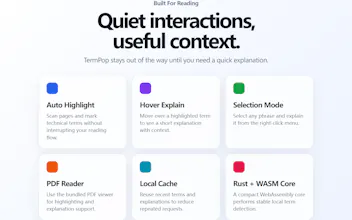
TermPop is a reading companion for technical content in Chrome and Edge. It highlights technical terms as you read and opens concise, contextual explanations on hover. Select any phrase and use the context menu to explain exactly what you need.
Hey Product Hunt! I built TermPop because technical reading kept pulling me out of the page.
When I ran into an unfamiliar acronym, framework, or research term, the usual flow was: copy it, open a search tab, compare a few results, then return and try to recover the original context. It is a tiny interruption, but repeated dozens of times in a paper, documentation page, or technical discussion, it breaks the reading rhythm.
TermPop keeps that loop in place. It highlights terms while you read, shows a concise contextual explanation on hover, and lets you select any phrase for a focused explanation. The core matcher runs locally with Rust and WebAssembly; LLM features are optional and use the provider configuration chosen by the user.
The project evolved through a lot of small, practical details: preserving page layout while highlighting live DOM text, preventing explanations from covering the wrong content, caching results without mixing contexts, supporting personal dictionaries and ignored terms, and building a dedicated PDF viewer for technical papers.
I am especially interested in feedback on:
- Which sites or document types you read most often
- Whether hover, selection, or hybrid mode feels most natural
- What would make TermPop trustworthy enough for your everyday reading workflow
Thanks for taking a look.