
Supaste
Clipboard Manager for macOS
519 followers
Clipboard Manager for macOS
519 followers
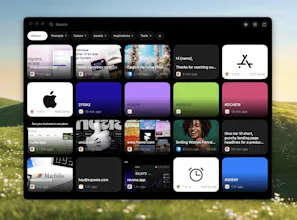
Supaste is a local-first clipboard and screenshot history app for Mac. Save copied text, links, images, files, code, colors, and screenshots in a beautiful searchable timeline.


Payment Required
Launch Team

Render: Get up to $100K in startup creditsCloud infrastructure for founders who want to move fast and NOT break things
Promoted
As someone constantly juggling UTM parameters, ad copy variants, and brand hex codes, this looks like a massive lifesaver. Does Supaste allow you to pin or organize specific clippings into folders/tags for different campaigns?
@andika_fadhilah yes, you can create your own collections/folders
@soltwagner Thanks for sharing what you've been creating! I'm looking forward to trying this app in my design work.
I'm curious about temporary storage and memory usage. If video files or sets of large images are copied to the clipboard using this app, does the summed size of the files put strain on available memory that would normally not keep more than a single item on the clipboard?
@underuncertainty Thank you.
For copied files, videos, or large image sets, it stores the file reference/path and metadata, not the full file data again inside the app. So the files are not unnecessarily duplicated and the summed file size should not sit in memory like multiple full clipboard copies.
For visual items, Supaste may generate lightweight previews/thumbnails, but the goal is to keep memory and storage impact minimal.
@soltwagner Many thanks for this explanation. @Supaste will be saving me a lot of time and frustration!
clipboard managers live or die on how they treat the pasteboard's concealed types — password apps mark items org.nspasteboard.ConcealedType so they don't get logged. do you honor that and skip them automatically? that's the detail that decides whether i trust one.
@qifengzheng Yes, absolutely — Supaste is designed to skip sensitive clipboard content.
It respects concealed pasteboard types such as org.nspasteboard.ConcealedType, so items from password managers should not be saved automatically.
On top of that, Supaste also has sensitive content detection for things that look like API keys, passwords, tokens, private keys, .env content, and similar data. You can also add apps to Ignored App Rules, so anything copied from those apps is never saved at all.
@rahilpirani yes, I will implement iCloud sync in the app soon, on the roadmap
Local-first with a timeline that spans text, images, code, colors, and files in one searchable store is the hard part. Most clipboard managers pick one content type and add the others as an afterthought. I've hit the same mixed-type indexing tradeoffs when handling diverse data in a unified store. Do you use Core Data, SQLite, or something else for the local persistence layer?
Supaste Review
Despite some flaws I will mention below, among all Clipboard Manager Apps I have tried, Supaste is the best, it is gorgeuous, fast, has a lot of extra features, and very reasonably priced, honestly very low price tag.
The flaws and notes:
1\. SEARCHING
Although it is the best in searching among all others including Paste, Pastepal, and Raycast, you cannot simply type when app window is open to start the search, you have to click on the search box and then start typing, and the second flaw is that you cannot search for a PART of the text, you have to start with the first character.
2\. It is very nice that it has a option to change the Card Size but even the largest size is still small, having larger option would be great. I see that the card size of Paste App is perfect.
3\. You cannot delete an item by pressing the Delete key in the keyboard, you have to click on the delete key.
4\. This is an additional feature which is very nice to have to helpful, which is the REMINDER option which other apps do not have but the Custom Date and Time does not work, you have to choose one of the available option, although it is a glitch and expected to be fixed, it is very nice the the custom Data and Time are there although it does not work.
5\. The hovering option on the Notch does not work well, though keep in mind that this option is not available in the other apps at all.
6\. It is very nice that when you drag an item or move the cursor over the opened app window and move away, it hides the app window which is very helpful but it would be very good to be able to click outside the open window or clicking on ESC key to hide it.
7\. For the Files copying, it would be great if it can work like the DropOver and NotchBox so when you drag a copied file out from the app window, it moves the file(s) to the new folder and remove it from the Supaste history UNLESS pressing OPTION key before dragging it so it copies the file(s) to the new location, keeping the original file in its original location and also keeping it in Supaste Clipboard History.
Finally, and again, it is the best Clipboard manager among all others and I am very happy that I purchased it.
A note for the developer, offering a Free Trial will bring a lot of users to the app once the try it, but without a trial, users may not be ready to pay for it if they are not sure related to its performance.
How does it compare to the now native macOS Tahoe clipboard history? Nicely done!
@reneandritsch more features, more actions, better UI and UX, better filters, your own collections, pins, favorites, shortcuts for pins, history, custom shortcuts for any clipboards
@soltwagner Thank you. That is a rich feature list.