Launched this week

Supaste
Clipboard Manager for macOS
475 followers
Clipboard Manager for macOS
475 followers
Supaste is a local-first clipboard and screenshot history app for Mac. Save copied text, links, images, files, code, colors, and screenshots in a beautiful searchable timeline.


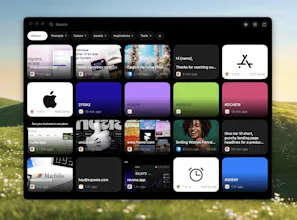
Supaste
RiteKit Company Logo API
@soltwagner This is a really thoughtful take on the clipboard manager problem. The visual timeline approach makes sense for designers and developers who need to quickly scan what they've grabbed, and the local-first philosophy is a breath of fresh air compared to cloud-heavy alternatives. The drag-and-drop from the notch is a nice UX detail that fits the Mac ecosystem well.
Product Hunt
Supaste
@curiouskitty You can watch demo video here
and lot of more actions coming, image converter, image resize, remove background (demo here https://x.com/soltwagner/status/2063652302020628793), more text actions, bulk copy (demo here https://x.com/soltwagner/status/2063603367214215219), better UI, better UX
and more useful features coming in the next updates
This is one of those tools I can immediately imagine using during a messy building day. When I’m working on product copy, small design details, support replies, screenshots, links, colors, and random snippets, I constantly copy things that I know I’ll need again… and then somehow lose them five minutes later.
I like that Supaste treats clipboard history more visually, not just as a long technical list. The local-first part also matters a lot for this kind of app, because clipboard history can easily include private product stuff, emails, credentials, or unfinished drafts.
The one-time purchase is refreshing too. :))
Curious how you think about search: is it mostly exact text search, or can it also help find things more loosely, like “that screenshot from the dashboard” or “the blue color I copied yesterday”?
also you got my upvote -- it’s a really cool product!
Supaste
@andrasczeizel Yes, that’s exactly where I want to take search.
Right now Supaste supports helpful search filters/autocomplete, so you can search with things like @Finder app tags, and @image, @text, @link, or @email type tags and more
Looser search like “that dashboard screenshot” or “the blue color from yesterday” is planned too, especially with OCR for images/screenshots and smarter app/type/date filters.
The local-first no-cloud call is the interesting bet! Is no-sync a privacy stance you're committed to or a v1 scope line you'll cross later with end-to-end encrypted sync? Cheers
Supaste
@artstavenka1 yes, in the next updates I will implement iCloud sync yes, and iOS app
At first, I was like "Ok raycast has solved it already, and now it is native to macos" but when I'm seeing the interface, it looks really nice. I love how you use the dynamic island style.
What if I already have an app that uses the notch? Could I use another UI?
Congrats!
Supaste
@fberrez1 I’ll add more customization options in the next update. You’ll be able to move the app from the top to the left, right, or bottom, and choose between a full library window or a small quick-paste window anywhere with the Supaste.com app.
DIY UX Test
Clean, native-feeling clipboard managers are weirdly rare on macOS, so this is welcome! Congrats on launching. Does history sync across devices, or stay local for privacy?
Supaste
@oleksii_sekundant local first, privacy, in the next updates I will add iCloud sync, and app for iOS
That's a clean take. Is cross-device sync on the roadmap, or is it intentionally local-only?
Supaste
@dhiraj_patel5 at the momant local-first, iCloud sync and iOS app on the roadmap