
SpesaTracker
Registra spese, rate e abbonamenti per non dimenticarli più!
5 followers
Registra spese, rate e abbonamenti per non dimenticarli più!
5 followers
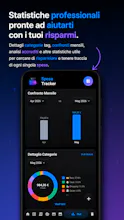
SpesaTracker è un app che ti promette di non perdere mai più di vista le tue spese...che siano spese regolari, rate o abbonamenti tutto sara sotto controllo, il TUO controllo. L'app è per lo più utilizzabile offline e senza abbonamento con servizi online per la possibilità di condividere con i tuoi amici tramite il tuo drive in modo criptato spese e portafogli con la possibilità di abbonarti all'app per avere limii maggiori e ultra personalizzazione dell'app. (Tutte le funzioni base senza sub!)




How does the encrypted sharing actually work in practice, like do both people need their own SpesaTracker account or can it sync straight through Drive without any setup?
@cemal4zml Both users must be logged in to the app using their Google accounts; from the settings, they can then share a wallet they’ve created.
The file will be created, encrypted, and uploaded to the Drive of the person who created the wallet, who can then share it via invitation using the in-app friend management system.
Finally gave it a try and the offline tracking actually works well, super handy for keeping my subscriptions and installments in check without data worries. Sharing through my drive encrypted is a nice touch too.
@pekkavfolufeb8 Hi! I'm glad you liked the app—I'd really appreciate it if you shared it with anyone looking for a similar solution :)
If you need help or have any questions, feel free to go to the “Contact Me” section in the app settings—you'll find all the ways to reach me there!