
Sleeve
Design the window that says “drag to install.”
6 followers
Design the window that says “drag to install.”
6 followers
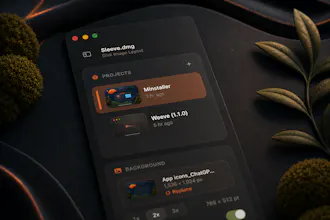
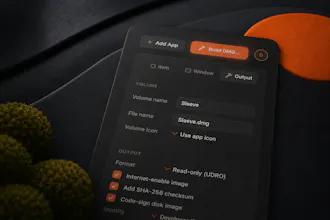
Sleeve is the macOS design tool for your DMG install window: arrange icons, set a background, add arrows and stickers, then build a signed disk image. Free to design, one-time license to build.




Hey Product Hunt 👋
I'm Dylan, co-founder of Square One and Weeve in the Netherlands.
Every time I ship a Mac app, the install window was the part I dreaded. You know the one: it opens when someone mounts your .dmg and asks them to drag your app into Applications. Making it look halfway decent meant hand-writing icon coordinates into an AppleScript, running create-dmg, mounting the result, squinting, nudging a number, then doing it all again. The very first thing a new user sees, built by trial and error in a terminal.
I wanted to design that window the way I'd design anything else: on a canvas, watching it come together as I go. So I built Sleeve.
You drop in your app and arrange the window live: icons, labels, a Retina background, a hand-drawn "drag here" arrow. What you lay out is exactly what mounts — no build-and-pray. When it's ready, one click produces a real disk image, code-signed with your Developer ID, checksummed, and ready to notarize. No hdiutil flags to memorize.
A few honest details:
Designing is completely free. Building a DMG is a one-time €29, no subscription.
Your license covers a year of versions, and anything released in that year keeps building forever.
macOS 14+, Apple Silicon & Intel, notarized, auto-updating.
And yes — Sleeve's own installer is built with Sleeve.
If you've ever wrestled a create-dmg script at 1am, I'd love to hear what would make this a no-brainer for your next release. I'm here all day and reading every comment.
— Dylan
No more boring application installers, nice. Thanks for making a tedious job, easy and fun!