
Slashy is an AI-native email client and assistant that drafts replies in your voice, triages what matters, and makes sure no follow-up slips, so you spend less time in your inbox and more time on what matters. It connects to your email, calendar, CRM, and meeting notes and learns how you work, so you can ask Slashy to prep you for your next meeting, draft a follow-up, clear your inbox to zero, track who still owes you a reply, or fire off an email from iMessage or Slack while you're on the go.
This is the 2nd launch from Slashy. View more

Slashy Assistant
Launched this week
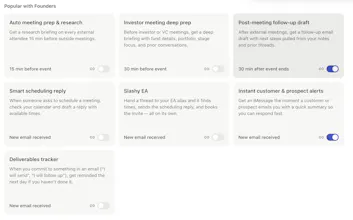
Slashy is an AI-native email client for managing all your inboxes. Slashy Assistant is the AI built into it: it drafts replies in your voice, organizes email, schedules meetings, prepares briefings, and tracks follow-ups. Connect your calendar, CRM, meeting notes, and favorite tools, and it starts helping within five minutes. Use it inside Slashy or through iMessage, Slack, or a phone call. Set up automations in plain English, and Slashy proactively handles recurring work before you have to ask.




Free Options
Launch Team / Built With


 Superhuman
Slashy
Really nice product! I've been looking for something like this for the past year, and this is it - it saves me an unbelievable amount of time every day. The only thing I'm missing is Outlook integration. Any chance that's on the roadmap?
Slashy
@maksim_sabunov Is on the roadmap hopefully in the next 2 months
Inspector
I've been using Slashy for about a year now, and it's saved me hours of pain.
It helps me with everything. Meeting invites, managing my calendar, searching for past emails, composing outreach, responding to customers, and giving me feedback on the few manual emails I still write.
Slashy makes me a pro at the small annoying things so I can get back to the part of my job I actually like. Good product, can't wait to try out the new agent. Congrats guys!
Slashy
@mklikushin Thanks Michael appreciate all the kind words :)
Congratulations on the launch! Can I connect Slashy with my ai note taker tool tactiq?
Slashy
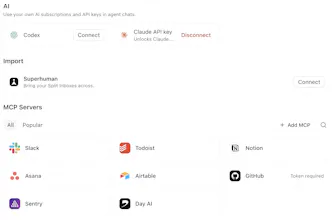
@heyitsirenechan yep Slashy has external mcp support so you can connect almost any tool :)
Sitefire
I've been using Slashy for months now, and really like the product. The agent feature was the missing piece so i can finally say goodbye to my openclaw. :)
Slashy
@jochenmadler Hopefully you don't need to open it again :)
I've been using slashy for the last month and now I'm not sure I could go back to living without it. The draft replies are actually solid and the assistant is usefully proactive but not annoying. Congrats on the launch, super excited to see what comes next.
Slashy
@willwashburn <3
I've been using slashy for a few weeks now and it feels like the Linear of email clients. Gmail sucked and had so many problems, superhuman was so expensive. But slashy hits the perfect spot of not costing too much, and having useful AI features.
Slashy
@leodev High praise :)