
Scribbler
JS notebook in the browser - Click. Code. No friction.
79 followers
JS notebook in the browser - Click. Code. No friction.
79 followers
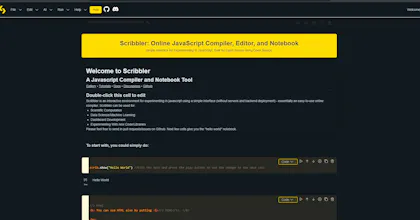
Scribbler is a browser-based JavaScript notebook that makes learning and experimenting with code effortless. Whether you’re a beginner writing your first Hello World or a developer testing snippets, Scribbler gives you a clean, interactive space to code and see results instantly. Unlike traditional editors or IDEs, Scribbler blends notebook-style learning (mixing code, text, and visual output) with the simplicity of running JavaScript right in your browser. No logins, no configuration.



Why we built it:
Coding education and documentation is still stuck in static tutorials and heavy setups. We wanted a tool that’s lightweight, notebook-based, and open to everyone. Scribbler is built to lower the barrier to learning code while still being powerful enough for real experimentation.
When I started experimenting with open-source libraries and new project ideas, I constantly felt something was missing. I wanted a simple, lightweight interface where I could test JavaScript code, tweak it, and see results instantly.
Python developers have had this for years with Jupyter Notebook. It’s become the gold standard for experimentation, data science, and education. But Jupyter comes with a catch: it requires a Python environment, backend kernels, and sometimes a heavy setup. Hosted options like Google Colab make this easier, but they’re still tied to the Python ecosystem.
Key Features:
✏️ Notebook-style interface: mix markdown, JavaScript, HTML, and CSS in one place
⚡ Instant execution: run JS code with zero setup or installs
📚 Beginner-friendly tutorials: step-by-step free JavaScript course (https://app.scribbler.live/?jsnb...)
📦 Import libraries easily: load ES6 packages via CDN on the fly
🌐 Works anywhere: device-agnostic, no login required
🆓 Completely free & open source
What’s next:
We’re working on collaboration features, richer sharing options, and multi-language support to expand beyond JavaScript.
Checkout a gallery of notebooks: https://examples.scribbler.live/
We’d love your feedback! 🎉
- Try Scribbler and share what you build.
- Tell us what features you’d like to see next.
- If you believe coding should be more accessible, give us an upvote ❤️
- Contribute on Github: https://github.com/gopi-suvanam/scribbler
The Bigger Vision
I envision Scribbler as the go-to environment for exploring and experimenting in JavaScript.
As more people start using it, I see use cases expanding into:
Interactive data science
Generative AI experiments
Scientific simulations
Financial and economic modeling
Decentralized and distributed computing
Scribbler is about making experimentation frictionless — for beginners, hobbyists, and professionals alike.
Happy experimenting! ✨
@gopi_suvanam I always hated doing a whole setup just to try something small. Scribbler opens in the browser and just works. I feels incredibly smooth
@neeraj_jain6 thanks a lot!
Excited to introduce Scribbler to the community today!
Scribbler is your new all-in-one playground for JavaScript. It combines a browser-based notebook with modern tools to help you learn and prototype faster.
Why you'll love Scribbler:
⚡ Instant: Start coding immediately with no login.
🤖 AI-Powered: Built-in AI assistance to help you write and fix code.
📱 Responsive: Compatible with all devices.
🔓 Open Source: Completely free and open for contributions.
We are launching it free for everyone today!
Let's Scribble 👊
Coming from Python, I've been spoiled by Jupyter notebooks. I wanted to learn JavaScript especially for graphing, interactivity and to make beautiful visualizations.
But every time I tried, setting up a dev environment killed my momentum. A coworker showed me Scribbler. Until that point I didn't know there was a colab like tool for JS.. I would've started learning JS way earlier if I knew.
What's really useful is the scrib.show() function. It lets me see visual output immediately, so I can grab 10-15 minutes between meetings and make some progress.
Perfect for quick prototyping and saving code snippets. Really useful tool.
Congrats on the launch team! 🎉