Your team agrees on a feature in chat. The AI agent captures every decision, drafts the plan, and opens a PR that matches what was agreed. No more "that's not what we discussed." Shared context between humans and agents — tasks, plans, GitHub, canvas, VS Code, CLI. One workspace from decision to shipped code.
Hey Product Hunt! I'm Jinhwan, the founder of Scindo.
I kept hitting the same problem on my team — we'd agree on something in Slack, then the developer would open their editor and build from memory. The PR would surprise everyone. "That's not what we discussed." Rework. Again.
AI agents are incredible individually, but completely disconnected from your team. Your Claude session has no idea what your PM discussed yesterday. Your Copilot doesn't know the team changed the API contract this morning. Every agent works in isolation.
I started building a team chat with an AI bot — basically what everyone else is doing. But I quickly realized chat alone wasn't enough. The real gap was between agreement and execution. So I added plan documents that the agent drafts from discussions, signoffs so the team locks in decisions, and direct GitHub integration so the agent opens PRs from that shared context. Then I built a VS Code extension and CLI because developers shouldn't leave their editor to collaborate. It went from "chat with AI" to a full workspace where decisions flow straight into code.
Free for teams up to 3. Would love your feedback!
Report
Congratulations @kim1017 One thing that’d be great to see is a decision audit trail — a timeline showing what was agreed, who signed off, when, and what PR it generated. For post-mortems and onboarding new engineers, that institutional memory would be worth the tool alone.
@jacklyn_i Your great feedback is heard and now timeline is available on Scindo! Thank you for your sharing! Please let me know if you want to see anything else. :)
Report
That’s not what we discussed. Rework. Again.” — every engineering team has lived this exact cycle. Question: how does Scindo handle decisions that evolve mid-sprint? If a signoff gets approved but the requirements shift two days later, is there a way to flag downstream PRs that were opened based on the old context? That traceability chain would be incredibly powerful. Congrats on the launch!
@jerrybyday Plans change. That's fine — as long as nobody ships against a stale one.
When someone edits a plan after sign-off, Scindo revokes every existing sign-off automatically. Everyone sees it: "Plan was edited — all sign-offs have been revoked." No one moves forward without re-signing.
If there's already a PR open against the old plan, Scindo flags it in the thread. You can view what changed, close the PR and re-implement, or dismiss if the PR still applies. Your call.
Everything shows up in the Timeline — who revised the plan, when sign-offs were revoked, who dismissed the drift warning. Full history, no manual logging.
The plan can shift. The team doesn't get blindsided.
Report
The hardest part of tools like this is getting the whole team to use the same workspace — one person going off-channel breaks the whole context chain. How are you thinking about adoption friction, especially for teams where some developers live in the terminal and others in Slack?
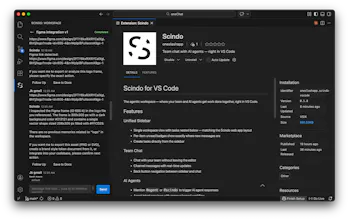
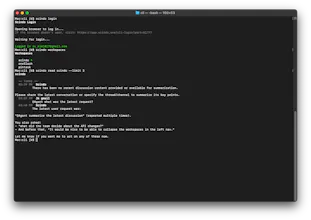
Terminal developers never leave the editor — Scindo runs inside VS Code and as a CLI. scindo send, scindo agent, same threads. PMs and designers stay in the browser. Three surfaces, one workspace. Nobody switches tools, everybody shares context.
The agent is the adoption hook. Once one person 'mentions' the agent in a task and the team sees a plan, a PR, and a deploy happen from one thread — the value is obvious. The second person joins because the first person stopped copy-pasting.
We're not replacing Slack. We're the workspace where agents and humans work together. Slack doesn't do that.
"I didn't realize the agent could actually take actions — I thought it was just a chatbot." Working on making that clearer in onboarding. The "wow moment" (agent proposes PR → you approve → it opens) needs to happen faster in the first session.
If you tried Scindo and got confused, I specifically want to hear from you.
Shipped knowledge base this week. Teams can now add documents, wikis, and reference materials that all agents in the workspace can access. So when your agent answers something, it's using your team's actual context — not just general knowledge.
Also shipped: any thread can now be exported as a structured document in one click. The agent handles the formatting.
What would make you switch your team to Scindo? Honest answers only. :)
We've been focused on the first 10 minutes of using Scindo. That window is everything. If a team doesn't see an agent do something useful in that window, they do not come back.
Shipping this week:
Guided first thread. When you start a new thread, the agent walks through one real action with you. Live, not a demo. You see how it works with your actual repo.
Drop a comment if you have questions about getting started. I will personally walk you through it.
Retention is strong. The teams who invited at least one teammate in their first 48 hours are almost all still daily active.
Biggest change this week: redesigned the onboarding to get teams to that first real agent action in under 3 minutes. Fewer setup steps, faster "wow moment."
Working on
- Better notification system so you don't miss something the agent surfaced while you were offline.
Honest question
- What would make you recommend Scindo to your team right now?


Scindo
Congratulations @kim1017 One thing that’d be great to see is a decision audit trail — a timeline showing what was agreed, who signed off, when, and what PR it generated. For post-mortems and onboarding new engineers, that institutional memory would be worth the tool alone.
Scindo
@jacklyn_i It's truly a good idea. We will what we can do about it. :) Thank you very much!
Scindo
@jacklyn_i Your great feedback is heard and now timeline is available on Scindo! Thank you for your sharing! Please let me know if you want to see anything else. :)
That’s not what we discussed. Rework. Again.” — every engineering team has lived this exact cycle. Question: how does Scindo handle decisions that evolve mid-sprint? If a signoff gets approved but the requirements shift two days later, is there a way to flag downstream PRs that were opened based on the old context? That traceability chain would be incredibly powerful. Congrats on the launch!
Scindo
@jerrybyday Thank you! Your invaluable feedback is on our task list :)
Scindo
@jerrybyday Plans change. That's fine — as long as nobody ships against a stale one.
When someone edits a plan after sign-off, Scindo revokes every existing sign-off automatically. Everyone sees it: "Plan was edited — all sign-offs have been revoked." No one moves forward without re-signing.
If there's already a PR open against the old plan, Scindo flags it in the thread. You can view what changed, close the PR and re-implement, or dismiss if the PR still applies. Your call.
Everything shows up in the Timeline — who revised the plan, when sign-offs were revoked, who dismissed the drift warning. Full history, no manual logging.
The plan can shift. The team doesn't get blindsided.
The hardest part of tools like this is getting the whole team to use the same workspace — one person going off-channel breaks the whole context chain. How are you thinking about adoption friction, especially for teams where some developers live in the terminal and others in Slack?
Scindo
@marianademchuk Excellent question/challenge. :) Thank you!
Terminal developers never leave the editor — Scindo runs inside VS Code and as a CLI. scindo send, scindo agent, same threads. PMs and designers stay in the browser. Three surfaces, one workspace. Nobody switches tools, everybody shares context.
The agent is the adoption hook. Once one person 'mentions' the agent in a task and the team sees a plan, a PR, and a deploy happen from one thread — the value is obvious. The second person joins because the first person stopped copy-pasting.
We're not replacing Slack. We're the workspace where agents and humans work together. Slack doesn't do that.
Scindo
📋 Week 2 maker update
Shipped:
Improved agent onboarding flow
Faster thread loading
Canvas rendering fix on smaller screens
Most common feedback:
"I didn't realize the agent could actually take actions — I thought it was just a chatbot." Working on making that clearer in onboarding. The "wow moment" (agent proposes PR → you approve → it opens) needs to happen faster in the first session.
If you tried Scindo and got confused, I specifically want to hear from you.
What broke the experience?
Scindo
Week 3 maker update:
Shipped knowledge base this week. Teams can now add documents, wikis, and reference materials that all agents in the workspace can access. So when your agent answers something, it's using your team's actual context — not just general knowledge.
Also shipped: any thread can now be exported as a structured document in one click. The agent handles the formatting.
What would make you switch your team to Scindo? Honest answers only. :)
Scindo
Week five update:
We've been focused on the first 10 minutes of using Scindo. That window is everything. If a team doesn't see an agent do something useful in that window, they do not come back.
Shipping this week:
Guided first thread. When you start a new thread, the agent walks through one real action with you. Live, not a demo. You see how it works with your actual repo.
Drop a comment if you have questions about getting started. I will personally walk you through it.
Scindo
📋 6 week
Retention is strong. The teams who invited at least one teammate in their first 48 hours are almost all still daily active.
Biggest change this week: redesigned the onboarding to get teams to that first real agent action in under 3 minutes. Fewer setup steps, faster "wow moment."
Working on
- Better notification system so you don't miss something the agent surfaced while you were offline.
Honest question
- What would make you recommend Scindo to your team right now?