
Sales Studio
Private studio for live demos on macOS
114 followers
Private studio for live demos on macOS
114 followers
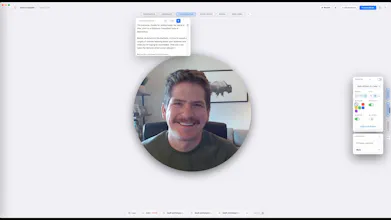
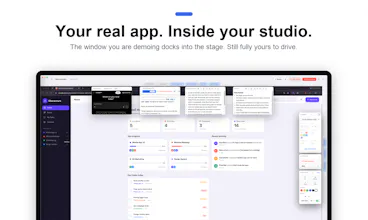
Sales Studio is a private studio for live demos on macOS. Your audience sees one clean, polished screen share in Zoom, Meet, or Teams. You see your script, notes, talking points, and every display you might switch to. No more window juggling.




Hey Product Hunt! I'm Jake.
I built Sales Studio because of a demo that went sideways. I was juggling a dozen windows on a sales call: the product in one, my notes in another, pricing in a third, and Slack pinging over all of it. My prospect saw every bit of that chaos. The demo was fine. It just didn't look like I wanted it to look.
So I built the tool I wished I had: a studio view for me, a clean stage for them.
Here's what that means in practice:
• You share one window. It always looks composed. Everything else lives in your private studio view.
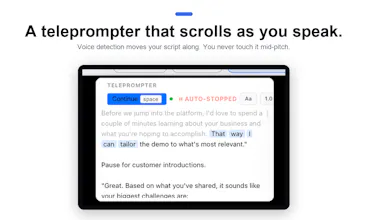
• A teleprompter that scrolls as you speak. Voice detection moves your script along, so you never touch it mid-pitch.
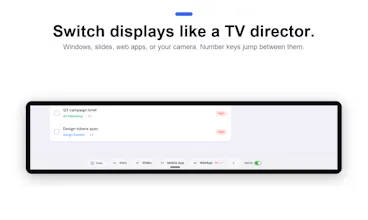
• Displays you switch like a TV director. Windows, screens, web apps, videos, or your camera, each with clean transitions. Number keys jump between them.
• Scene layouts. Size and position your shared window over a branded background, drop your camera beside it, and it all mirrors live to the audience.
• Camera controls built in. Background blur runs on your Mac (nothing goes to a server), plus mirror, shapes, borders, and shadows.
• A tool bench you arrange yourself. Notes, checklists, a stopwatch, even an embedded web panel for looking things up mid-call.
• Freeze the audience view. Need to do something off camera? They keep seeing the last frame while your camera stays live.
• Record what they saw. Get a QuickTime-ready MP4 of the exact program output, camera and all.
It's macOS only (Apple Silicon), works with Zoom, Meet, Teams, or anything that can share a window, and there's a 14-day free trial. From $9.99/mo.
I'd love your honest feedback, especially from anyone who runs demos for a living. Ask me anything!
Congrats on launching! Curious how you handle latency when multiple prospects join a live demo at once - does the screen share stay smooth, or does performance dip with more viewers?
@medal411 Good question. Sales Studio doesn't handle the distribution at all - it produces one clean window, and Zoom/Meet/Teams shares it like any other screen share. So viewer count doesn't touch performance on my end; it scales however your meeting tool scales. The compositing happens locally on your Mac.
Finally something that fixes the window chaos during live demos. The floating script view while everyone else sees a clean screen share actually feels like how demos should have always worked.
@nazlcanyel1nsm Thanks! That was exactly the itch. The script sits right next to what you're actually demoing, so your eyes never leave the studio. Glad it clicks for you.
the composited "one clean window" model is the whole value prop here, but it also means the polish depends on your Mac behaving during the call. what happens when something outside Sales Studio's control fires mid-demo - a Slack or calendar notification banner, a Time Machine popup, a spinning beachball while a heavy app loads? does the studio compositing sit at a layer that's genuinely isolated from OS-level overlays, or is there still a window where a stray notification could bleed into the "clean" shared view the same way it would without the tool?
The split-view layout for presenter vs. audience is really thoughtful, especially keeping the script and notes out of the shared screen without a clunky second monitor setup. Whoever designed this clearly ran enough bad demos to know exactly what needed fixing.
@kazmmrselrgym Thanks! You guessed it - the second monitor thing was exactly the problem. I demoed off a laptop at coffee shops enough times that "one screen, everything visible" became the whole design constraint.
Right on the pain point—having to juggle multiple sources during a sales call is a major challenge and adds unnecessary stress. I built a GTM strategy for a 120-person sales team, and this would have been incredibly useful back then. How does it integrate with CRM?
the one clean window idea makes sense for reducing what a prospect can accidentally see, but compositing multiple sources live adds cpu/gpu load right when you need your machine to be at its most responsive during a demo. have you tested this on an older or lower-spec mac, does the compositing itself ever introduce lag into the screen share?