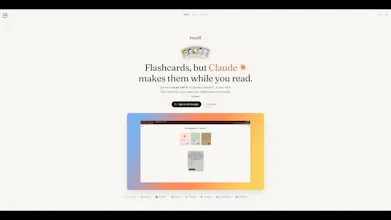
Recall turns your notes into spaced-repetition flashcards - made by your AI, not by hand. Point Claude or ChatGPT at a PDF, doc, or Notion page and it writes atomic Q&A cards straight into Recall over MCP, no copy-paste. Then review them one card at a time with FSRS scheduling. It's the card-making grind of Anki, automated - so you spend your time recalling, not formatting.
No reviews yetBe the first to leave a review for recall
Maker
📌
It's the night before a test. You've read your 40 pages of notes three times and you still don't trust yourself to remember any of it. You know flashcards would fix this. You also know you'll never sit down and make 60 of them by hand.
Hey Product Hunt 👋
I'm Tushar, a software engineer from India, and that exact moment is why I built Recall.
I've been preparing for an exam and kept quitting spaced repetition for the same reason every time - reviewing cards was fine, but making them was so tedious I'd give up by day two. So I handed the making to the AI I was already using.
You point Claude or ChatGPT at your notes - a PDF, a doc, a Notion page - and it writes atomic Q&A cards straight into your Recall deck over MCP. No copy-paste, no exporting CSVs, no leaving the chat. Then you review them one at a time with proper FSRS scheduling.
It's not another "AI flashcard generator" that spits out a list you have to clean up - the cards land in your deck, sorted into folders, ready to review. Anki's card-making grind, automated.
I'm a solo maker and Recall is a paid product, with early pricing for the first users. I'll be in the comments all day - ask me anything, especially the MCP side.
👉 My ask: if you've ever bounced off flashcards or Anki, tell me what actually killed it - the making or the reviewing? I've got a theory and I want to know if I'm wrong.
Report
Auto-generating flashcards from whatever you read removes a lot of the friction that normally kills spaced repetition habits. Does it work across formats — PDFs, web articles, even screenshots — or is it currently limited to certain content types?
Report
Maker
@ark_y_k great question yuki, and you nailed the whole reason i built it - that friction is exactly what kills the habit.
on formats: because recall runs through your AI over mcp, it works with basically anything your AI can read. pdfs, docs, and notion pages are the core today. web articles and screenshots work too as long as your AI client can pull them in - Claude and ChatGPT can both read images, so a screenshot of your notes becomes cards fine.
so it's less "recall supports format X" and more "if your AI can read it, recall can turn it into cards." that's the part i think makes it different :)
Report
@tusharnath Running through the AI over MCP instead of building format-specific parsers is a clever way to sidestep that whole problem. So in theory, if the AI can read it, recall can turn it into cards — no separate integration needed per file type?
recall doesn't need a custom integration for every format. it just asks your AI to read the content through mcp and generate flashcards from it.
so if your AI client can understand it, recall can usually turn it into cards. that's what keeps it simple and lets it work across new content types without me having to build a parser for each one.
Report
@tusharnath That's a really elegant approach — leaning on the AI's own reading capability instead of maintaining a growing list of format-specific integrations. Feels like it'll age well as new content types show up, since you're not the bottleneck for supporting them.
Report
A nice touch would be letting users highlight a specific passage in their PDF or doc and only generate cards from that excerpt, instead of the whole document. Sometimes I just want to drill one chapter's key points without spinning up flashcards for every page.
Report
Maker
@mesutyarar10494 oh this is a good one, man - and the nice part is you can kind of already do it. since recall runs through your AI, you can just say "only make cards from the section on X" or paste the excerpt directly, and it'll scope to that. no need to card the whole doc.
a proper "highlight → generate" ui would make it way smoother though, and i'm noting it down. exactly the kind of drill-one-chapter flow i want to nail. thank you 🙏
Report
The MCP integration sounds really clean, would love to see a way to bulk-edit or skip cards after they're generated because sometimes the AI splits things in awkward spots. A simple "merge these two cards" button right in the review flow would save me from regenerating the whole deck when one question gets cut weirdly.
Report
Maker
@mevlt120748 the clean mcp part means a lot, thank you :)
good news on the awkward splits - you can already fix those conversationally. just tell your AI "merge those two cards" or "redo that one, it split weird" and it'll patch the deck over mcp, no full regen. there's also inline edit on each card in review (the little pencil).
but you're right that a proper "merge" button right in the review flow would be way faster than typing it out. adding it to the list - that's a real friction point. appreciate the sharp feedback 🙏
@mayuresh_patole thank you Mayuresh 🙏 honestly a lot of the design sense comes from chronicle - the tiny details obsession rubbed off on me. even used chronicle for some of the launch assets :)
@ark_y_k great question yuki, and you nailed the whole reason i built it - that friction is exactly what kills the habit.
on formats: because recall runs through your AI over mcp, it works with basically anything your AI can read. pdfs, docs, and notion pages are the core today. web articles and screenshots work too as long as your AI client can pull them in - Claude and ChatGPT can both read images, so a screenshot of your notes becomes cards fine.
so it's less "recall supports format X" and more "if your AI can read it, recall can turn it into cards."
that's the part i think makes it different :)
@tusharnath Running through the AI over MCP instead of building format-specific parsers is a clever way to sidestep that whole problem. So in theory, if the AI can read it, recall can turn it into cards — no separate integration needed per file type?
@ark_y_k yep, that's exactly the idea :)
recall doesn't need a custom integration for every format. it just asks your AI to read the content through mcp and generate flashcards from it.
so if your AI client can understand it, recall can usually turn it into cards. that's what keeps it simple and lets it work across new content types without me having to build a parser for each one.
@tusharnath That's a really elegant approach — leaning on the AI's own reading capability instead of maintaining a growing list of format-specific integrations. Feels like it'll age well as new content types show up, since you're not the bottleneck for supporting them.
A nice touch would be letting users highlight a specific passage in their PDF or doc and only generate cards from that excerpt, instead of the whole document. Sometimes I just want to drill one chapter's key points without spinning up flashcards for every page.
@mesutyarar10494 oh this is a good one, man - and the nice part is you can kind of already do it. since recall runs through your AI, you can just say "only make cards from the section on X" or paste the excerpt directly, and it'll scope to that. no need to card the whole doc.
a proper "highlight → generate" ui would make it way smoother though, and i'm noting it down. exactly the kind of drill-one-chapter flow i want to nail. thank you 🙏
The MCP integration sounds really clean, would love to see a way to bulk-edit or skip cards after they're generated because sometimes the AI splits things in awkward spots. A simple "merge these two cards" button right in the review flow would save me from regenerating the whole deck when one question gets cut weirdly.
@mevlt120748 the clean mcp part means a lot, thank you :)
good news on the awkward splits - you can already fix those conversationally. just tell your AI "merge those two cards" or "redo that one, it split weird" and it'll patch the deck over mcp, no full regen. there's also inline edit on each card in review (the little pencil).
but you're right that a proper "merge" button right in the review flow would be way faster than typing it out. adding it to the list - that's a real friction point. appreciate the sharp feedback 🙏
Chronicle
such an awesome product and idea! well done Tushar!
@clairetaylor thank you Claire! means a lot coming from you :)
Chronicle
Looks amazing!
@mayuresh_patole thank you Mayuresh 🙏 honestly a lot of the design sense comes from chronicle - the tiny details obsession rubbed off on me. even used chronicle for some of the launch assets :)
Flex-Worthy Templates
gotta share this with all my friends. they'll love it.
@shushantlakhyani thanks so much! been dogfooding this for a while, really helped me!