
ReadyCSV
Clean HubSpot import CSVs in your browser. No upload.
10 followers
Clean HubSpot import CSVs in your browser. No upload.
10 followers
ReadyCSV checks, repairs, maps, and re-exports HubSpot Contacts CSVs entirely in your browser. No upload, no account, no AI calls - client data never leaves your device. Built for agencies, RevOps consultants, and regulated teams who can't paste client lists into cloud tools.



Hi Product Hunt! 👋
I'm Artem, a solo founder from Ukraine.
ReadyCSV exists because of one awkward moment that kept repeating: an agency or RevOps consultant gets a messy client CSV to import into HubSpot - broken emails, wrong date formats, lifecycle stages that don't match, duplicate contacts. The obvious 2026 move is "paste it into ChatGPT," except you often can't: it's client data under NDA, or GDPR-sensitive, or just not yours to upload anywhere.
So ReadyCSV runs the entire preflight in your browser tab:
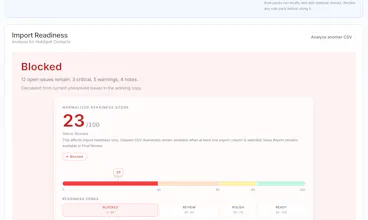
🔍 Checks the file against real HubSpot import rules (required identity fields, email format & duplicates, date formats, lifecycle/lead-status enums, phone formats, encoding damage, structural CSV problems)
🔧 Lets you apply safe fixes, edit cells, map headers, exclude columns
📤 Exports a cleaned CSV for import + a source-labeled Issue Report you can hand to a client
🔒 No upload, no account, no AI calls, no analytics scripts. Open DevTools → Network tab while you work: your file never leaves the device.
The full workflow is free: analysis, safe fixes, the complete header mapping review, cleaned CSV and Issue Report. Paid tiers ($49 one-time Pro / $149/yr Agency with commercial client-work rights) add applying every suggested mapping in one action plus the Excel-friendly export - license keys are verified locally in the browser too, no license server.
Honest limits, since trust is the whole point: HubSpot Contacts only for now (Shopify Products is next once its ruleset is ready), ~20MB files, and it flags account-specific things (like custom lifecycle stages) for review rather than pretending to know your HubSpot account.
I'd love brutal feedback - especially from anyone who preps client CSVs for a living. What would make this a no-brainer for your workflow?
Took it for a spin on a messy 8k-row export with custom mappings and it caught a few broken property associations I'd been overlooking. Love that it all runs locally, makes it easy to justify to compliance.
@greenarrow Thanks for running it on a real 8k-row file, that is exactly the feedback I was hoping for.
One honest clarification so I do not take credit for more than it does: the mapping review covers header to HubSpot property matching, including likely aliases and anything unmapped or in conflict. It does not inspect object associations, so what surfaced for you came through that path.
The compliance angle is the whole reason it is built this way. There is nothing to get approved because nothing leaves the tab.
If anything felt slow or off at 8k rows, I want to hear it. That is the size range where it should stay boring.
This is exactly the kind of tool I've been wanting. One thing that would make it even more useful for my agency workflow: let me save mapping presets per HubSpot portal so I don't have to redo the column mappings every time I import a different client's file. Would save a ton of clicks on repeat engagements.
honestly this is exactly what i needed for our client work, dragged in a messy hubspot export and it flagged the duplicates and broken emails instantly. really like that nothing leaves the browser, huge plus for the regulated stuff we handle.