@nmithani1 We screwed up with the delay in the update. Sorry guys.
To answer your query, we are different from Dropzone and other similar file moving tools.
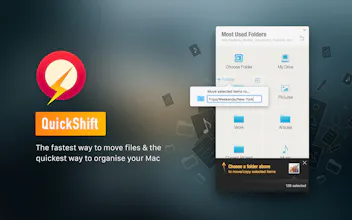
1. QuickShift has different ways of selecting files apart from the traditional drag and drop. For example, you can just select your files in the Finder and launch QuickShift. It will automatically detect the selected files to move or copy. A lot of juggle especially when multiple windows or desktops are open can be eliminated
2. QuickShift has features to organise the files apart from just having the grid of most used destinations for files. For example, once you drag in a set of files, you can take time to create a hierarchy in the Finder ( Documents/Client A/ Requirements) on the fly to move the contents here.
3. Copy is another well developed feature in QuickShift
4. Undo option for both Move and Copy
5. A ready shortcut to launch QuickShift from anywhere and anytime
6. Support for external drives & devices to manage clutter.
7. With 2.0, we have also brought in a easy access to clean up & organise recent files.
And please feel free to tell us the features that you would like to see in QuickShift. It would help us a lot
Report
Hunter
Handy utility for the Mac to reduce Desktop clutter that stores your designated files in their predefined folders. This can of course all be done automatically via OS X's Folder Actions and system services, but this is a pretty nice option for users who don't like DIY solutions.
@t55 Thank you Ton for bringing this product to the notice of Product Hunt users. We have released a new update with most of the changes requested by the users over this time. We were late in the release of update. Sorry. And thank you for the support!
Report
My desktop is a gigantic mess. Unfortunately this app doesn't seem to load for me :-( Hoping it's an easy fix.
@kdumovic Sorry for the delay Kyle. Please check version 2.0. Hope you like it. And please feel free to contact us at support@growthbeats.com, if you run into any problem
Report
Recently I am using a powerful all-in-one tool to optimize and clean up my Mac , and I'd to share for you, simple clicks(https://www.imymac.com/powermymac/) to free up your Mac storage space, protect your privacy, speed up your MacBook or iMac.
@csaba_kissi@nerdybff Please check out the new update - version 2.0. On the day of the Product Hunt listing, the site crashed due to the amount of traffic we received. Sorry. If you face any problem, please mail us at support@growthbeats.com
@narayananh On this day, we had received so much traffic that the site went over quota. We are hosted on GCP and crossed the quota for the day. Sorry. And please check the latest update.



QuickShift
QuickShift
QuickShift
QuickShift
Nerd Know-How
QuickShift
QuickShift