
Pyx
Private investment research, built 100% in Rust
4 followers
Private investment research, built 100% in Rust
4 followers
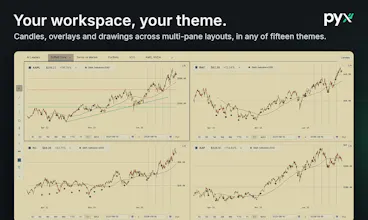
Pyx pulls everything an investor looks at into one place: your brokerage accounts, live prices, time weighted returns, ETF look-through, a full charting workspace, and a decade of financials and SEC filings for any company. All of it lands in a single encrypted file on your machine, with no account and no cloud. From there it is yours: open it with sqlite3, export CSV, keep notes as plain markdown, or hand it to the AI you already use through the built-in local MCP server.




Hi everybody, my name is Jared. I built Pyx because every tool I tried for my own portfolio asked me to hand it over first: create an account, sync to their cloud, and give up all of my personal data. I wanted the depth of a professional terminal without giving up all of my data or paying hundreds a month.
Pyx pulls the whole picture into one interface. Your brokerage accounts come in read only through SnapTrade, and/or from OFX/CSV files if you would rather no third party is involved at all. The app ships with prices, time weighted returns, allocation with ETF look through, and a full charting workspace. Type any ticker, held or not, and you get a decade of financials, growth, margins, valuation multiples against their own history, peer comparisons, estimates, ownership, and the SEC filing behind each number.
All of that lives in one encrypted SQLite file on your disk. There is no account, no login, no Pyx cloud, and no telemetry. The app can reach nine hosts, listed in the source, and anything else is blocked and logged.
Through this project I learned that data ownership leads to users having the agency to bend the app to their own workflows. Tag anything and the tag becomes a view of its own: a compare chart against your benchmark, upcoming earnings, and a peer table that ranks the members on whatever you care about, so a "Data Center Infrastructure" or "watch for Q4" list turns into a research desk in a couple of keystrokes. Filters, sorts, and layouts save as named views, every command is configurable, and your notes are plain markdown files in a folder you choose, readable by any editor and any tool you already use. If you work with an AI, Pyx also ships a local MCP server, off by default and opt-in per capability, so Claude, Codex, or any MCP client can read your portfolio and run the same research the app shows. If you never touch it, the app is complete without it.
It runs natively on macOS today. Windows and Linux builds exist, but I am holding them until I have people testing them properly, so if that is you, say so below. After that come community plugins, and placing trades from inside the app, which today is read-only by design.
Pyx is $7 a month or $70 a year, one plan with everything. The code PRODUCTHUNT gives you the first month free at checkout through Polar.
Pyx is still early in development so expect frequent updates, and I really appreciate any feedback you have which will be incorporated in future development!