
ProToys
14 essential macOS utilities in one lightweight app.
22 followers
14 essential macOS utilities in one lightweight app.
22 followers
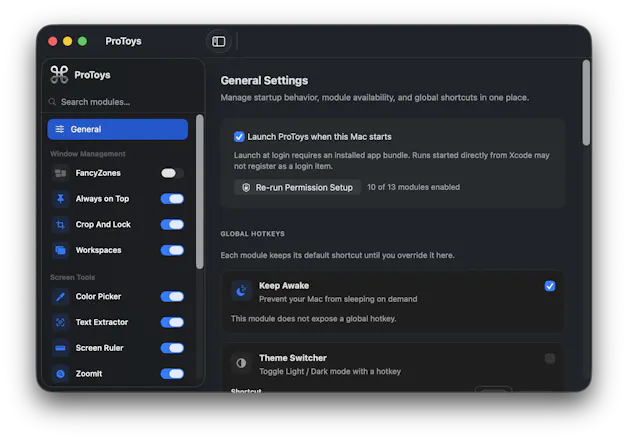
Tired of cluttering your Mac with a dozen single-purpose menu bar apps? ProToys is a unified toolkit that brings 14 essential macOS utilities into one lightweight app. Instead of managing separate subscriptions, background processes, and scattered settings, ProToys gives you everything you need in one centralized place. It's built to save you time, reduce menu bar clutter, and optimize your workflow. Stop downloading individual apps for basic tools—get them all in ProToys.



Hey Product Hunt! 👋 I'm Qutibah, the maker of ProToys.
For years, I was a dedicated Windows user and absolutely relied on Microsoft's PowerToys. When I switched to macOS, I realized that a similar unified toolkit didn't exist. As an engineer constantly switching contexts, I found myself downloading separate, single-purpose apps for every basic Mac utility I needed just to replicate that workflow. Eventually, my menu bar became a cluttered mess, and managing all those different background processes was frustrating.
Heavily inspired by PowerToys, I built ProToys to solve my own problem. It’s a single, lightweight app that combines 14 essential macOS tools into one unified toolkit tailored specifically for the Mac ecosystem. My goal was to create something that saves time, reduces menu bar clutter, and just works seamlessly without hogging system resources.
The 14 tools:
• FancyZones : drag windows into custom grid layouts, snap with a modifier
• ColorPicker : global hotkey eyedropper, copies HEX/RGB/HSL
• ImageResizer: Images resize/convert
• ScreenRuler : measure pixels anywhere on screen (multiple modes)
• AlwaysOnTop: pin any window above others with one shortcut
• ZoomIt: presentation zoom + on-screen drawing + Break screen
• PowerRename: bulk rename files with regex, preview before applying
• TextExtractor: OCR text from any region of the screen
• CropAndLock: crop part of a window into a thumbnail that stays visible
• Workspaces: save and restore window layouts per task
• MouseUtils: find-my-mouse spotlight + pointer crosshairs
• Awake: keep your Mac from sleeping, with timer or indefinite mode
• ThemeSwitcher: quick light/dark toggle with optional schedule
• SystemStats: CPU / GPU / RAM / Disk in the menu bar
I’d love to hear your feedback on the UI, what utilities you use most in your daily workflow, or what new tools you’d like to see added in future updates.
I'll be hanging out in the comments all day, so ask me anything!