Ply

Ply

building features into your existing stack, with no-code

4.9
16 reviews

1.7K followers

Supercharge your team by building internal features into the apps you already use, without code. Create your own add-ons, command bar tools, or notifications. Works with Gmail, Airtable, Zendesk, HubSpot, Salesforce, Pipedrive, Intercom and many others.
This is the 2nd launch from Ply. View more
Portals by Ply

Portals by Ply

Forms powered by AI and your data
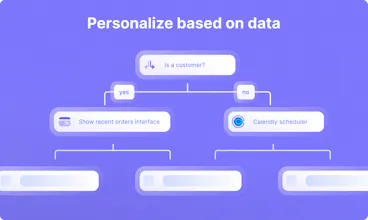
Ply portals are powerful form-like experiences that are connected to your data in real time. Combine your processes, AI and business logic to make your ideal customer workflows. No coding required.
Portals by Ply gallery image
Free Options
Launch tags:User ExperienceSaaSNo-Code
Launch Team / Built With
Vy - Cross platform AI agent
AI agent that uses your computer, cross platform, no APIs
Promoted

What do you think? …

Nadav Saadia
Great stuff! Does the code run in the browser or the background?
Maayan Abenina-Adar
@nadav_saadia our Code Helper with AI lets you run Javascript code in the background / "in the cloud" as a step in your portal's workflow. This is useful if there's a custom data manipulation that you want to achieve in one step, without using our prebuilt data helpers. It supports the Javascript Fetch API, so you can use it to perform custom API interactions, e.g. multiple API calls in one step or paginating through results. It comes with an AI assistant that can help generate code for you. Just map in workflow values and describe what you want the code to do, and the assistant generates JS code for you to use. Check out this doc to learn more: https://docs.ply.io/build-featur...
Yanlin Wu
Congrats on the launch! You must have put in much work to build Ply Portal with such a huge team. Good luck to you!
Yaniv Tross
@linda_yanlin Haha! Yeah they're awesome :)
Ron Oren
We've been using Ply for a while now and love it. We are so excited to test Portals! Go Ply
Yaniv Tross
@ron_oren_iai You've been an awesome customer since early beta days ❤️
Haim Moskowitz
huge! looks great guys can't wait to try it
Ron Gura
Can forms DO that!??
Yaniv Tross
@rongura 😂😂😂
Matan Kleyman
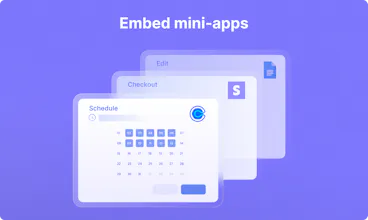
Super cool! Do I need engineer to help me embed the mini-app or its no-code as well ?
Maayan Abenina-Adar
@matan_kleyman Hey there, all of our mini-apps are added as steps to a workflow. No coding is required. Currently, we have mini-apps that connect to Calendly, HubSpot, Google Docs, and Stripe, but we're planning to add more. Curious to hear which apps you'd be interested in using in a portal workflow.
Matt
🧐 Good find
This looks awesome! I wanted to ask: the branding placement on paid plans is a bit unclear with the images you provide on the pricing page. Is Pry/Portals branding on all the paid plans?
Yaniv Tross
@mattisinfact You found a bug in our pricing page - they all have the same image in the comparison table🤦‍♂️ Until we fix it, here are screenshots: Free - https://ibb.co/fDRtySV (Full branding + thank you screens also have a "create your own" button) Launch - https://ibb.co/H2zh8Xn (Less branding) Engage/grow - https://ibb.co/dkxRNVp (Minimal) Optimize/Enterrprise - https://ibb.co/4R3GxJz (whitelabled)