We make several types of free-to-try, in-the-browser productivity software: (1) video meeting software (team.video); (2) task & workflow management software (subtask.co); (3) mind-mapping & system visualization software (plectica.com)
No reviews yetBe the first to leave a review for Plectica
I love a good diagram tool, but i've recently found out that keynote on Mac does this quite well. Curious to how this tool is differentiates itself because Keynote also allows for collaboration?
@rawoyemi Keynote is ultimately designed to be a presentation tool, and so it simply lacks the features and flexibility inherent in Plectica’s systems-first approach.
I’ve never collaborated in Keynote, but Plectica is web-based and I’ve found the “multiplayer” experience to be fast & seamless.
Report
Casey from Plectica here. Thanks @automaticyes for responding!
@rawoyemi A few additional key differences between Plectica and Keynote:
Plectica is structured to work and organize information the way your brain does based on science, which leads to the the following point: Users have said that Plectica has made them smarter (even outside of using the tool), while prominent academics like Edward Tufte have found that powerpoint makes you dumber: https://www.edwardtufte.com/bboa....
Purely from a feature standpoint, in Plectica:
- you have a practically boundless canvas to work in
- creating and moving elements is much more flexible
- you can nest cards and collapse and expand them
- you can easily drag and drop elements into and out of each other
- you can embed media and attach files to cards
- you can copy and paste data from elements into and out of the software
Hope this helps!
@rawoyemi thanks for sharing that note. I think @automaticyes@casey_conway added some good points on how Plectica is different - but I'm curious - what sort of things do you really like best in Keynote that make it great for you? (also just curious if there's anything about Keynote that bugs you)
Report
@automaticyes
I get you, the point being that keynote allows for similar functionality (albeit limited) but the usage is beyond the original intention hence it's not as seamless.
@casey_conway
Thanks for this, really appreciated the breakdown of the different features!
@clbecker
Yeah, I think their points hit the nail on the head for me. I like the fact that I "can" get a diagram done reasonably quickly. I guess things like the size of the slide (i.e. pseudo-canvas) and the range of features are limited though.
I’ve been using Plectica for over a year and love it. It’s the fastest way to map out a user journey, technical architecture (like a commit reveal scheme within a crypto product) or any other system.
Whenever I have a new idea, I’ll jump into Plectica to map out how it would function. In some instances I’ve found it effective for creating quick interface wireframes too.
The point is, it’s faster than Figma and Sketch at the ideation phase, it encourages you to think in systems, (which are the foundation of all reality, people!! 🙀) plus it’s collaborative. What’s not to like?
When we suggest the need to “think about it” we often assume what that means as a purely in-the-head exercise. What I find Plectica really useful for is getting what’s in my head on a canvas that allows me to more deliberate and “thoughtful” about all the factors and elements in play — and how best to explain them for a given purpose. Anytime I see a canvas or graphical heuristic, I think of how easy it would be capture in Plectica. As a tool to support analysis, planning and knowledge management, Plectica is charting new territory. Bravo team — keep up the great work!!
Pros:
Plectica’s ease of use, range of possible applications, and depth of individual and collaborative utility is exceptional.
Cons:
I want to contribute to maps while mobile! A mobile mode would be wonderful.
I have created a few maps- one I used in particular to teach a bunch of school students, mapped the events and perspectives of different be jurors in the film '12 angry men'. This was a session on 'thinking and biases'
Pros:
the Perspectives feature which pops out the relationships from a particular perspective is powerful
Cons:
struggling with presenting complex maps to the audience... Perhaps some zoom in features will help
Approaching the complexity of a new map is something that is always on our mind. Would you be up for a quick chat about how that could work better for you?
I’m doug at Plectica dot com, and you can always get us on intercom (the blue chat icon in the lower right side of a map)
I’m Derek, Plectica’s Co-Founder.
I’m super excited Plectica got hunted on PH. Thanks Jason!
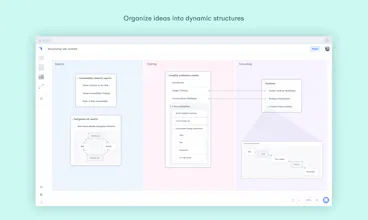
We are proud of Plectica, an ultra-clean interface that allows you to easily diagram anything, together. We’ve worked hard, and have some happy users – “Any organization that has a design team should be using Plectica to get stakeholders on the same page. It’s simply a faster way to design a service.” (Matthew Anderson - Ridecell) Whether everyone is in the same room or remote, you can build upon and connect each others contribution in one diagram.
Plectica transforms how you think and work whether you are a UX, brand, service, or program designer; software developer; product or project manager; executive; student; or educator. Our team’s diverse mix of designers, scientists, applied researchers, policy experts, and engineers has successfully woven two decades of cognitive science research on how humans think and learn into our interaction design. Plectica is a visual mapping tool that works the way your brain does.
We also hope you’ll see that Plectica is a labor of love. We believe technology can be the driver of more thinking and more thoughtfulness, not less. Our products aren’t just good for better ideas, workflows and diagrams. They’re good for people and good for society, too. We believe that a tool that helps people to think–to clarify their thoughts, share them, and collaborate more effectively–is what the world needs more of today.
Try it out with your team. We’d love to hear what you think!
@_derek_cabrera "We also hope you’ll see that Plectica is a labor of love."
Indeed!
Report
Seeing as complex topics often have multiple dimensions, such as change over time, or different contextual states, these can be difficult to represent in a flat space.
I think the power of Plectica is in its overview-type features, which can allow for this to some extent. These are:
**Attributes** (tags)
Filtering by attribute highlights cards.
**Perspectives** (tags+info)
Filtering highlights and displays extra information.
**Waypoints** (presentation / walkthrough)
This is arguably the most useful feature.
Tell stories which zoom in on cards.
Waypoints can serve as a lightweight presentation.
Apart from those useful features I also found Plectica very easy to use. Although Plectica has fewer design options than flowcharting apps, I preferred this approach which suited my needs.
in my case this was: laying down ideas quickly, then organising and relating them.
Each card has a standard simple set of tools, accessible within each card.
Add the standard card by double-clicking.
Choose a color, title and summary.
Move cards or nest them infinitely.
Choose the internal layout for each card.
Set and name relationship lines.
Pros:
Minimalist design for quick diagramming.
Attributes & Perspectives for clear filtering.
Waypoints for presentational storytelling.
Cons:
A few more colors (?).
Maybe at some point I'll be wanting more import and export options, such as OPML format.
Domino Spot
Whiteboard by Frameable
Domino Spot
Overview
When we suggest the need to “think about it” we often assume what that means as a purely in-the-head exercise. What I find Plectica really useful for is getting what’s in my head on a canvas that allows me to more deliberate and “thoughtful” about all the factors and elements in play — and how best to explain them for a given purpose. Anytime I see a canvas or graphical heuristic, I think of how easy it would be capture in Plectica. As a tool to support analysis, planning and knowledge management, Plectica is charting new territory. Bravo team — keep up the great work!!
Pros:Plectica’s ease of use, range of possible applications, and depth of individual and collaborative utility is exceptional.
Cons:I want to contribute to maps while mobile! A mobile mode would be wonderful.
Overview
ArtSquare
Overview
Whiteboard by Frameable
I have created a few maps- one I used in particular to teach a bunch of school students, mapped the events and perspectives of different be jurors in the film '12 angry men'. This was a session on 'thinking and biases'
Pros:the Perspectives feature which pops out the relationships from a particular perspective is powerful
Cons:struggling with presenting complex maps to the audience... Perhaps some zoom in features will help
Overview
Plectica
Overview
Seeing as complex topics often have multiple dimensions, such as change over time, or different contextual states, these can be difficult to represent in a flat space. I think the power of Plectica is in its overview-type features, which can allow for this to some extent. These are: **Attributes** (tags) Filtering by attribute highlights cards. **Perspectives** (tags+info) Filtering highlights and displays extra information. **Waypoints** (presentation / walkthrough) This is arguably the most useful feature. Tell stories which zoom in on cards. Waypoints can serve as a lightweight presentation. Apart from those useful features I also found Plectica very easy to use. Although Plectica has fewer design options than flowcharting apps, I preferred this approach which suited my needs. in my case this was: laying down ideas quickly, then organising and relating them. Each card has a standard simple set of tools, accessible within each card. Add the standard card by double-clicking. Choose a color, title and summary. Move cards or nest them infinitely. Choose the internal layout for each card. Set and name relationship lines.
Pros:Minimalist design for quick diagramming. Attributes & Perspectives for clear filtering. Waypoints for presentational storytelling.
Cons:A few more colors (?). Maybe at some point I'll be wanting more import and export options, such as OPML format.