Plectica
Concept Mapping. Collaboration. Metacognition.
17 followers
Concept Mapping. Collaboration. Metacognition.
17 followers
We make several types of free-to-try, in-the-browser productivity software: (1) video meeting software (team.video); (2) task & workflow management software (subtask.co); (3) mind-mapping & system visualization software (plectica.com)




Domino Spot
Whiteboard by Frameable
Domino Spot
Overview
When we suggest the need to “think about it” we often assume what that means as a purely in-the-head exercise. What I find Plectica really useful for is getting what’s in my head on a canvas that allows me to more deliberate and “thoughtful” about all the factors and elements in play — and how best to explain them for a given purpose. Anytime I see a canvas or graphical heuristic, I think of how easy it would be capture in Plectica. As a tool to support analysis, planning and knowledge management, Plectica is charting new territory. Bravo team — keep up the great work!!
Pros:Plectica’s ease of use, range of possible applications, and depth of individual and collaborative utility is exceptional.
Cons:I want to contribute to maps while mobile! A mobile mode would be wonderful.
Overview
ArtSquare
Overview
Whiteboard by Frameable
I have created a few maps- one I used in particular to teach a bunch of school students, mapped the events and perspectives of different be jurors in the film '12 angry men'. This was a session on 'thinking and biases'
Pros:the Perspectives feature which pops out the relationships from a particular perspective is powerful
Cons:struggling with presenting complex maps to the audience... Perhaps some zoom in features will help
Overview
Plectica
Overview
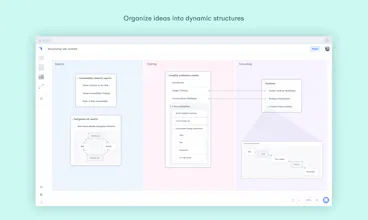
Seeing as complex topics often have multiple dimensions, such as change over time, or different contextual states, these can be difficult to represent in a flat space. I think the power of Plectica is in its overview-type features, which can allow for this to some extent. These are: **Attributes** (tags) Filtering by attribute highlights cards. **Perspectives** (tags+info) Filtering highlights and displays extra information. **Waypoints** (presentation / walkthrough) This is arguably the most useful feature. Tell stories which zoom in on cards. Waypoints can serve as a lightweight presentation. Apart from those useful features I also found Plectica very easy to use. Although Plectica has fewer design options than flowcharting apps, I preferred this approach which suited my needs. in my case this was: laying down ideas quickly, then organising and relating them. Each card has a standard simple set of tools, accessible within each card. Add the standard card by double-clicking. Choose a color, title and summary. Move cards or nest them infinitely. Choose the internal layout for each card. Set and name relationship lines.
Pros:Minimalist design for quick diagramming. Attributes & Perspectives for clear filtering. Waypoints for presentational storytelling.
Cons:A few more colors (?). Maybe at some point I'll be wanting more import and export options, such as OPML format.