
Olivi
Import CSV from any time tracker, send invoices in minutes
11 followers
Import CSV from any time tracker, send invoices in minutes
11 followers
Freelancers track hours in Toggl or Harvest - then copy them into spreadsheets to invoice clients. Olivi fixes that. Drop a CSV from any tracker - entries map to clients, group into invoices, and get emailed with PDF attached. Four clicks. Built for solo freelancers billing multiple clients: - Smart CSV import with client/project mapping. - Keep tracking of your unbilled time logs. - Email composer with templates and PDF attachments. - Per-client rates, currencies, and tax settings.



It all started as a learning project - a way to try out new technologies in web development. As a freelancer with years of experience, I decided to build a straightforward system for managing clients, projects, invoices, and time logs with a built-in time tracker. As the architecture grew, I realized this could become a standalone product, and I started looking for my niche.
Pretty quickly I understood that I couldn't compete head-to-head with the market giants - Harvest, Clockify (freelancer and agency market), or Invoice Ninja and FreshBooks (invoicing market).
So I started searching for a narrow niche - that small corner of the market where the workflows just weren't user-friendly enough. Such a simple flow - turn time logs into an invoice and send it to a client - still takes way too much time. I studied competitors' interfaces, and none of them left me satisfied.
That's why I'm presenting Olivi - a project I've been working on for six months, focused on giving users that smooth, pleasant experience of turning time logs into a ready-to-send invoice, delivered straight to the client's inbox. Along the way, you'll find email templates, tax rates, preset payment details, automatic balance tracking, and more - all built to remove friction from your monthly billing.
I'm asking you to give the app a try and see how the workflow feels. Every piece of feedback will be read the same day. I'll do my best to respond to questions as quickly as I can.
P.S. I just really like olives.
Does the CSV mapping stick around for repeat imports from the same tracker, or do you have to redo the client matching every single time?
@kumsalmnyj the clients and projects are recognized and created automatically during first import. You only need to have a column "Client" or "Customer" in your CSV in order to successfully map customers.
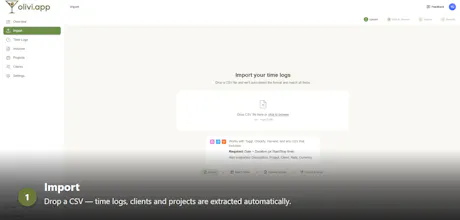
During the import you see the full picture of imported data - clients, projects, dates, time logs, and rates. You can review, edit or remove them. Or don't do anything at all, just click "Import".
Olivi works great with CSVs from Toggl, Clockify and Harvest - we recognize most of their columns. If column's name isn't recognized Olivi will ask for a manual match.
Finally someone fixed this annoying step, dragged my old Toggl CSV in and had an invoice drafted in under a minute. The per-client tax and currency settings are exactly what I needed for my mixed US and EU client roster.
@yeterkeyq Thanks for trying it out! Is there anything you'd like to see added to Olivi?