Hi Folks 🖖,
thanks @frankdilo for the hunt ☺️
🛫 How it started?
Over the years I’ve tried multiple OTP Authenticator apps, but wasn’t satisfied with any of those for either usability, security or privacy:
* Google Authenticator: No Mac app, and what if I lose/reset/upgrade my iPhone?
* Authy: Why does it want my phone number? Where on earth are my tokens stored?
* Yubikey: I forgot my key at home, f**k! Moreover, need to buy at least 2 in case of hardware failure ..
* 1Password/Lastpass: would you keep your credit card and pin in the same wallet?
So, I’ve built Obsidian: an easy to use, secure and privacy-aware OTP Authenticator app trying to overcome all these issues.
👇Obsidian features
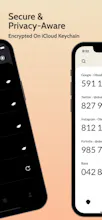
* Uses the iCloud Keychain to securely store you data
* Seamless synchronisation across iOS & MacOS via iCloud
* Daily Backups
* Privacy-aware: Obsidian does not collect any data nor it requires a login to function
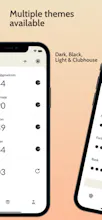
* Customizable UI (2 Display Mode: Classic and Minimal, 4 Themes: Light, Dark, Black and Clubhouse)
🤝 What is 2 Factor Authentication?
2-Factor Authentication provides an additional layer of security by requesting a temporary code (One-Time Password or OTP) in addition to your username/password, making it much harder for an attacker to break into your account, even if your password was compromised.
Expecially today with the increasing interest around Bitcoin, and in general cryptocurrencies, it’s fundamental to have 2-Factor Authentication secure your wallets and accounts.
😎 Are you already using Google Authenticator?
No worries, Obsidian can import automatically data from Google Authenticator, all you have to do is:
1. Open Google Authenticator
2. Export your tokens in the form of a QRCode
3. Scan the QRCode with Obsidian
4. Done
🚀 What’s next?
Obsidian is growing really fast, I’m currently working on some new features (e.g. folders) that will come later next month.
I’m also opened to feedbacks, requests or suggestions, so do not hesitate to contact me 😄
@chrismessina I added the "OTP Authenticator" in the title, but it was removed .. 😅
By the way I believe mine was born first, you even left a comment to the first PH launch 3 years ago 😂 check out https://www.producthunt.com/post...
Why is there no word about fusion on the homepage? Als it’s not really explained on the AppStore, or did I miss it? Is obsidian fusion for sync between iOS an mac?
@berot3 Fusion is only detailed within the app (you are right I can mention it on the home page). Anyway the answer is no, sync between iOS and MacOS works even without Fusion! If you have troubles syncing make sure you have iCloud Keychain enabled on both devices (Settings > iCloud > Keychain > "On") or contact me privately and I'll try to help you out 😄
Congrats on the launch! Do you have a white paper or memo to see how obsidian is generating the codes?
Currently using Authy, will give a try on Obsidian!
@pradeeb28 Obsidian relies on the standard OTP implementation. Which means it works the exact same way as Authy, Google Authenticator etc. I'll may add some reference urls to the landing page though!
Report
Authy user here. I have two concerns before switching. 1) is security, how can I be sure this cannot be accessed, that it doesn't phone-home my info? 2) The MacOS app says there will be payment involved (monthly, yearly), why should I leave Authy to pay for sync?
@linuz90 thanks mate! Let me know what you think 🤩
Report
Haven't tried this yet as I need to migrate my tokens, however I must tell you that you have a lot of typos and grammatical errors.
It's ok as you're probably a standalone developer but you should proofread your app :)




Rigel
Caméra - MultiCamera
Rigel
Caméra - MultiCamera
Rigel
Osaurus
Rigel
Rigel
Audio Writer iOS
Rigel
Typefully
Rigel
Rigel