
NourishGrid
Meal planning that fits real life.
7 followers
Meal planning that fits real life.
7 followers
Most meal planners either lock you into their recipe database, or let AI take over completely — often with generic suggestions that miss your preferences. NourishGrid does neither. Bring your own recipes from anywhere (URL, photo, or manual). Ask Nora only when you want a suggestion — she learns from your taste and in-app behavior to suggest what actually fits. Your grocery list builds itself from your plan, with room to add anything else — one list, everything you need. You stay in control.




Hey Product Hunt — Marcelo here, a solo founder and indie maker of NourishGrid.
I built NourishGrid because weekly meal planning was a mental burden and stealing time I wanted to spend with my family.
It wasn't one moment — it was the accumulated weight of it. Every weekend, carving out mental space to think through the week ahead. What are we eating Monday through Friday? What do we already have? What do we need to buy? Did I account for that busy Tuesday? It's not hard exactly — it's just relentless. And it was pulling me away from the moments I actually wanted to be present for.
I looked at the apps out there and found two camps. Recipe organizers with no planning help. And AI apps that promise to do everything for you — but the output is often generic, ignores your actual preferences, and breaks trust the moment it gets something wrong.
NourishGrid sits in between.
Build your own recipe library: import recipes from any website, snap a photo, ask Nora for something specific, or simply type them in manually.
Plan your week your way: select the days you want to cook, and for each one choose how you want to fill it — pick from your library, import a new recipe, or ask Nora for a suggestion. She works from your actual taste profile, budget, and family's needs. She helps when you ask. You stay in control.
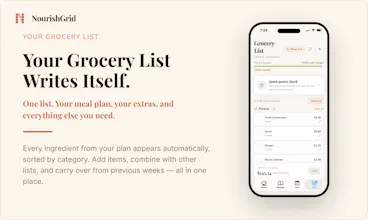
Your grocery list builds itself from your plan — and you can add whatever else you need: type items manually, paste an existing list, or snap a photo of one. Everything you need to shop for, in one place.
If you have ever lost a lot of time on a Sunday to meal planning instead of being present with the people around you — NourishGrid was built for you. Free trial, no commitment. I'd love to know what you think after your first week.
Here's the App Store link: NourishGrid App - App Store
Link to redeem Promo code for 3 Free months (redeem via link): https://apps.apple.com/redeem?ctx=offercodes&id=6772842850&code=PHLAUNCH
— Marcelo
Finally a meal planner that doesn't shove a recipe database down my throat. Adding recipes from a photo actually worked on the first try, and the grocery list pulled everything in automatically.
@abdullahsa7xy, thank you for your feedback! Giving people the flexibility to bring their own recipes — in whatever way works for them — was one of the main goals, so I'm glad the photo import landed well for you.
The grocery list is one I'm especially proud of too. It builds automatically from your weekly plan, but you can also merge in another list — paste one in or scan a photo — or just add items manually. And if you want a sense of cost before you shop, it'll estimate that against your budget too.
The bring-your-own-recipes approach is exactly what I've been wanting. One thing that would seal the deal for me is a Pantry mode where I can log what's already in my kitchen and Nora prioritizes meal suggestions that use those ingredients before adding anything new to the grocery list.
@ademfp4k , thank you for your feedback! Quick clarifying question — are you thinking of something automated, like the app inferring what's left in your pantry over time, or more of a manual list you'd log yourself?
Either way, a full pantry tracker isn't something the app offers right now, and honestly my hesitation is close to what you might already be sensing — it only really works if people log purchases and usage consistently, and realistically most of us (myself included) wouldn't keep that up for long. The app's sense of what's in your kitchen would slowly drift from reality.
In the meantime, you can get close to what you're after by telling Nora directly what you already have when you ask for a suggestion — she'll try to build the recipe around it (on the "Ask Nora" option you can include a more open-ended prompt, in this case asking to find a recipe that uses X, Y, and Z).
Finally a planner that doesn't shove its own recipes at you. Dropped in a few URLs from sites I already cook from and the grocery list just built itself properly, even caught a duplicate ingredient I forgot about.
@brahimiperkej1 , thank you! That's exactly the experience I was hoping for — your own recipes, flexible planning, and a grocery list that actually gets the details right.