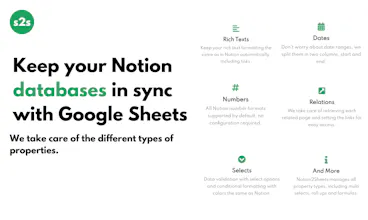
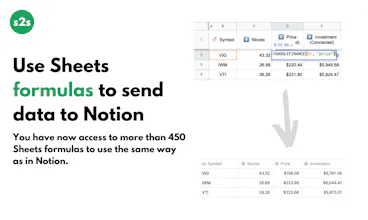
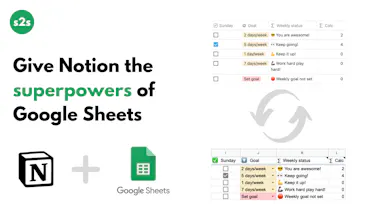
π Keep your Notion databases automatically in sync with Google Sheets β Use Sheets formulas to send data to Notion π Schedule page creations with recurring tasks π Connect Sheets cells with Notion blocks π Create charts and embed them back in Notion
Hi Product Hunt and thanks @benln for the hunt π
My name is Leandro, I am a software developer from Argentinaπ¦π· that decided to stop doing freelance work and to start building products πͺ and Notion2Sheets is the first one!
As soon as the official Notion API was released I decided to jump in and build Notion2Sheets, a Google Workspace Add-On that runs in the side panel of a spreadsheet and allows you to integrate Notion with Google Sheets.
We all love Notion, but databases are not as powerful as spreadsheets. The good news is that you don't need to choose one or the other, you can have the best of both worlds!
- Connect your Notion workspace and sync the databases that you want with Sheets.
- Create charts, use sheets formulas and send data to Notion, connect with third party add-ons, use Google Data Studio and more!
- Schedule page creations with recurring tasks, daily, weekly and monthly options.
- Connect cells in Sheets with blocks in Notion to build dynamic dashboards.
No-code is about giving users superpowers without them having to learn how to write code, I hope Notion2Sheets can do that for you!
I believe great products are built based on users ideas and feedback, I would love to read yours ‡οΈ
Leandro
Report
@benln@leanzubrezki OMG!
THIS IS INCREDIBLE! I have wanted this feature soooo badly, I love the interface of notion and the power of gsheets.
Great! You overcome the problem of the tables integrating Gsheets. I think i will give it a chance and i'll feedback you if i'll find something cool to integrate
@_iamdave Thanks Dave! Having your data in Google Sheets opens a lot of possibilities for integrations that are not possible directly with Notion, I will be happy to get your feedback!
I've been using Notion2Sheets for several months now and everything has been great so far. Thanks to it I came up with a lot of interesting setup ideas for my Notion workspace. I would highly recommend it.
Really valuable integration - not just to backup a Notion Database, but to make available to Notion fields the plethora of Google Spreadsheet functions. I've been using for several weeks and love it!
@glen_creaser Hi Glen thanks for your comment!
There are three main differences between free and paid plans:
1. 60 vs 15 minutes automatic updates.
2. Manual updates only for paid plans.
3. Extra limits on workspaces, databases and the rest of the features.
Pricing is hard π
Quicktion
Quicktion
Quicktion
Quicktion
Notion x GTD System
Quicktion
2023 Digital Planner
Quicktion
Quicktion
Quicktion
Afino Puzzles 1.0
Quicktion