
Notepik
Stop taking meeting notes. Start getting work done.
3 followers
Stop taking meeting notes. Start getting work done.
3 followers
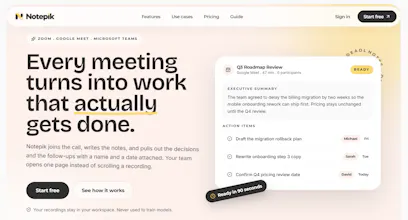
Notepik joins your Zoom, Google Meet, or Microsoft Teams call, creates a speaker-labelled transcript, and turns the conversation into a clear summary, key decisions, and actionable follow-ups. Every action item includes a suggested owner and due date, so nothing gets lost after the call. Search across every meeting, discuss transcript moments with your team, and push tasks directly into Slack, Asana, Trello, or ClickUp. Built for agencies, sales teams, product teams, researchers, consultants...





@Notepin One month since we launched Notepik here. Thank you to everyone who tried it, left feedback and asked hard questions. Here's what has changed since.
🎬 A full walkthrough, in under 4 minutes
Many of you asked to see the whole product before signing up. So we made a narrated tour of a real workspace, from connecting a calendar to asking questions across every meeting:
https://notepik.com/features
It covers everything in the order you'd use it:
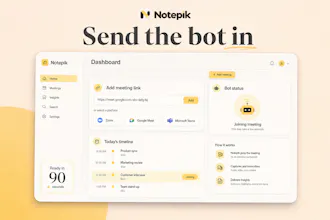
- The bot joining Zoom, Google Meet or Teams, or uploading a recording
- Summary, decisions and action items with suggested owners and due dates
- Clicking any transcript line to hear that exact moment
- Meeting insights: talk time, questions, topics and tone (labelled as an estimate, with its reason)
- Comments, @mentions, tags and read-only share links
- Follow-up email drafts you review and send yourself
- HubSpot sync, plus Slack, Asana, Trello and ClickUp
- Ask: answers from every meeting, with links to the exact meeting and moment
🛠 What we improved under the hood
- Calendar auto-join is more reliable. If an update from your calendar goes missing, Notepik now re-syncs on its own, so a meeting booked in between still gets the bot.
- The billing page is clearer. Every workspace without a paid plan is on Free automatically, and it now says so instead of asking for payment.
- We shipped a round of security and dependency upgrades.
💬 What's next
Your feedback is shaping the roadmap. What would you most like Notepik to do after a meeting? Tell us in the comments. We read every one.
You can still start free, no card needed: https://notepik.com
Notepik for Chrome is live 🎉
Some calls aren’t the place for a bot: a first call with a nervous prospect, a sensitive one-to-one, a client who’d rather not see an extra name in the participant list.
So we built a way to get the write-up without one.
Open your Google Meet, Zoom or Teams call in Chrome, click the Notepik icon, and press “Record this tab”. It records the call, everyone else and your own voice, and when you stop you get what Notepik always gives you:
✅ A summary for the people who missed it
✅ The decisions, as a list
✅ Action items with an owner and a due date
✅ Everything searchable across every meeting your team has had
Prefer the bot? The same popup sends it to the call in one click. It also shows your next meetings and your latest write-ups.
Something we were careful about: with no bot in the call, nobody else on the call is told they’re being recorded. So the extension won’t start until you confirm you’ll tell everyone, and it shows a recording badge while it runs. Recording people without telling them isn’t a feature we want to build.
It’s included on every plan, including the free one, and uses your usual monthly hours. It works in English, French and Arabic.
👉 Add it to Chrome: https://chromewebstore.google.com/detail/notepik-meeting-notes-wit/kldpcmfeapkfdibcbliacbliddgjnpbk
If you try it, I’d love to hear which calls you use it for.