
Notchkin
A notes app that lives in your MacBook's notch.
172 followers
A notes app that lives in your MacBook's notch.
172 followers
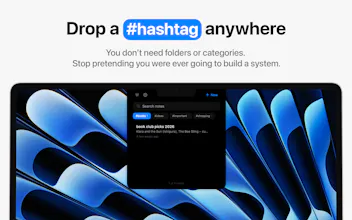
Your MacBook's notch just sits there doing nothing. Now it takes notes. Hover over it, a panel drops down, you jot the thing down and carry on. And yes, there's a mildly passive-aggressive mascot.



Payment Required
Launch Team

AWS Activate CreditsCredits that fuel your startup’s next milestone
Promoted
I like the idea, it can be actually used a temporary buffer for AI promps of notes. For example sometimes working with Claude Code I want to continue but I don't want to miss some details in it's response. So currently I have Sublime Text opened where I put such notes.
For example I asked AI how can we reduce amount of component re-renders in my application and it gives me 2-3 options and I understand that right now which should only implement first and second option. So I will same third options somewhere and I will return to this option later this date. Sure I can always scroll up and try to find this note in the conversation itself, but it become too cluttered with changes etc
@bogdan_stefanjuk Thanks! That’s a really nice way to use it - makes sense as a quick holding spot when you don’t want to break your flow.
As another solo Mac dev, the "it does one thing" + local-only + one-time-purchase combo is the part I respect most here — that restraint is way harder to hold than it looks once feature requests start rolling in. The drawn-on notch fallback for clamshell setups is a clever touch too.
@lennoxbeflying Means a lot coming from another solo dev :) The restraint really is the hard part, especially now that the requests are stacking up and they all sound sensible one at a time. Trying to keep it small, local, and one-time for the long haul though!
I can't help, but that note has an evil look. 😅 Like "😈". But the idea is good! :)
@busmark_w_nika Haha thanks! The evil look is actually on purpose 😅 He's a smug, slightly passive-aggressive little sticky note, that's the whole bit.
Right now it's mostly in the writing, the placeholder text and some of the labels, e.g. start a new note and the title field will say stuff like "Try to be profound this time" or "Oh. You again."
It's probably my favourite part of building the app. As the feature set grows, I want to push that personality further and make it feel even more woven into the entire experience.
Repurposing the notch is one of those ideas that looks obvious only after someone ships it.
@reallynattu Exactly! The notch is one of the few elements that's always present, regardless of what app you're using, which makes it surprisingly well suited for something you need instant access to.
The drawn-on notch fallback for external monitors is such a thoughtful detail. Shows real care for clamshell users, not just laptop screens.
That's great!
@ruvik_milkis Thank you!