
Notchkin
A notes app that lives in your MacBook's notch.
178 followers
A notes app that lives in your MacBook's notch.
178 followers
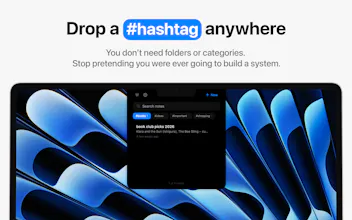
Your MacBook's notch just sits there doing nothing. Now it takes notes. Hover over it, a panel drops down, you jot the thing down and carry on. And yes, there's a mildly passive-aggressive mascot.



Notchkin
@dannystan Congrats on the launch! I'm not a Mac user so I had to look up what the notch was (duh!), clever. Love the mascot - passive-aggressive mascot - too much fun!
Notchkin
@anna_ludwinowski Thank you! And don't feel bad, plenty of Mac users had to look it up too, the notch is so pointless that giving it a job felt like community service. Really glad the mascot landed, he's going to be insufferable about this for days. Appreciate you stopping by even from the non-Mac side of the fence!
the mascot being mildly passive-aggressive is a fun detail but I'm curious if it's just flavor text or if it actually nudges behavior, like guilting you about notes you never revisited. that's the kind of small mechanic that could either make this delightful or mildly annoying depending entirely on execution, curious which side it lands on in practice
Notchkin
@ansari_adin Yeah, that's the part I was most careful about because I didn't want it to become annoying.
Right now it's just flavour, not a mechanic. It reacts to things like how many notes you have or how long it's been since you opened one, but it never does anything with that, it only comments.
Down the line I might lean more into checklists and reminders, and that's where a nudge with a bit of attitude could actually earn its place. But you're right that it lives or dies on execution, so I'd want to test it with real users first.
@dannystan good call holding off until you have real usage data rather than guessing. one thing worth tracking now even before it's a mechanic: are people who get a comment about an old unopened note more likely to actually open it afterward, or do they just notice the comment and move on? that passive signal might tell you whether the personality already has latent pull before you turn it into an actual nudge, which would make the case for leaning into it later much stronger than intuition alone
Dial
The notch angle is clever but I keep running into the same problem mentally - most of my actual screen time isn't near the top edge, so the muscle memory to look/hover up there takes real retraining. The "one thing" focus is exactly right for a notes app, but that value only lands if the trigger feels as instant as a keyboard shortcut. What happens for people running in clamshell mode on external monitors? That's where I spend most of my day and the notch isn't in play at all there. Would love to know if there's a fallback shortcut for that setup.
Notchkin
@galdayan Yeah, fair, and that's why the notch isn't the only way in.
You don't have to reach up there at all. There's a global shortcut (⌥N by default, remappable) that toggles the panel from wherever you are, so it's as quick as any launcher. The hover's just the lazy option for when your hand's already on the trackpad. There's a separate Quick Capture shortcut too (⌘⇧N) if you just want to dump a thought into a new note without aiming at anything.
Clamshell on an external is the honest soft spot. It still works, Notchkin puts a panel on every display you've got, and on a screen with no real notch it draws its own little one up top, so the hover target's there and ⌥N opens it right on that monitor. I won't pretend a drawn-on notch is what everyone wants, and if that's not your thing, fair enough. But it's a notch app at heart, so it needs a notch to live in, whether that's a real one or a drawn one.
LoadFast Snippet Expander
The notch as capture surface is clever because it removes the “which notes app do I open?” tax. I like that there’s also a global shortcut, because quick capture only works if it becomes muscle memory. Curious whether people are mostly using hover or the shortcut after a few days.
Notchkin
@vidur_saini That's exactly the problem I was trying to solve! From my own use, I find myself using the shortcut most of the time once it becomes muscle memory. The notch is great because it's always there and discoverable, but the shortcut is usually faster when you're already in the flow of doing something else. It'll be interesting to see whether other users end up behaving the same way.
Love the idea of turning the notch into a quick capture surface. One question: does Notchkin sync or integrate with the native macOS Notes app / Apple Notes, or is it designed to stay as a separate local notes app?
Notchkin
@max_shin Glad you like it! Notchkin is its own thing on purpose. It doesn't sync with Apple Notes or anything in the cloud, there's no account, no server, everything just lives on your Mac. You're not locked in though, you can export any note (or all of them) to Markdown or RTF, and import them back if needed too.
@dannystan I usually organize my notes in Apple Notes or Notion as my primary workspace, so some kind of integration with Apple Notes or Notion would make Notchkin much more useful for me as a daily quick-capture layer.
Either way, love the direction. Wishing you the best with the launch!
Notchkin
@max_shin That's totally fair, and you're definitely not the first person to mention it. My initial thinking was that the value of Notchkin comes from being fast, local, and ideally self-contained, but I can see the appeal of using it as an inbox that feeds into Apple Notes/Notion/another system. I'll be paying close attention to feedback like this as people start using it. Thanks for the kind words and for taking the time to share your thoughts!
Putting notes literally in the notch is such a "why didn't this exist already" idea — turning dead hardware space into something useful is a great instinct. Does it sync with the system Notes/iCloud, or is it its own little store? Wondering how it fits next to an existing notes workflow rather than adding a second place to lose things.
Notchkin
@kwan_tsui It's its own little store, everything stays local on your Mac with no iCloud or Apple Notes sync (no cloud or accounts at all, which is kind of the point). The way I think about it, Notchkin isn't trying to be your archive, it's the fast "catch it before it's gone" layer that already sits where your eyes are, so you're not opening an app and breaking flow just to jot a thought. And to stop it becoming a second place to lose things, there's instant search and tags to find stuff, plus one-tap export to Markdown or RTF, so anything worth keeping can graduate into your main notes app.
Congrats on the launch!
I was wondering what other features this product had over me just hovering my bottom right corner for the notes app popup (apart from the really cool mascot!)
Notchkin
@zyrxun Thanks! Depends what your corner popup is, but if it's a Hot Corner into Apple Notes, the main difference is that Notchkin isn't a separate app window and nothing syncs to iCloud, it's just a panel that drops out of the notch and tucks back when you move away, all kept local on your Mac. It's also more of a real notes manager than a scratchpad, so search, tags, and pins keep it usable once you've got more than a handful of notes instead of it becoming a pile you scroll through. But the mascot is obviously the real selling point ;)
@dannystan Thank you!