No reviews yetBe the first to leave a review for NoForm — Forms, without the friction
Maker
📌
There are forms everywhere for things like legal documents and registrations, but they can be hard to fill in and edit. I have seen my friends, family and even myself struggle with them sometimes, especially when they are PDFs. Most downloadable forms are PDFs, which makes it difficult to edit the position of text boxes, change their size and make other changes. So, I decided to come up with a solution that makes forms easier to complete by answering questions either out loud using your voice or by typing.
My project, NoForm, is an AI assistant that fills in forms for you. First, you upload the PDF or image form, and the app analyses it by extracting the fields and turning them into a conversation.
Next, the app asks each question out loud, and you can answer either by pressing the voice button and speaking or by typing into the text field. Sometimes, the questions are also multiple choice. If the form requires it, there will be a place where you have to tick legal statements such as “I understand…” and add a signature if necessary.
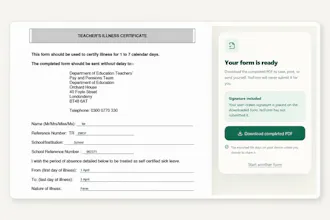
Finally, you will have a chance to review your answers and change anything that does not look right before previewing and downloading the original form with your answers placed in the correct positions.
I created NoForm and used Codex as my developer agent to help me build and improve it.
The app was built with Next.js, React, TypeScript and Tailwind CSS. I used GPT-5.6 to analyse uploaded forms, extract their fields and turn them into structured questions. OpenAI speech models are used to read the questions out loud and recognise the user’s responses.
NoForm then places the confirmed answers back onto the original form while keeping its layout. Every time Codex finished working on something, I tested the full process and gave it prompts to fix problems such as multilingual responses, audio recording, field detection and PDF answer placement.
My biggest challenge was making the upload feature work because it needed an API key. I had added the key as one of my environment variables, but the app kept saying there was insufficient quota, meaning there was no money left, even though my dashboard showed that I had enough credit. After a lot of debugging, I found out that my local development build was still using an older key, which was overriding the new and correct one.
Transcribing voice was another challenge because I was originally using the browser’s speech recognition, which was not very accurate. For example, “John Doe” would sometimes become “London”. In the end, I used OpenAI’s speech recognition, which made it much more accurate and reliable.
The third challenge was that when the completed form was downloaded from the app, it lost the original logo, layout and formatting and looked like a simple text document. However, this did not take too long to fix because I explained the issue clearly to Codex and asked it to keep the original PDF design while adding the answers. Codex worked on it and fixed the problem within a few minutes.
I am most proud that I managed to turn my idea into a complete working app and not just a basic prototype. NoForm can accept PDF, PNG and JPG forms, understand the questions from the actual uploaded document, ask them out loud, take answers through voice or text in different languages, allow the user to review everything and then place the answers back into the original form without losing its logos, layout or formatting.
I am also proud of how I used Codex to build and improve the project. I did not just give it one prompt and leave it there. I kept testing every stage, found problems with the voice flow, multilingual answers and downloaded forms, and then explained those problems clearly to Codex so it could fix and improve them. This helped me turn NoForm into a more polished and useful product.
The biggest accomplishment for me is that I built something that solves a real problem and could genuinely help people who struggle with complicated forms, PDFs or language barriers. I am also proud that I achieved this at the age of 12 during OpenAI Build Week.
I learned that when you work with AI agents, it is not just about writing one prompt. You need to describe and define the problem clearly, test every step, find issues and give Codex accurate instructions to fix them.
Next, I would like NoForm to support more languages and understand more complicated forms, including scanned and handwritten ones. I also want to improve how accurately the answers are placed onto each form because different forms can have completely different layouts.
In the future, NoForm could be used in places such as schools, GP surgeries and councils. I have seen that a lot of time can sometimes be spent filling in forms before an appointment properly starts. With NoForm, the doctor or patient could answer the questions by speaking while the form is completed at the same time.