
NeoReceipt
Receipt Management, Reinvented by AI.
25 followers
Receipt Management, Reinvented by AI.
25 followers
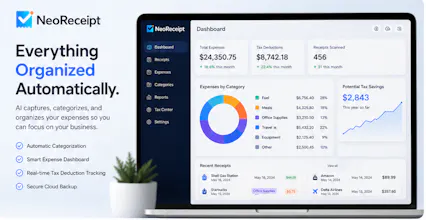
AI receipt scanner and 1099 expense tracker for freelancers. Snap receipts, auto-sort into IRS Schedule C, find every tax deduction, and export at tax time.


Would love to see mileage tracking added since most freelancer 1099 work involves driving between client sites. Being able to log a trip automatically in the background and have it appear under vehicle expenses for Schedule C would save me a ton of manual entry at tax time.
@serap573014 Thanks for the suggestion! We think mileage tracking is a natural addition to NeoReceipt. Our goal is to automatically detect business trips, let you review them, and categorize them alongside your receipts so everything is ready for tax season. Bringing receipts and mileage together in one app would save freelancers a lot of manual work.
Would love to see mileage tracking built in—especially automatic drive detection that logs trips and links them to the relevant client or project. That alone would save me from having to cross-reference my calendar with a separate app every tax season.
@faiza_sheikh2 Thank you! That’s exactly the kind of experience we want to build. Automatic drive detection with the ability to link trips to a client or project is high on our wishlist. The goal is to make mileage and receipt tracking work together so you don’t have to juggle multiple apps when tax season comes around. Appreciate the feedback!
the auto-sort into schedule c categories is genuinely clever, that kind of specificity usually gets bolted on as an afterthought but it clearly shaped how you built the whole flow
@adabirvar Thanks! That was exactly our goal from day one. We didn’t want to build just another receipt scanner. We started with the real problem freelancers and self-employed people face at tax time, then built the entire experience around IRS Schedule C categories so receipts are organized correctly from the moment they’re scanned. Glad that came through!
finally something built for freelancers instead of generic expense apps. snap a receipt and it drops into the right schedule c category without me touching anything
@necdet654042 Thank you! That was our goal from the beginning. Instead of building another generic expense tracker, we focused on the needs of freelancers and self-employed professionals. If you can snap a receipt and have it land in the right Schedule C category automatically, we’ve made tax prep a little easier. Really appreciate the support!
The auto-categorization into Schedule C buckets right from the scan is such a thoughtful detail, shows the team actually talked to freelancers rather than guessing at the workflow. Clean execution.
@berkehallokdww Thank you so much! That means a lot. We spent a lot of time thinking about the real workflow freelancers go through at tax time, so building around Schedule C categories from the start felt like the right approach. Really glad that attention to detail came through.
Snap a receipt and it actually filed it under the right Schedule C line, which has been a nightmare with other apps I tried. Wish I had this last April.
@tekkanat_f95054 Thank you! That’s exactly the problem we set out to solve. We wanted scanning a receipt to be the end of the job, not the start of more manual categorization. Really glad NeoReceipt made that process easier for you, and hopefully next tax season is a lot less stressful.