Launched this week

ModelHub
The missing menu bar app for local LLMs on Mac.
532 followers
The missing menu bar app for local LLMs on Mac.
532 followers
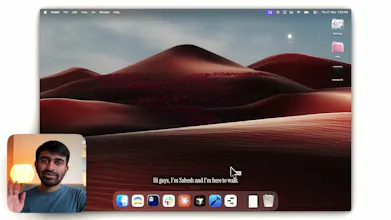
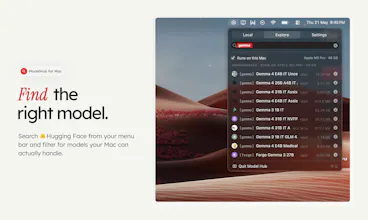
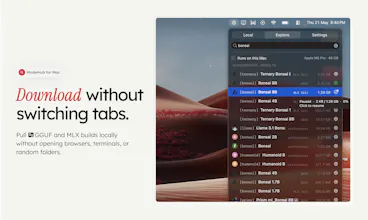
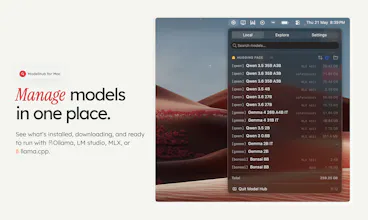
ModelHub is a native macOS menu bar app for developers working with local LLMs. It helps you discover models from Hugging Face, download the right local build, manage your model library, and use Hugging Face models with Ollama, MLX, LM Studio, llama.cpp, and the tools you already have without bouncing between browser tabs, terminal commands, model cards, and local folders. Ollama, MLX, and LM Studio are great tools. ModelHub is the missing discovery and management layer around them.


ModelHub
TimeWave
The 'Runs on this Mac' feature for checking if a model can run on the hardware that I have is my favourite part! That's usually the first thing I want to know before downloading some huge model.
Two things I'd love to see: more pre-download details like license, context length, and RAM estimate, and a quick way to open the original Hugging Face model card from inside the app.
ModelHub
@mdsahilak Oh you can click the model on explore tab to get to HF right away! We are thinking about adding stats like # of downloads / RAM estimate etc here. Thanks for your feedback!
ModelHub
@mdsahilak +1 to the license point especially - we've seen a lot of users get bitten by downloading a model and then realising it's non-commercial only. planning to flag that upfront on the card itself, probably alongside context length and quantization. open question for you: would you want a hard filter for it ("only show models I can use commercially") or just info displayed?
TimeWave
TimeWave
Quick one on storage - if I've already pulled Qwen 32B via Ollama and then discover it again in ModelHub, do you dedupe against the existing local file? Or do I end up with two copies eating 20GB? Well done guys overall
ModelHub
@artstavenka1 hey thanks for using! these are some problems we are actively trying to tackle. ideally - ModelHub should SURFACE issues like these for you to take actions! Thanks for feedback!
Does ModelHub handle quantization format filtering during discovery — like surfacing only Q4_K_M builds based on available VRAM, or is model selection still manual?
ModelHub
@hirogure Right now we have a runs on my mac option that shows models that can be run within the memory of your ram and in MLX format - we plan to make it a bit more nuanced going forward.
@sabesh MLX-only for now makes sense given the Apple Silicon focus. Curious if the roadmap includes GGUF/llama.cpp support — that'd cover the broader "runs locally" crowd beyond Mac users.
mailX by mailwarm
Does ModelHub also track which models are actually being used so you can archive the ones you never run?
ModelHub
@thamibenjelloun Since the runtime is up-to you, there is no straightforward way to track this. Still trying to figure this one out!
I usually encounter more issues with how to quickly validate whether a model is suitable for your scenario after obtaining it, and whether there is corresponding code that can quickly verify and reduce the time spent trying one by one. I would like to know if your tool has such a function or scenario.
ModelHub
@genglin Hey! this app is not meant for inferencing / running the model at all. This is upto you. We only want to make the model management layer neat and accessible.
@sabesh Okay, I understand. Thank you for sharing. My old Mac probably can't run it, because I even have trouble running Ollama properly. But I can use your tool to filter out small models that are suitable for my machine.
Local LLMs via menu bar is the right UX switching between models shouldn't require a browser tab. Does it handle model downloads itself or do you bring your own? Curious about the memory footprint running models in the background.
ModelHub
@imad_elkhafi You can download models from HuggingFace right from the app! And the downloaded models sit in the HuggingFace cache, so you don't have to worry about interoperability with loading models using MLX.
@sabesh HuggingFace integration built in is the right call no friction to get models running. MLX support means it'll be fast on Apple Silicon too. Downloading this today.