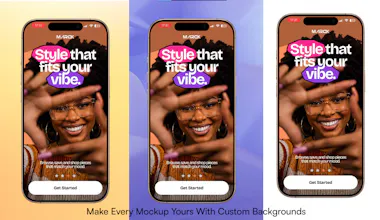
Transform ordinary screen recordings into beautiful product mockups in seconds. Add realistic device frames, motion presets, ambient backgrounds and custom canvases directly in your browser. No uploads. No account required. Free to use.
Why I built it
Everyone who builds apps eventually needs beautiful visuals. I kept switching between design tools just to present a simple screen recording. It felt unnecessarily slow and complicated. I wanted something that worked instantly in the browser without uploading videos or creating an account.
That became MockupReel.
What makes MockupReel different
Everything happens locally in your browser. That means:
No uploads
No waiting for rendering queues
No account required
Your recordings stay on your device
All features are free
Since the first beta, MockupReel has been used in 15+ countries, with 3,000+ exports created by designers, founders, marketers and indie developers.
What's new in Version 1.0
This release introduces some of the biggest improvements yet:
✨ Motion Presets to instantly animate your mockups
🎨 9 Ambient Background Styles
🖼️ Custom Canvas Backgrounds using your own images, gradients or textures
📱 Device frames
⚡ Faster browser rendering
🔒 Privacy-first exports
I'd genuinely love your feedback. If you try MockupReel today, I'd especially like to know:
What was the first thing you created?
Which feature should I build next?
What slowed you down during the experience?
I'll be here all day answering every question. Thank you for checking out MockupReel.
Report
The browser-based editor is surprisingly snappy and the motion presets actually make a boring screen recording look like a real product shot. Big fan that nothing gets uploaded to a server.
Report
Maker
@birsenu6d2 Thanks so much! I'm really glad you noticed both of those. A fast, responsive editor and local, privacy-first processing have been core goals from the start. It's great to hear the motion presets helped elevate the final presentation. Thanks for the support!
Report
Maker
MockupReel 1.2 is here!
We've just shipped one of our biggest updates since launch, making it even easier to create polished marketing assets from both screen recordings and static screenshots.
Here's what's new:
🖼️ Static Image Mockups You can now upload PNG, JPG, and WEBP screenshots directly into device frames. No screen recording required.
📸 Frame Snapshots & Session Gallery Capture the perfect frame from any recording with Shift + S, manage snapshots in a dedicated gallery, and export them individually or as a ZIP.
🚀 Hero-Cropped Exports Static image exports are now automatically cropped around your device, creating presentation-ready graphics perfect for social media, portfolios, and product launches.
📋 Transparent PNG Exports Copy transparent mockups directly into Figma, presentations, Slack, or your favorite design tools with a single click.
⚡ Performance & Workflow Improvements Alongside dozens of UI refinements, we've improved editor responsiveness, added smarter keyboard shortcuts, and made the overall workflow faster and smoother.
As always, MockupReel remains free, requires no account, and processes everything locally in your browser.
MockupReel stands out because everything runs directly in the browser. No downloads or setup needed. The fact that you can export in up to 4K for free is amazing. It's packed with features, easy to use, and doesn't feel limited like most free tools.
What needs improvement
I'd love to see more keyboard shortcuts. I'm a big shortcut person, so having more of them would make creating mockups even faster.
vs Alternatives
I also tried Shot.so, but I kept coming back to MockupReel. It's free, supports 4K exports, and gives me more control over customizing my mockups. It simply offers more without asking you to pay.
Ratings
Ease of use
Reliability
Value for money
Customization
Report
6 views
Thank you for your feedback! Expect more shortcuts in a future release for a faster workflow 😉
MockupReel helps me create polished product demo videos in minutes without needing After Effects. As a product designer, I value simple tools that save time while producing high-quality results. The local processing and 4K exports are a big plus.
What needs improvement
Increase the video length Export GIFs and animated screenshots in addition to videos.
vs Alternatives
I chose MockupReel because it's free, lets me add my own logo, and has an intuitive interface that I could use immediately without watching a tutorial. It delivers professional results with very little learning curve.
The product fast, and it solves a real problem. Being able to transform a plain screen recording into a high quality mockup video directly in the browser
The browser-based editor is surprisingly snappy and the motion presets actually make a boring screen recording look like a real product shot. Big fan that nothing gets uploaded to a server.
@birsenu6d2 Thanks so much! I'm really glad you noticed both of those. A fast, responsive editor and local, privacy-first processing have been core goals from the start. It's great to hear the motion presets helped elevate the final presentation. Thanks for the support!
MockupReel 1.2 is here!
We've just shipped one of our biggest updates since launch, making it even easier to create polished marketing assets from both screen recordings and static screenshots.
Here's what's new:
🖼️ Static Image Mockups
You can now upload PNG, JPG, and WEBP screenshots directly into device frames. No screen recording required.
📸 Frame Snapshots & Session Gallery
Capture the perfect frame from any recording with Shift + S, manage snapshots in a dedicated gallery, and export them individually or as a ZIP.
🚀 Hero-Cropped Exports
Static image exports are now automatically cropped around your device, creating presentation-ready graphics perfect for social media, portfolios, and product launches.
📋 Transparent PNG Exports
Copy transparent mockups directly into Figma, presentations, Slack, or your favorite design tools with a single click.
⚡ Performance & Workflow Improvements
Alongside dozens of UI refinements, we've improved editor responsiveness, added smarter keyboard shortcuts, and made the overall workflow faster and smoother.
As always, MockupReel remains free, requires no account, and processes everything locally in your browser.
I'd love to hear what you think!
Full changelog:
https://mockupreel.studio/changelog