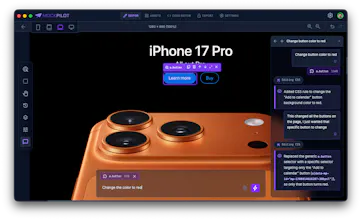
MockPilot turns any live webpage into an editable mockup on your desktop. Use natural language - no design or coding skills needed. 📸 Capture full pages or single components from any URL 🎨 Auto-extracts typography, colors, components & icons into a reusable asset library 💬 Edit in plain English — just tell the AI what to change, and it uses your assets to keep everything on-brand 📦 Export as clean, standalone HTML Free & open source. macOS + Windows.
Hey Product Hunt 👋
I built MockPilot for a very specific frustration I kept seeing on every team I've worked on: a PM (or designer, or support lead, or founder) has a clear idea for a feature or a tweak to an existing screen - but no fast way to show it. So they write a paragraph, drop in a screenshot with arrows, and hope the developer interprets it the way they meant. Half the time, they don't.
MockPilot fixes that. You point it at any URL - your own product, a competitor, anywhere - and it captures the page (or just one component) as a fully editable mockup. While it captures, it pulls the site's design system apart into a reusable asset library: typography, colors, components, icons.
Then you just describe what you want in plain English. "Add a second pricing tier between these two", "reuse the same card style", "Replace this empty state with a CTA to import data", "Make the nav sticky and add a search field." The AI does it, on-brand, using the assets it already extracted. No Figma. No CSS. No design background needed.
When you're happy, hand off a clean HTML export, deploy it, or just create a screenshot and send it to your developer. Suddenly "here's what I want" is a real artifact instead of a paragraph and a prayer.
It's an Electron app, fully local (captures never leave your machine), open source, and free. macOS and Windows builds are on the GitHub releases page.
A few things I'd love your feedback on:
1. PMs especially - what does your current "spec a UI change" workflow look like, and where does MockPilot fall short of replacing it?
2. What would make handoff to developers smoother - annotations? A diff view? Figma export?
3. Which sites break the capture? Bug reports very welcome.
Happy to answer anything - and thanks for checking it out! 🚀
Report
The local capture point is the part I'd trust most here. In PM-to-dev handoff, the hard bit is usually keeping the mock close to the existing design system instead of generating a pretty but impossible screen. Curious how strict the asset reuse is — if I ask for a new component, does it prefer composing from captured tokens/components before inventing new CSS?
@xiaosong001 Great question! By default it's going to generate new HTML and CSS. If you want to use one of the existing assets (components, typography etc.) you can go to the assets page and attach any asset to the prompt. That way you ensure it's using exactly what you want it to use.
Report
Good one! The thing I'd want to stress-test is sites that render client-side or lazy-load on scroll. Does the capture wait for the DOM to settle? Do you end up grabbing half-loaded components?
@artstavenka1 so there are two parts to the way we handle this: The first part is the Capture Browser. That's where you interact with the web page before you capture a static version of it. At that point you can scroll down as far as you want to load whatever you want and then when you click capture it goes to the second part which is the crop tool. This tool can be used to further extend or contract the height of the page, as well as select which part of the page to crop.
Report
The asset library extraction is the part that grabs me, pulling a live site's typography and colors into something reusable so edits stay on brand is really handy. Curious whether the exported HTML comes out as semantic markup or mostly positioned divs. Congrats on shipping.
@i_sanjay_gautam thank you. I plan to expand this feature to let users grab components from other websites or from component banks and add them to the assets library so they can integrate them into the mockup.
As for the exported HTML, it's as semantic as the original website is. We don't change the original HTML other than stripping out redundant attributes (redundant in terms of visual appearance) and JS.
The live-site-to-editable-mockup flow is a great bridge for non-designers and fast product iteration. Auto-extracting typography, colors, and components is the practical bit. How clean is the exported HTML on complex responsive pages?
@sarveshsea we capture the HTML and CSS pretty much as is. We strip away the noise by removing things like redundant attributes or empty elements or invisible elements and so on. So it's as clean as the original website or slightly cleaner.
Report
The "no Figma needed" angle is smart – designers will use it anyway, but this opens it up to everyone else. How does it handle sites with heavy animations or scroll effects?
@vlad_zabavskiy we generate a static capture of the website. So if you have things like scroll animations, you can scroll to a certain point of the animation in the Capture Browser and then when you click capture, it'll capture that point in time.
Report
@yoav_kadosh Scroll position control is underrated – most tools just grab the top and call it done. That changes a lot for animation-heavy sites.
Report
This look good especially for demo presentation, I have a question, can't it be developed fully without the hassle of going through all these processes ?
@daniel_oyetunde by fully developed, you mean an actual website, not just the HTML and CSS? That means different things to different users. The purpose of this tool is to have designers and PMs and maybe developers to create a visual representation of the features that they would like to implement. The nice thing is that AI tools like Copilot and Cloud Code do a very good job converting HTML and CSS to actual React code or other frameworks.




MockPilot
The local capture point is the part I'd trust most here. In PM-to-dev handoff, the hard bit is usually keeping the mock close to the existing design system instead of generating a pretty but impossible screen. Curious how strict the asset reuse is — if I ask for a new component, does it prefer composing from captured tokens/components before inventing new CSS?
MockPilot
@xiaosong001 Great question! By default it's going to generate new HTML and CSS. If you want to use one of the existing assets (components, typography etc.) you can go to the assets page and attach any asset to the prompt. That way you ensure it's using exactly what you want it to use.
Good one! The thing I'd want to stress-test is sites that render client-side or lazy-load on scroll. Does the capture wait for the DOM to settle? Do you end up grabbing half-loaded components?
MockPilot
@artstavenka1 so there are two parts to the way we handle this: The first part is the Capture Browser. That's where you interact with the web page before you capture a static version of it. At that point you can scroll down as far as you want to load whatever you want and then when you click capture it goes to the second part which is the crop tool. This tool can be used to further extend or contract the height of the page, as well as select which part of the page to crop.
The asset library extraction is the part that grabs me, pulling a live site's typography and colors into something reusable so edits stay on brand is really handy. Curious whether the exported HTML comes out as semantic markup or mostly positioned divs. Congrats on shipping.
MockPilot
@i_sanjay_gautam thank you. I plan to expand this feature to let users grab components from other websites or from component banks and add them to the assets library so they can integrate them into the mockup.
As for the exported HTML, it's as semantic as the original website is. We don't change the original HTML other than stripping out redundant attributes (redundant in terms of visual appearance) and JS.
memi
The live-site-to-editable-mockup flow is a great bridge for non-designers and fast product iteration. Auto-extracting typography, colors, and components is the practical bit. How clean is the exported HTML on complex responsive pages?
MockPilot
@sarveshsea we capture the HTML and CSS pretty much as is. We strip away the noise by removing things like redundant attributes or empty elements or invisible elements and so on. So it's as clean as the original website or slightly cleaner.
The "no Figma needed" angle is smart – designers will use it anyway, but this opens it up to everyone else. How does it handle sites with heavy animations or scroll effects?
MockPilot
@vlad_zabavskiy we generate a static capture of the website. So if you have things like scroll animations, you can scroll to a certain point of the animation in the Capture Browser and then when you click capture, it'll capture that point in time.
@yoav_kadosh Scroll position control is underrated – most tools just grab the top and call it done. That changes a lot for animation-heavy sites.
This look good especially for demo presentation, I have a question, can't it be developed fully without the hassle of going through all these processes ?
MockPilot
@daniel_oyetunde by fully developed, you mean an actual website, not just the HTML and CSS? That means different things to different users. The purpose of this tool is to have designers and PMs and maybe developers to create a visual representation of the features that they would like to implement. The nice thing is that AI tools like Copilot and Cloud Code do a very good job converting HTML and CSS to actual React code or other frameworks.