
MinkNote is a native macOS notes and journal app built on plain Markdown files you own. No database, no account, and no vendor lock-in. Organise work with projects, journals, tags, fast search, rich text or Markdown editing, and automatic image organisation in one private, local-first workspace.


Forum Threads


View all
The plain Markdown choice matters more than the feature list. A lot of tools say “your data is yours” but still make leaving painful. Reveal in Finder makes that promise concrete. How are you thinking about sync without losing the local-first feel?
@ra5tadark thanks for your feedback.
Sync is left up to the user: the intended approach is to use the backup/sync tools you already trust: Time Machine, iCloud Drive, Dropbox, Git, Backblaze, or whatever you prefer.
plain files as the actual source of truth is the right call, I've been burned before by note apps that quietly lock your data into a proprietary index. quick question on sync - if you edit the same note on two Macs while offline and then both come back online, how does MinkNote handle the conflict? does it merge, keep both versions, or just take whichever saved last?
@omri_ben_shoham1 great question.
MinkNote doesn’t run its own sync service; if the notes folder is in iCloud Drive, iCloud handles syncing.
Concretely, iCloud Drive does not smart-merge two offline edits to the same Markdown file. macOS treats that as a document conflict: one version becomes the current file, and the other is kept as a conflict version. The user can choose which version to keep, or keep both, in which case macOS creates a renamed copy like Note.md / Note 2.md.
MinkNote doesn’t yet add its own merge layer on top of that, but it's something I'll be looking into.
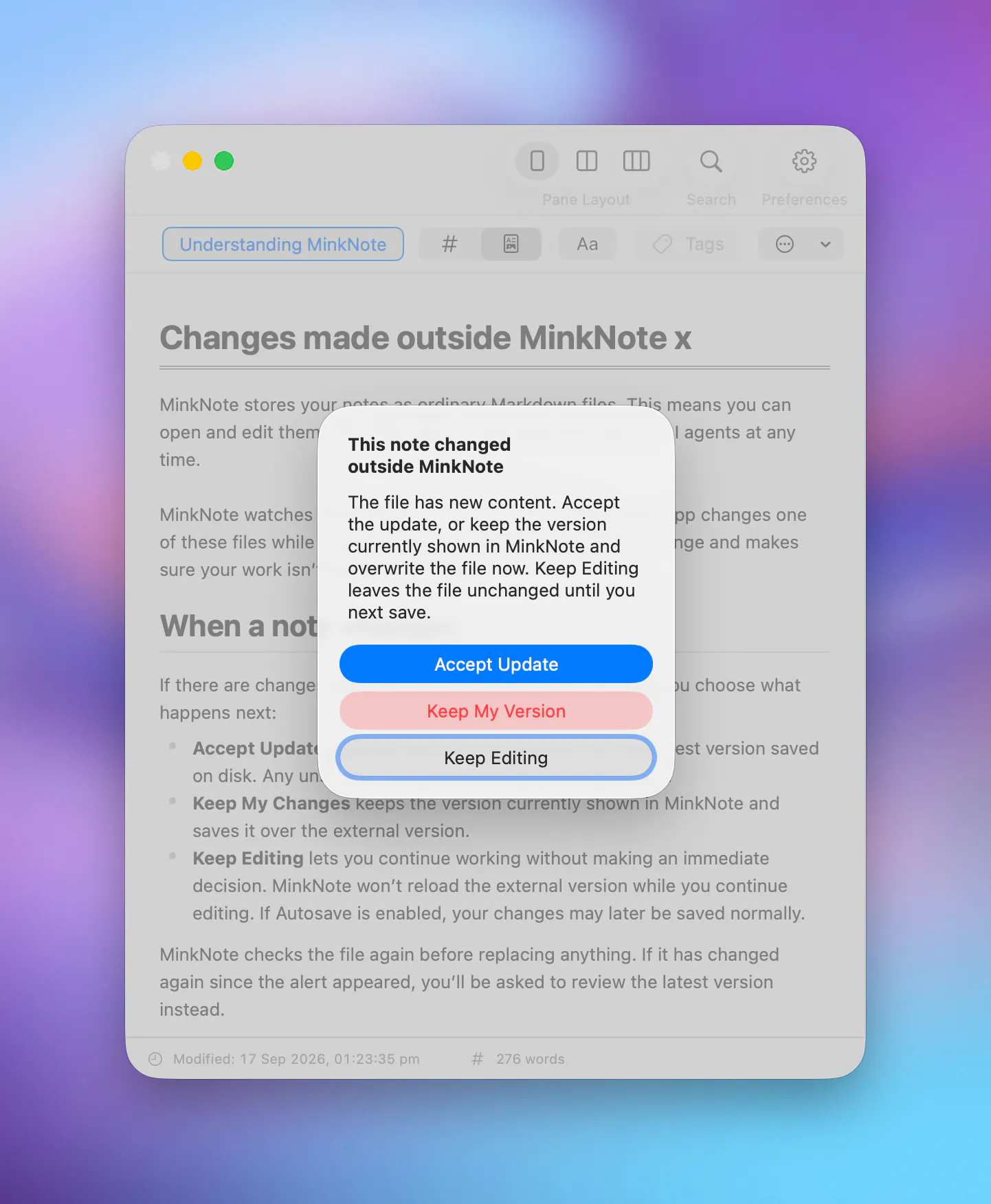
@omri_ben_shoham1 FYI: this is now supported! MinkNote detects when its Markdown files are changed by other apps and responds to the update. iCloud Drive works fine, for now MinkNote lets your accept/reject the latest update:
What’s new in MinkNote 1.6
"Plain Markdown files you own" is the part that sells me — I've been burned by note apps where exporting later is a nightmare. Plain files mean it's future-proof, greppable, and plays nicely with git and other tools, which most "local-first" apps only half-commit to.
Since the notes are just files on disk, how do you handle sync across machines — iCloud/Dropbox folder, or is there something built in?
@jason_chenyan thanks for your input.
Currently sync is optional but you can put a MinkNote project in iCloud Drive, Dropbox, OneDrive, Google Drive or any sync provider of your choice. I'm not currently planning on adding a custom sync layer as the system ones are quite good.
@jason_chenyan FYI: this is now supported! MinkNote detects when its Markdown files are changed by other apps and responds to the update. Two Macs with MinkNote get prompted when files update over iCloud Drive:
What’s new in MinkNote 1.6
Congrats on the launch! Coming from TextMate, I really appreciate the minimalist, local-first approach.
Quick question: Are there already built-in keyboard shortcuts for quick navigation?
Excited to test it this weekend!
@hannesh thanks for the kind words!
Keyboard shortcuts have been central focus in the app's development, more than 90% of all operations are mapped to keyboard shortcuts, here's a preview:
@demianturner Perfect, exactly what I was hoping for. Excited to give it a try!
Been using MinkNote for a bit and it's exactly what i wanted. super minimalistic, no clutter, nothing fighting for attention. the fact that it's just plain markdown files means i'm not locked into anything, no account, no database, just my notes as files i actually own. journal + project organization is simple without feeling barebones. if you want something quiet and local-first this is it
Thanks so much@velogan_boy :-)
There's more essential work needed but I felt it was finally time to launch an MVP and get user feedback. If anything feels missing as you keep using it, I’d love to hear it.
@demianturner that makes sense, and honestly relying on iCloud's existing conflict handling instead of building your own merge logic is probably the safer call for v1, rolling your own three-way merge for markdown is a rabbit hole. the renamed-copy fallback (Note 2.md) is at least visible and recoverable, which is better than silently picking a winner. good luck figuring out the merge layer if you get to it.
Love that the frontmatter stays visible and the plain files remain fully readable outside the app, treating long-term ownership as a feature rather than an afterthought.
Thanks for the input @ilko_kacharov .
I came to frontmatter through Jekyll/blogging years ago, and it still feels like the cleanest tradeoff: structured enough for the app, plain enough that the note remains yours.