
MCP Market
Know what MCP works before you install it.
3 followers
Know what MCP works before you install it.
3 followers
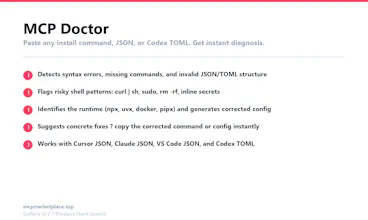
Trust Score, Risk Level, and real install success rates for every MCP server. MCP Doctor diagnoses your config for syntax errors, risky commands, and missing secrets. Install wizard generates Cursor JSON, Claude JSON, VS Code JSON, and Codex TOML. See what actually works before you paste a command.




GPT-5.6-sol helped us build MCP Market from a simple MCP directory into a trusted MCP installation decision platform.
MCP is becoming an important layer for AI tools like Cursor, Claude, VS Code, and Codex, but users still face a major problem: they do not know which MCP servers are safe, compatible, or actually install successfully.
With GPT-5.6-sol, we accelerated product strategy, feature planning, UI copy, debugging, and implementation. It helped us design Trust Score, Risk Level, MCP Doctor, install guides, Codex TOML support, starter stacks, health reports, multilingual pages, and Product Hunt launch materials.
The biggest impact was speed. As a solo builder, GPT-5.6-sol helped me move from idea to shipped product much faster, while keeping the product focused on one core goal: helping users know what works before they install.
If we win $10k in OpenAI credits, we will use them to improve MCP Market’s intelligence layer: automated MCP verification, better config diagnosis。
Hey Product Hunt!
I built MCP Market because installing an MCP server is still much harder than it should be. Finding a repo is easy — knowing whether it’s trustworthy, compatible with your AI client, and configured correctly is the hard part.
MCP Market helps developers go from discovery to a working setup with:
Clear Trust Score and Risk Level signals
Client-specific configs for Cursor, Claude Desktop, VS Code, and Codex
Guided install flows and an MCP Doctor for config/command issues
Install feedback that distinguishes “copied” from “actually worked”
Reusable MCP Starter Stacks for common workflows
The goal is simple: know what works before you install.
I’d especially love feedback from people who have recently set up MCPs: what was the most frustrating part of your last installation — choosing a server, config format, permissions, runtime, or debugging?