Magic Portfolio

Magic Portfolio

Creative portfolio boilerplate

17 followers

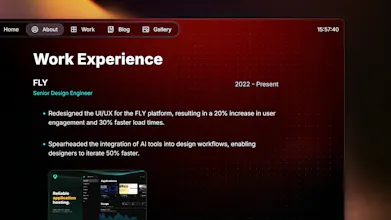
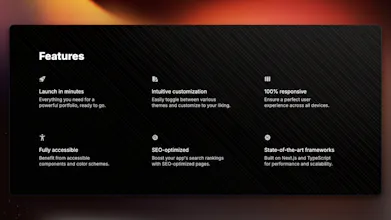
A versatile, responsive, and SEO-friendly portfolio tailored for designers and developers. Showcase your work, start a blog and password protection. Built with Once UI and Next.js.
Magic Portfolio gallery image
Free
Launch tags:HiringBrandingTech
Launch Team / Built With
PinMe
PinMe
Publish Sites in Seconds. Tamper-proof by design.
Promoted

What do you think? …

Lorant One
Hey Product Hunt! 👋 For years, I avoided creating a portfolio for two main reasons: 🛑 Templates just didn’t cut it: I needed something simple, customizable, and SEO-friendly—but every template I found was either bloated or lacked the flexibility I needed. 🛑 Starting from scratch felt like too much work: I didn't have the capacity to start from zero. After launching my design system, Once UI, I finally had the foundation to build the portfolio I wanted. What's inside Magic Portfolio: ✨ Completely customizable ✨ Fully responsive and SEO-optimized ✨ Show off your CV, projects, and blog ✨ Password-protected pages Looking forward to your feedback! 🙌
Star Boat
Wow, @lorant_one! Magic Portfolio sounds like a game-changer for anyone looking to showcase their work without the hassle. I totally relate to your struggle with finding the right template—it's like searching for a needle in a haystack! I love that you’ve made it fully customizable; that’s crucial for standing out in a sea of portfolios. The password-protected pages feature really caught my attention! It’s such a smart way to share work with potential clients or employers without making everything public. I can already see how it could add an extra layer of professionalism. Quick question: How do you recommend users get started with customization? Any tips for making the most out of the features? Looking forward to trying it out! 🌟
Lorant One
thank you @star_boat, appreciate your kind words! customizations is very simple: - first, open the config file and set the brand, accent, neutral colors, the theme, border, etc. from a set of pre-defined values. it provides the look and feel of the site. - then open the content file, where you can set which sections you want to render on each page Magic Portfolio was built with Once UI, so the customization options are wild. learn more at https://once-ui.com/customize hope to see your portfolio built with Magic Portfolio - don't forget to share it with us!
Lucas Benjamin Foster
Sounds like a great tool! Been searching for a portfolio solution that's simple yet customizable. Magic Portfolio looks promising and I can't wait to give it a try.Congrats on the launch.
Lorant One
@lucasbenjaminfoster thank you Lucas, we hope you'll love Magic Portfolio! you can find us on Discord (https://discord.com/invite/5EyAQ...) if you need help, and we're looking forward to featuring your portfolio on the landing once it's ready! ;)
Rishikesh Bidkar
Congratulations on going live Lorant.