
Lunen.ai
Build AI agents your whole team can run, and control
140 followers
Build AI agents your whole team can run, and control
140 followers
You've used ChatGPT and Claude for real work. They just do the task. No record of what they touched, no approval on the risky step, nothing you could hand your security team. Great UX, zero governance. Enterprise tools flip it: total control, an interface nobody wants to open. Lunen is what automated AI should be, the clean UX and the full transparency, not one or the other. Now in early access.
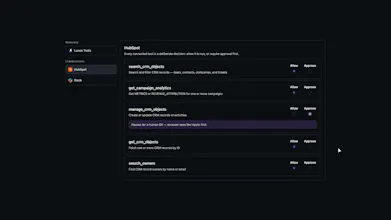





The "2FA checkpoint" framing for risky calls is the interesting part to me. Most agent tools either gate everything behind a human click or trust the model fully — you're doing something in between. How is the read vs. write / auto-allow vs. approve line actually drawn? Is that a threshold an admin configures per tool/data source, or does Lunen infer it from the action type itself? And for scheduled agents running unattended — if a write needs approval and nobody's there to click it, does it just sit and wait, or fall back to a pre-set policy?
@tarandeep_singh11 great question, every agent in Lunen gets a policy. It can be you building the policy per agent, or your admin configuring them for you. We made the policy engine flexible for authoring and narrowed to the tool level for most granularity for least privilege access required. We designed it this way so Lunen can fit into your organizations standard practice for policy decisions, as well so a non-technical user can easily build agents with the support of their own teams.
For scheduled agents, if any action reaches a policy where the effect is approval, the agent will simply pause until proper permission is granted.
The agent-identity piece is what I'd dig into first, @mikerudolph_ . You mention agents get their own identity, and permissions scope down to the individual MCP tool call. When an agent actually hits a connected MCP service, does that downstream service see the agent's own scoped credential — or is Lunen brokering one shared token behind the policy layer? That's the difference between real least-privilege at the source vs. only inside Lunen.
Two more, since MCP is doing the heavy lifting: can I bring my own self-hosted MCP servers, or is it a curated catalog to start?
And the audit log records which model ran — can I pin or route models per agent, and is that model choice itself a governed policy decision, or just logged after the fact?
@akbar_b Great questions, answered in bullets:
When an agent actually hits a connected MCP service, does that downstream service see the agent's own scoped credential
- Depends on the service, we don't broker one shared token. Some services are personal credentials you specify, these could be your personal or you could have specific credentials for agent access. Think Github. Others might have an org-level, or team level credentials. It's up to you!
can I bring my own self-hosted MCP servers?
- For sure, we have a curated list to get you started and you can add additional MCP servers and our policies can be used similarly.
can I pin or route models per agent, and is that model choice itself a governed policy decision
yes, when building an agent you specify the model and variant and can swap in between runs to find cheaper models. Model availability is subject to which providers you provide credentials for and deeper access can be gated by policies you apply to your users.
Thanks for the questions!
@mikerudolph_ thanks for laying this out so clearly 🙏 The part I keep chewing on is "swap in a cheaper model between runs" — in practice a cheaper model often shifts output shape or quality just enough to break a downstream step. Do you surface any signal (a per-run eval/regression) so teams can tell when a swap quietly degrades an agent, or is that on us to watch? Either way, treating model choice as a governed policy is a really sharp framing.
Would love to see a side-by-side replay of the agent's exact tool calls with diffs against what it intended to do, makes post-hoc review way easier when something feels off.
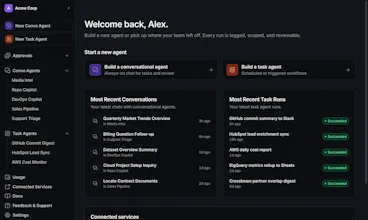
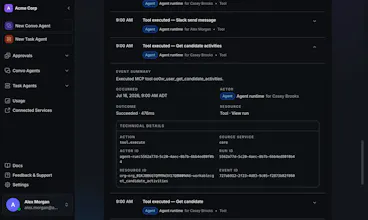
@fakkelek20444 thanks for the comment! When you're building an agent in Lunen, we craft an exact execution plan with detailed tool calls which you see in the blueprint on the right-side panel in the UI. This makes it easy to keep track of the final plan while chatting with Lunen in plain language. On post run, you can see per-session details on what the agent did against the plan for exactly that kind of debugging. We put a lot of effort into our execution, including wrapping your plan in a DAG. Tool drift is always a risk though with any dynamic server and so this kind of UI can be very helpful!
Congrats on the launch, Mike. The control layer is the part most agent builders skip, and it is the first thing a regulated buyer asks about. I run a HIPAA-compliant AI suite for clinicians, and "who can run what, with which data" is half of every security review we go through. How granular do the permissions get, can an admin scope which data sources an agent touches per team member? And can the audit log be exported to hand to a compliance team during a review?
@clemente_lopez1 Hey! Permissions can be scoped to the connected service via MCP as well as each individual tool call that MCP service offers. Everything is explicitly denied by default, so you select what is allowed, and what requires approval. This can all be configured for which specific user is allowed to build agents with which specific policy. Yes, audit logs can be exported absolutely!
@mikerudolph_ Deny by default at the tool call level is the right answer, and exportable audit logs will save your buyers real time in procurement. In healthcare that combination usually decides whether a tool survives the security review. Appreciate the detail, Mike, following along.
The approve-the-risky-step checkpoint is exactly what's missing from most agent tools — they fire and you reconstruct what happened afterward. Before wiring this into a real workflow I'd want to know where the action record actually lives: a hosted store only, or something I can export or self-host to hand the security team? And is the approval gate rule-based per action type, or does a human get pinged on every write?
@noctis06 Great questions, the audit record can be exported absolutely. And the approval gate is entirely up to you, you can scope is as narrow as each individual tool type on an specific MCP service. This allows you to determine what is a gated rule versus what's allowed. We designed it this way because context matters, and no two agents are the same risk level.
@mikerudolph Per-tool-type scoping per MCP service is the right granularity — that is the knob that lets me auto-allow reads and gate writes without babysitting every call. The thing I would check next: does the exported audit record capture the approval decision itself — who or what approved, and which rule matched — or just the action that ran? For a security review the decision trail matters more than the action log.
@noctis06 the export includes the approval decision. You're always able to answer: what the agent did, which policy enabled it, and if applicable, who approved it. Everything is traced. Even agents running on pre-approved policies, you're able to trace who created the agent and delegated the access from the start.
That's the trace I'd want — tying every action back to the enabling policy and, for delegated agents, who granted the access. One gap I'd still poke at: when an action ran under a pre-approved policy that later gets edited, does the export pin the exact policy version (or a hash) that was in force at execution time, or does it just reference the policy's current state? For an audit six months later, that's what makes 'which policy enabled it' actually defensible.
the approval-on-the-risky-step idea is the part that actually matters here, most agent tools either block everything or nothing. curious how you define what counts as risky by default - is that something the team configures per action type or does the agent itself flag it based on context?
@omri_ben_shoham1 great question, at this time it's something your team decides while building the agent. Your org admins can set stricter scopes via user policies so they can say "no user is allowed to just allow an agents `create_pull_request` via the Github MCP, it must be approved in-flight". Flexible to match your teams security needs.