
Local Music Organizer is a native macOS toolkit built for large local music collections. It works with Music.app libraries and standalone audio files, with no Apple Music subscription required. Find duplicates and missing files, compare playlists, inspect metadata, detect suspicious upscales and transcodes, view spectra and waveforms, and repair or convert rare formats offline. Your music stays on your Mac. Try every feature free for 3 days, then unlock it with one purchase. No subscription.












Free Options
Launch Team / Built With


Framer AI AgentsDesign and publish professional sites with AI
Promoted


 Crates


Thanks for taking the time to write such a detailed review. You described the kind of library LMO was made for very well: years of CD rips, newer lossless replacements, multiple versions of the same recording, and the problem of deciding which copy is actually worth keeping.
A few clarifications may help, because several different LMO tools seem to have been mixed together.
Spectrum Analyzer, Audio Inspector, and Audio Authenticity are separate parts of the app.
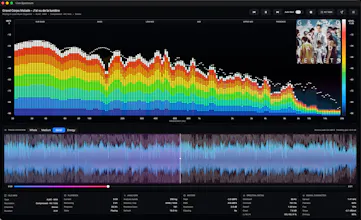
The Spectrum Analyzer is an interactive visual tool. It lets you inspect the frequency content of the music yourself while listening. It does not look at a spectrum and simply declare that a FLAC is "fake lossless."
Audio Inspector is the detailed inspection workspace for an individual file. It gives you the technical information about that file and lets you examine it more closely.
Audio Authenticity is the part that performs automated analysis. It works from the decoded audio itself rather than trusting the filename, FLAC extension, bitrate field, or other container metadata.
The analysis looks for combinations of characteristics that can be consistent with previous lossy encoding or artificial upscaling, such as the effective audio bandwidth, the shape and sharpness of high-frequency roll-off, how much meaningful spectral content remains above a suspected boundary, how consistently those characteristics occur throughout the recording, and whether the overall pattern resembles codec-related filtering rather than a natural recording or mastering characteristic.
Importantly, it is not based on a simplistic rule such as "there is nothing above 20 kHz, therefore this is fake FLAC." That would produce many false positives.
Old recordings, analogue sources, mastering filters, noise reduction, recording equipment, intentional low-pass filtering, restoration work and many other perfectly legitimate processes can produce similar spectral characteristics.
And there is a fundamental limitation here that applies to every audio analysis tool: you cannot reconstruct the complete history of a finished audio file with 100% certainty from the final signal alone.
If somebody converted an MP3 to FLAC fifteen years ago, the FLAC does not contain a label saying "I used to be an MP3." Analysis can find evidence that is consistent with a previous lossy source, sometimes very strong evidence, but it cannot travel back in time and prove every stage of the recording, mastering and encoding chain.
That is why LMO treats Audio Authenticity as technical evidence for investigation rather than an absolute verdict.
There is also an important correction to the "What needs improvement" part of your review: LMO does not stop after flagging a suspicious file.
It only stops at the boundary of your local library. LMO will not search external download sources or obtain replacement music for you.
But if you already have other copies or versions of that recording somewhere in your own Music.app library, Quality Duplicates is designed for exactly the next step you described.
LMO can bring the matching local tracks together so you can see the alternatives you already own, compare them, inspect the actual files, listen to them, and decide for yourself which version you want to keep.
So the workflow is closer to:
Audio Authenticity helps identify a file that deserves investigation.
Quality Duplicates helps find the matching alternatives already present in your own library.
Audio Inspector and Spectrum Analyzer give you additional tools to examine those versions yourself before making the final decision.
LMO deliberately leaves that final decision to you. A higher bitrate, larger FLAC or wider spectrum does not automatically mean that one mastering will sound better than another.
You were also right about wanting to keep your existing Music.app library rather than migrate everything into another proprietary library system. LMO is built around working with the library and local files you already have.
One correction on the pricing model as well: LMO is not a subscription.
There is a 3-day full-feature trial, and after that it is a single $29.99 one-time purchase to unlock the app permanently. There are no monthly or yearly fees.
I chose that model very deliberately. I am a music collector myself, and I do not use music subscriptions. I understand very well why another collector with a carefully built local library may also have no interest in adding yet another recurring subscription just to maintain music they already own.
A local music library utility should be something you can buy once and keep using whenever you need it, whether that means a large cleanup now or occasional maintenance later.
Thanks again for the thoughtful review. It was genuinely useful because it showed me that I need to make the distinction between Audio Authenticity, Audio Inspector and Spectrum Analyzer clearer, explain the Quality Duplicates workflow better, and make the one-time purchase model more obvious.
I wouldn't say this is a one-time product. The library is constantly growing, and tracks need to be edited regularly. I created the app primarily for myself (and only later realized it could be useful to someone else). I use the app every week after new tracks are added.