🚀 Glims: Create Eye-Catching Videos from Static Images and Clips
Hello Hunters! 👋
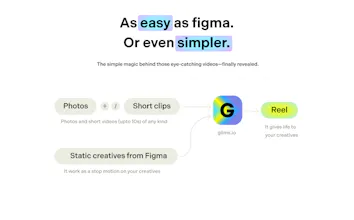
We’re @sooryagangaraj and @sanalck007, and we’re building Glims — a tiny tool that turns your static images and short clips into fast, fun, and polished videos — we call them glims.
It started with a simple idea: sharing work-in-progress or personal moments should be effortless. But existing tools were either too bloated (hello timelines 😵💫) or too rigid. So we set out to build something where you just drag in your images, tweak a few things, and hit generate.
No layers. No keyframes. Just vibes. ✨
With Glims, you can: ✅ Combine images, short clips, or even GIFs into a single video ✅ Add filters (grayscale, grain, blur...) for that extra polish ✅ Customize animation curves, durations, aspect ratios ✅ Export in GIF, MP4, WebM
And the best part? It’s perfect for so many creative moments: 🎬 Showreels for Designers & Artists: Turn static UI designs, art boards, or even Figma explorations into stunning case study videos or Behance/Dribbble reels.
📸 Photo Memories for Everyone: Capture travel moments, event highlights, or just your favorite photos into a vibey video for friends and family.
📣 Social Media Teasers for Creators & Influencers: Showcase your products, before/after transformations, or event promos on Instagram Reels, TikTok, or X — grab attention with quick, animated visuals.
🧠 Quick Prototypes for Founders & Indie Makers: Animate app screenshots or product mockups into polished videos — perfect for Product Hunt launches, crowdfunding pages, or pitching your startup idea.
👩💼 Marketing Teams & Brands: Easily turn product photos or campaign assets into engaging promo clips for social — no video editor required.
🛍️ Retailers & E-commerce Stores: Showcase your new collection, seasonal drops, or special offers with animated product videos.
Glims is still in early beta, so things may break or surprise you — but we’re super excited to see what you create!
Share your creations with #MadeWithGlims on X — we’ll feature our favorites on the landing page.
Drop your thoughts, feedback, or your Glims in the comments — we’d love to chat! 🙌
Report
💡 Bright idea
Nice app. Good ai and very easy to use.Will be amazing if there are templates and ai based auto edit etc. wish you all the best.
I love this product...works for a simple usecase like... I wanted to create a flashback reel for my child's birthday..and I can easily do it in few clicks.🙌
@angelinmaryjohn Yes, absolutely. Especially when you don’t want to post publicly just to get a video reel — privacy matters. Glims runs 100% on your browser, not on any external servers — your content never leaves your device. This makes it safe even for highly confidential work.
We believe that a tool for turning images into videos (or stitching video clips together) shouldn't force public sharing — unlike platforms like Instagram Reels or TikTok chasing virality.
Report
Really can do w/ turning images + clips into clean & vibe-filled videos without timelines or fuss, love it!!
Lightweight + simple + actually makes sharing feel effortless imo
I think Glims should adjust the animation of the images appearing. It doesn't look very natural right now. I feel that since you're making a very simple function, this will be a very key attraction point.
@hi_caicai We use a balanced default speed, but the final output can vary based on how many images you drop.You’ll find a speed control on the right (attached a screenshot here) — feel free to adjust the transition speed to your liking. Let me know if that works for you or if you’re looking for something different!
Report
Using Glims, I could quickly create a shareable video from my static images in a few seconds.
Thanks for building this ❤️
Tested Glims a couple of weeks ago, and it was looking solid. Great to see it on Product Hunt today. Going to share this with the designers in my circle. Cheers, @sanalck007 and @sooryagangaraj \m/




VideoToScreenshots
🚀 Glims: Create Eye-Catching Videos from Static Images and Clips
Hello Hunters! 👋
We’re @sooryagangaraj and @sanalck007, and we’re building Glims — a tiny tool that turns your static images and short clips into fast, fun, and polished videos — we call them glims.
It started with a simple idea: sharing work-in-progress or personal moments should be effortless. But existing tools were either too bloated (hello timelines 😵💫) or too rigid. So we set out to build something where you just drag in your images, tweak a few things, and hit generate.
No layers. No keyframes. Just vibes. ✨
With Glims, you can:
✅ Combine images, short clips, or even GIFs into a single video
✅ Add filters (grayscale, grain, blur...) for that extra polish
✅ Customize animation curves, durations, aspect ratios
✅ Export in GIF, MP4, WebM
And the best part? It’s perfect for so many creative moments:
🎬 Showreels for Designers & Artists: Turn static UI designs, art boards, or even Figma explorations into stunning case study videos or Behance/Dribbble reels.
📸 Photo Memories for Everyone: Capture travel moments, event highlights, or just your favorite photos into a vibey video for friends and family.
📣 Social Media Teasers for Creators & Influencers: Showcase your products, before/after transformations, or event promos on Instagram Reels, TikTok, or X — grab attention with quick, animated visuals.
🧠 Quick Prototypes for Founders & Indie Makers: Animate app screenshots or product mockups into polished videos — perfect for Product Hunt launches, crowdfunding pages, or pitching your startup idea.
👩💼 Marketing Teams & Brands: Easily turn product photos or campaign assets into engaging promo clips for social — no video editor required.
🛍️ Retailers & E-commerce Stores: Showcase your new collection, seasonal drops, or special offers with animated product videos.
Glims is still in early beta, so things may break or surprise you — but we’re super excited to see what you create!
Share your creations with #MadeWithGlims on X — we’ll feature our favorites on the landing page.
Drop your thoughts, feedback, or your Glims in the comments — we’d love to chat! 🙌
Nice app. Good ai and very easy to use.Will be amazing if there are templates and ai based auto edit etc. wish you all the best.
VideoToScreenshots
Thanks so much, Ajay! Really appreciate the feedback. Templates and AI-based auto-edit are definitely on our roadmap — stay tuned! 🙌
Dazzlink
VideoToScreenshots
Thanks so much, Angelin! So happy it helped with such a special moment! 🙌✨
appshots
@angelinmaryjohn Yes, absolutely. Especially when you don’t want to post publicly just to get a video reel — privacy matters. Glims runs 100% on your browser, not on any external servers — your content never leaves your device. This makes it safe even for highly confidential work.
We believe that a tool for turning images into videos (or stitching video clips together) shouldn't force public sharing — unlike platforms like Instagram Reels or TikTok chasing virality.
Really can do w/ turning images + clips into clean & vibe-filled videos without timelines or fuss, love it!!
Lightweight + simple + actually makes sharing feel effortless imo
Let's gooo team
VideoToScreenshots
Thanks a lot, Sam! Glad you liked the lightweight and simple flow — we really wanted to make sharing feel effortless 🙌
@sooryagangaraj Awesome stuff :) Keep it up!
VideoToScreenshots
Credits to my team ❤️ 👉 @sanalck007 & @saeed_salam
Thank you again Sam 😊
YouMind
I think Glims should adjust the animation of the images appearing. It doesn't look very natural right now. I feel that since you're making a very simple function, this will be a very key attraction point.
VideoToScreenshots
Thanks for the feedback, CaiCai! Totally hear you — we’ll definitely keep this in mind. 🙌
appshots
@hi_caicai We use a balanced default speed, but the final output can vary based on how many images you drop.You’ll find a speed control on the right (attached a screenshot here) — feel free to adjust the transition speed to your liking. Let me know if that works for you or if you’re looking for something different!
VideoToScreenshots
Thanks so much, Shyjal! Super happy to hear it helped you create shareable videos so easily. Appreciate the love! ❤️
Tinkerfont
Tested Glims a couple of weeks ago, and it was looking solid. Great to see it on Product Hunt today. Going to share this with the designers in my circle. Cheers, @sanalck007 and @sooryagangaraj \m/
VideoToScreenshots
Hey Mighil! 🙌 Thanks a ton, man — means a lot! Appreciate you sharing it with your folks.