GitBrain

GitBrain

AI-powered Git Client for Mac

131 followers

GitBrain lets you simplify your Git workflow and maximize you coding productivity. Using AI, it intelligently understands your code changes and provides suggestions for Git operations.
GitBrain gallery image
Free
Launch Team
Intercom
Intercom
Startups get 90% off Intercom + 1 year of Fin AI Agent free
Promoted

What do you think? …

Kiwhan Song
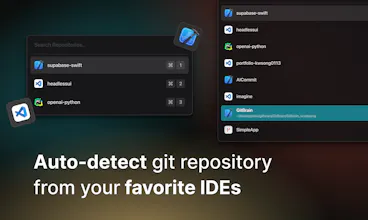
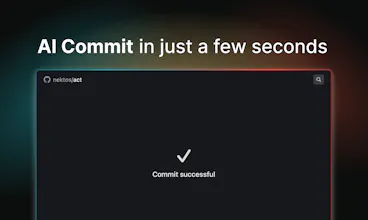
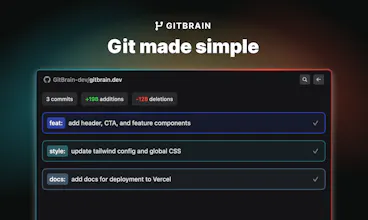
Hey Product Hunt Community! Hey developers! 👋 I’m excited to introduce GitBrain, an AI-powered Git Client for Mac to all of you. 🚀 What's GitBrain all about? As developers, we spend a lot of time working with git: creating commits, dealing with pull requests, resolving conflicts, and more. But let's face it, these git tasks are tiring and time-consuming. GitBrain is here to help you save time with git, so you can focus more on coding. 👉 What can GitBrain do for you? The most frequently performed and tiring task in git is committing changes to repositories. GitBrain simplifies your git commit workflow by - Providing an AI-generated summary of your code changes so that you can review it before committing - Automatically splitting your code changes into multiple commits with AI-generated messages → Many times, we forget to commit at the right moment, resulting in a large batch of changes to commit all at once. It becomes a hassle to figure out what we've been working on and how to split it using Git clients. With GitBrain, all of that is taken care of for you, saving you time and making the process much more convenient. - GitBrain can automatically detect your Git repositories from your IDEs, eliminating the need to manually import them. This way, the projects you're currently working on will be conveniently displayed at the top of the list, allowing for easy access and management without any extra effort. - Accessible with a simple keyboard shortcut, allowing you to commit with just few key strokes. ⭐ Where are we going next? 1. We're working on creating more lightweight UIs for git interactions. Imagine being able to commit right from your menu bar! 2. We plan to expand GitBrain's features to cover even more git tasks. Our goal is to make GitBrain write pull requests and suggest helpful git operations, so you can focus solely on your code. To thank our early supporters, we are offering a limited number of free lifetime licenses for GitBrain's beta users. Join us quickly! And even after that, you can use the code M5NJY3NA for a 50% discount. We're a small team of developers who want to build useful tools that make developers more productive. We highly value your feedback and suggestions. Come join us, and let's create an AI-powered git client together!
Adam Presley
💡 Bright idea
I went ahead and decided to support this product. The direction is an intriguing concept so far. I haven't been able to put it through "the wringer" yet, but the results so far are promising. It doesn't look like it is a full replacement for a Git GUI, but I can see the benefit for just committing code. The ability to edit commit messages and double-check what I'm committing is pretty important for me. I look forward to seeing how this product evolves. :)
Kiwhan Song
Thank you, @adam_presley, for your support and valuable feedback! We've received several requests from users to have the ability to edit commit messages before committing. In the next version, we will be addressing this feature. I have a few questions related to your feedback: 1. When it comes to editing commit messages, which option do you prefer? a) Editing the prefix part (feat, fix, etc.) and description separately, with the ability to edit the prefix tag through a dropdown UI. b) Editing the commit message as a whole. 2. Could you please provide more details on what you mean by "double-checking"? Are you referring to reviewing the code changes you've made, checking how the AI has split your code changes, or checking after the commit process is completed? Thanks again for your support!!
Adam Presley
@kiwhan 1. Option "a" is nice, but "b" is fine too honestly. I can always imagine scenarios where I may need to provide more "color" as to the "why" in a commit 2. Oftentimes I will review the files that are changed. Many times this is just for peace of mind. Other times, I may not be ready to commit a file yet, or a file should NOT be committed (and added to the gitignore). In other situations, I may want to only commit a partial chunk of a file.
Kiwhan Song
@adam_presley Thank you for your response! We have been receiving similar feedback from other users, and we are committed to figuring out what would be best for our users moving forward.
Adam Presley
@kiwhan Thank you for considering feedback. And I certainly appreciate it if this tool is designed to be "laser focused" on just doing commits well. I would still find it a useful tool in my "tool belt" just the same.
Kiwhan Song
@adam_presley GitBrain is currently focused on doing commits well, but it will evolve and offer additional features through future updates. I'm glad to hear that you find GitBrain helpful!
Garen D Orchyan
Looks great, best of luck today 🦄♥️
Kiwhan Song
@orchyan Thank you so much for your kind words and support!
Barnabé DUBUS
💡 Bright idea
Wow! This is wonderful software! It's very well integrated with macOS. I've just done a few tests, and it's very effective. I love it. I've had the idea of generating commits via the ChatGPT API for a few months now, but I haven't been very convinced by the results on GitKraken and Ruby Mine. GitBrain succeeds where others fail. It's very easy to use, very fast, very pleasant and perfectly integrated into the Mac experience. I've already sent in a few feedbacks via GitBrain. I can't wait for the roadmap! I love it after just a few minutes. I think what's missing the most is the ability to edit the message, or I haven't figured out how to do that yet. I hope the launch goes well for this great product. We'd love to see more like this on ProductHunt. 🚀 🚀 🚀
Kiwhan Song
@barnabed Thank you so much for your kind words and feedback! We're glad to hear that you find it easy to use with a great user experience. One of our key goals with GitBrain was to prioritize a lightweight and native-like UI that seamlessly integrates with the Mac experience. We also acknowledge your suggestion about editing messages in GitBrain. We are actively working on implementing this feature and it will be available in the next update. We'll also carefully review the feedback you've sent via GitBrain and get back to you soon. Thank you for your support!
Luca Repetto
@kiwhan, congrats! You must be very excited and proud to see the launch of this. I'm sure it's been a labor of love!
Kiwhan Song
@rep_eat Thank you so much for your kind words! I am indeed thrilled and proud to see the launch of this project. I couldn't be happier to share it with the community.
Awais Younas
Wow! GitBrain looks like a great tool to help streamline Git workflow and boost coding productivity.
Kiwhan Song
@itsawaisyounas Thank you for your kind words and support! We are dedicated to continuously improving GitBrain to streamline the Git workflow and enhance developers' productivity. Your support is invaluable in helping us achieve this goal, and we're truly grateful.
Tapa
Great idea! I downloaded and tried it out. Some feedback: - It's not integrated with the Git CLI or VS Code or other tools where I usually track my changes. So, it doesn't fit easily with my workflows. - I couldn't figure out how to close it. I had to kill it from my activity monitor.
Kiwhan Song
@tapadipti Thank you for trying out GitBrain and providing us with valuable feedback! We appreciate your efforts in helping us improve the user experience of our app. To close the GitBrain window, you can simply press ESC or use the hotkey that you assigned for GitBrain. (The hotkey toggles the window, similar to how it works in apps like Alfred or Raycast on Mac.) We apologize for any inconvenience caused by having to kill GitBrain from the activity monitor. We understand that GitBrain may not easily fit into your existing workflow since it's not yet integrated with other tools. That's precisely why we made it easily accessible through keyboard shortcuts or the menu bar, ensuring convenient access. Rest assured, we are actively working towards improving integration with user workflows. Thanks again for your detailed feedback!
Tapa
@kiwhan Thanks for your reply. Great to know that you are working on the improvements!
123
Next
Last