
www.gia.ac
AI app Builder, Vibe coding, from a single sentence.
96 followers
AI app Builder, Vibe coding, from a single sentence.
96 followers
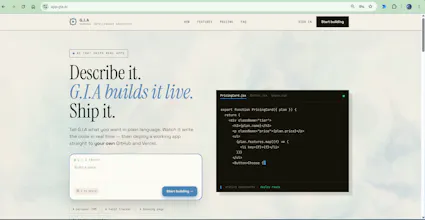
GIA.ac (General Intelligence Architect) builds working web apps from a single sentence, a real coding agent, not templates. Every app ships with a built-in AI assistant for your customers that only sees your app's own data. What makes G.I.A different: it verifies its own work and tells you honestly what works, what is sample data, and what it could not confirm — no fake demos. Built for small businesses and founders. Free to try; paid plans from €9.99/month at gia.ac.


Free Options
Launch tags:Developer Tools
Launch Team

Customer.ioAutomate Messaging Everywhere — Startups Get 12 Months Free
Promoted
How is it different from Lovable or Replit (or any other similar tools that are able to code your own solution)?
@busmark_w_nika hey Nika, Great question — three real differences:
Where your code ends up. GIA deploys to your own GitHub and your own Vercel accounts. Not hosted on my platform, no per-app hosting fees, export anytime. Most tools in this space keep your app inside their walls — that's the business model. Mine is: you own it, you can leave whenever.
A real coding agent under the hood — not a loop over a pile of templates. You see the actual files being written, tested, and repaired in real time — not a loading bar and a reveal. If it makes a mistake, you watch it fix it. Nothing to take on faith — the build IS the demo.
Every app ships with a built-in AI assistant that knows that specific business — services, prices, availability, pulled from the app's own data — answering that app's customers from day one. A nail salon gets a booking receptionist, automatically. I haven't seen another builder do this.
And the pricing philosophy: the full build + live preview is free, no card. You pay (€9.99/mo) only to download the code or deploy. Try before you pay, always.
Genuinely happy to be compared side by side — same prompt in both, see where the code lands. That's the test I built GIA to win.
The word "working" in that tagline is doing the heavy lifting, and rightly so. Plenty of tools produce something that looks like an app. Shipping something that actually runs is the real bar.
@rohanmanthani You've put your finger exactly on it, and it's the whole reason GIA is architected the way it is.
"Working" comes from the agent actually running what it wrote: it builds, reads the real errors, repairs them, and only then shows you a preview. You watch that happen live, including the failures and the fixes. That's the difference between a code generator and a coding agent.
It doesn't always get it in first try. But you're never handed a pretty thing that doesn't run and told it's done.
Congrats, what early workflow usually gives users the quickest win?
@dmitrii_volosatov Thanks! The workflow is deliberately one step*, but how you write that step decides the quality of what you get back. the Architect brain under the hood, is equipped with a powerful coding agent, with the last advanced skills, with a domain specific awareness and intelligence. GIA has also the capability to learn and adapt to your needs during the diff mode.
1. Describe the idea and the problem. What should the app do, who is it for, and what problem does it solve for your customers? Plain language, no technical terms needed.
2. Set the bar explicitly. This is the part most people skip, and it's what separates a toy from something real. Tell GIA the standard you expect, set you standards Higher, production-ready, complete workflows end to end, a proper data model, reusable components, professional UI. Ask for the level you'd expect from a serious build, and the agent aims there.
3. Say what you care about visually, if you care: tone, feel, how it should look to your users. If you don't, skip it.
Then GIA builds it live in front of you — real code, real files, a working preview, plus a built-in AI assistant that knows that business and can answer its users.
4. Iterate from the preview. Once it's running, you refine in the same chat: add a page, change a flow, fix a detail. Each change happens live.
The whole build and preview are free, no car, you only pay when you want to download the code or deploy it.
A tester caught G.I.A lying, and it changed the product.
Two weeks ago someone ran a build and told me the app looked finished but wasn't. The dashboard had records, the forms submitted, the charts rendered. None of it did anything. G.I.A had seeded convincing demo data and presented it as working features.
He was right. And it isn't only my problem. Every serious review of AI app builders this year lands on the same sentence: these tools demo beautifully and fall apart the moment real data and real users arrive. The industry answer so far has been more features, more autonomy, mobile. That widens the gap, it doesn't close it.
So I stopped shipping features and built the boring thing. G.I.A changes the data in your app and checks whether the output actually reacts. Then it tells you plainly: this works, this is sample data, this I could not verify. It fails closed, so anything unproven is labelled unconfirmed rather than done.
It makes my demos look worse. That is the point.
Still early, still solo, and there is plenty G.I.A doesn't do. But it will not tell you something works when it doesn't. her is the honest feedback " Hi Elhoucine,
Thanks, I appreciate it.
I tested G.I.A.ac by asking it to build an early recipe app called Minbite for people hosting food gatherings. The app needed to manage guests and dietary restrictions, suggest and modify recipes, identify conflicts, and include an assistant that understood the app’s own data.
The beginning was genuinely impressive. G.I.A immediately started creating the app and showed me the files it was writing and modifying. I could see meaningful parts such as the dashboard, guest management, recipes, conflict analysis, and the AI assistant being built live.
The finished app also worked surprisingly well as a first version. I could add a guest, navigate through the pages, create or modify recipes, and the new data remained after refreshing. The assistant also correctly explained where the demo and newly added data were stored, and its answer matched what I found in the generated files.
My hesitation appeared when I looked more closely at the Conflict Analysis feature.
The app displayed realistic conflicts involving the demo guests, which initially made me believe G.I.A had implemented logic that compared dietary restrictions and identified conflicts automatically.
However, after inspecting the generated files, I found that these conflicts had been manually added as demo records during the initial setup.
The Conflict Analysis page itself appeared to only load and display existing conflict records and let the user mark them as resolved. I could not find logic that compared new guests, checked recipe ingredients, generated new conflicts when the data changed, or removed conflicts after an issue was corrected.
The empty state also told the user to add more guests to see potential dietary conflicts, even though adding guests did not appear to trigger any actual analysis.
The demo conflicts were also displayed as “Unknown vs Unknown,” despite their descriptions naming the guests involved.
This was the point where I hesitated around the word “working.”
The app looked complete enough that I initially believed the underlying conflict detection existed. It had a polished page, realistic examples, working controls, and language suggesting it would respond to new information.
I only discovered the difference because I know enough programming to inspect the generated files and recognize that displaying seeded examples is not the same as implementing the actual business logic.
A nontechnical user might never notice that distinction.
They could see a polished app with persistent data and realistic demo behavior, deploy it, and begin depending on it without realizing that an important feature was standing on weak stilts and could fail as soon as real information was introduced.
The danger is not necessarily that the app crashes immediately. It is that it appears to work until the user expects it to behave beyond the demo.
I think this is also where G.I.A could meaningfully differentiate itself from ordinary vibe-coding tools.
Showing the files being written is valuable, but visible code does not necessarily make a nontechnical user feel in control. They can watch the files appear without knowing whether a feature contains real logic, sample behavior, or only a finished-looking interface.
The stronger opportunity may be for G.I.A to work with the user rather than simply building for them.
For example, when it reached the conflict requirement, it could have asked whether conflicts should be detected between guests, between guests and recipes, or both.
After building the page, it could have clearly stated that the interface and sample conflicts were complete, but automatic conflict detection had not yet been implemented.
It could then test the feature itself by adding a new guest and conflicting recipe, checking whether a conflict appears, changing the recipe, and confirming that the conflict updates or disappears.
More broadly, G.I.A could tell the user what was actually implemented, what is only demo data, which assumptions it made, what remains unsupported, and how the user can verify the important behavior.
That would move the promise beyond watching an app get built. It would help the user understand what works, what does not, and what decision is needed next.
Honestly pretty wild watching it actually generate something usable just from a plain description. Tried describing a simple habit tracker and got a working layout back in like under a minute.
@prentice_han Hey thank you for actually trying it instead.
If you want to see where it gets interesting: give it something with a real domain, a heavy once. GIA is build to support and build large and heavy apps, Automations, just think off, it, give it a prompt in one sentence, and watch the magic happens,