Bridging the painful operational gap between literature synthesis and the active drafting of a manuscript is an exceptional design philosophy for research workflows. The absolute highlight of Flowing is its real-time reference interpolation engine. Typically, executing a rigorous literature review or drafting a complex methodology section forces an academic into a chaotic multi-window dance: pinning a reference manager like Zotero or Mendeley on one half of the screen, scrubbing through highlighted PDFs in an isolated viewer, and attempting to maintain a fluid train of thought in a blank Word document.
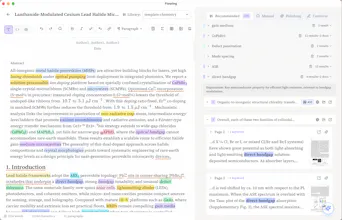
Flowing completely eliminates this layout fragmentation. By analyzing your text inline as you write and instantly resurfacing contextual nodes—pulling exact text blocks, auto-highlighting relevant cross-disciplinary vocabulary, and rendering a compact view of the exact source page right beside your cursor—it functions as an external working memory. Furthermore, restricting the built-in AI assistant to generate and polish text solely from the verified boundaries of your uploaded PDF library addresses the primary danger of academic AI integrations: semantic hallucinations. The editor explicitly blocks generic, unsourced filler text, ensuring that every automated paragraph completion or technical polish is grounded in empirical evidence you've already vetted.




Hi Product Hunt! 👋
I'm Jim, an independent developer, and I'm really excited to finally share Flowing with you.
Over the years, I've noticed a few recurring pain points in research writing.
You know you've seen the evidence before.
You might even remember the paper—but not where the relevant paragraph, figure, or experiment is.
So you leave your editor, open PDFs, search again, and break your writing flow—sometimes only to realize you still can't find the exact passage you needed.
So I started building Flowing around one simple idea:
Keep your research library inside the writing process.
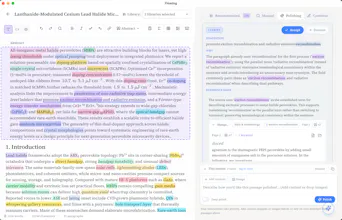
Instead of leaving your editor to search through dozens of PDFs, Flowing automatically detects high-quality keywords you're writing about and surfaces the most relevant snippet from your own paper library. You can preview the snippet thumbnail or return to the original source with one click.
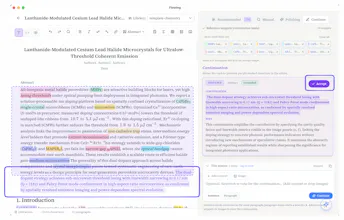
Moreover, thanks to those retrieved snippets and your manuscript as context, Flowing's continuation and polishing suggestions stay much closer to your intended narrative than what you'd typically get from general-purpose AI assistants like ChatGPT. We even benchmarked this on a real chemistry PhD manuscript, where the difference became surprisingly clear. (Here is the detail if you are interested in: 📝https://flowing.works/en/blog/ai-paper-continuation-comparison)
Flowing is now publicly available. 🎉
To celebrate the launch, we're offering an Early Bird program. Join our Discord (https://discord.gg/Vqh7sKeJn4) to receive an invite code, and you'll get 2 years free, plus 50% off for life after that.
If you're already using ChatGPT, Claude, or Gemini for research writing, I'd genuinely love to hear how you currently keep your reference library in the loop—or whether that's still a pain point for you.
Thanks so much for checking out Flowing! 🙌
the tension-check idea in the comments below is the right instinct, and I'd push it one step further: once a suggestion gets accepted and lightly edited into the manuscript, is there any record that this sentence originated from an AI continuation grounded in source X, versus purely the researcher's own synthesis? asking because academic integrity policies are increasingly asking authors to disclose AI-assisted passages, and "draft -> check evidence -> light edit -> keep" as you described it is exactly the kind of workflow that gets fuzzy to reconstruct after the fact if someone asks "which parts did the AI actually write."
@galdayan That's another excellent point, and I hadn't thought about it from exactly that perspective.
You're right that once a suggestion has been accepted and lightly edited, it can become difficult to reconstruct which parts originally came from the AI. We don't currently keep that kind of provenance history, but I think this is definitely something we could support in the future by maintaining a traceable history of AI-assisted edits.
Thanks for bringing this up—it's a really thoughtful suggestion.
the part I'd worry about is subtle misattribution - if it's pulling a passage from your own PDFs to support a claim, does it ever surface a source that's tangentially related but not actually saying what the draft implies it says? that's the kind of error that's easy to miss during a deadline crunch and expensive to catch after submission
@omri_ben_shoham1 That's an excellent question and I'm really glad you brought it up.
It's something we thought about a lot when designing this feature.For Continue Writing and Paragraph Polishing, we'd rather show no related snippet than one that's only tangentially related. During generation, we put a lot of effort into both retrieval relevance and evidence alignment, because a loosely related snippet can create exactly the kind of false confidence you described. We only surface snippets when we're confident they can genuinely support the generated suggestion.
Thanks for raising this—it was exactly the kind of failure mode we wanted to avoid.
@goodbetterbest Congrats on the Lanuch. I wish I had something like flowing during my Management days. This is really need in academics here working with word and docs is just time consuming. Can we collaborate with peers? does it support multiple projects at a time?
@roopesh_donde I'm really glad it resonates with your experience. 😊
At the moment, Flowing is primarily designed for individual researchers, so real-time collaboration isn't supported yet. It's definitely something we've heard interest in, though.
Yes, you can absolutely work on multiple projects. You can create separate documents and switch between different paper libraries depending on what you're writing.
Right now, our main focus is helping researchers stay grounded in their own literature while writing. Once that workflow is solid, we'll continue exploring features that make research collaboration easier as well.
Thanks again for the thoughtful questions!
@goodbetterbest Awesome, I will recommend it to students. Real time collab is tricky, but needed as we have mostly group projects in academics.
Can it recognize handwritten notes or annotations inside PDFs too?
@lee_jay1 Good question. Actually not yet. At the moment, Flowing focuses on the text content of your PDFs rather than handwritten notes or annotations. It's definitely an interesting direction, though, especially for researchers who annotate papers extensively. Thanks for the suggestion!
How often do people actually accept Flowing's suggestions compared to starting from scratch?
@pablo_ani We’re tracking this now (accept / edit-then-keep / dismiss vs typing on your own), but it’s still too early for a reliable %.
In practice it’s rarely all-or-nothing: most useful cases look like draft → check evidence → light edit → keep. “Start from scratch” usually means the suggestion didn’t fit that spot in the manuscript, not that people avoid AI entirely.
Happy to share more once the data is actually meaningful.
Does it support citation managers like Zotero or Mendeley out of the box?
@hambali_salisu Not a direct Zotero/Mendeley plugin today — Flowing is built for the writing loop, not bibliography management.
Most people use both: Zotero/Mendeley for citations, Flowing for drafting with PDF snippets you can verify.