
Expense Tracker: Budget & Gold
Track expenses, gold & budgets — offline, private, free.
4 followers
Track expenses, gold & budgets — offline, private, free.
4 followers
100% offline money manager for Android. No account. No ads. No cloud — your data never leaves your phone. Built because every budget app I tried either required a login or paywalled the features I needed. This one doesn't. Track expenses & income with charts. Monthly budgets with overspend alerts. Gold portfolio tracking (bars, coins, jewelry). 6 currencies. Recurring transactions. CSV export. Completely free. No in-app purchases.


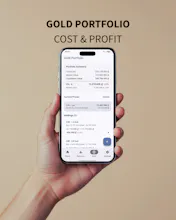


🆕 v3.6.0 is live — Gold Portfolio now shows your real sell-back P&L
Quick update for those tracking gold — the portfolio screen now distinguishes between:
- Market P&L — what your gold is worth at today's dealer sell price
- Liquidation P&L — what you'd actually get if you sold it back (buy-back price is always lower)
This matters because in Vietnam and much of Southeast Asia, the spread between sell and buy-back prices can be
significant. Before this update, the app only showed the optimistic number. Now you see both.
Also new: separate sell/buy-back price inputs, CSV export with liquidation columns, and an estimated indicator (~) on
holdings where buy-back data isn't available yet.
Still 100% offline. Still no account. Still free.
Grab the update on the Play Store → https://play.google.com/store/apps/details?id=dev.tuandoan.expensetracker
What's New in v3.8.0
🎨 Material You, done right
Dynamic color on Android 12+ — app picks up your wallpaper palette automatically
Redesigned Home screen with pinned filter chips and a single unified scroll
Smoother top-bar scroll behavior on every tab — surface tints as you scroll
Edge-to-edge content that flows behind the navigation bar
Chart colors now derive from the M3 color scheme — consistent in light & dark
⚙️ Quality-of-life polish
FAB and notifications no longer hidden behind the nav bar
Status bar tint matches the top bar when you scroll
Privacy Policy, Terms of Service, and Share App added to Settings
🥇 Headliners from recent releases
Gold portfolio with dual P&L (market value + real liquidation value based on buy-back prices)
Budget alerts — notifications at 80% spend and when you go over
Advanced search — filter by category, date range, scope, with persisted preferences
Recurring transactions, CSV export, full backup & restore — all offline
🔗 Play Store: Install Expense Tracker -> https://play.google.com/store/apps/details?id=dev.tuandoan.expensetracker
💬 Feedback: Reply on the Product Hunt post — I'm the solo dev, you'll actually hear back
⭐ Upvote if you want to see more privacy-first, offline-first personal tools
What's new in v3.9:
• Password-protect your backups — encrypted exports use AES-256 with a password only you know
• Import prompts for the password automatically when you pick an encrypted backup
• Wrong passwords let you retry without re-picking the file; your existing data stays untouched
• A one-time reminder explains that lost passwords can't be recovered — pick something you'll remember
🔗 Play Store: Install Expense Tracker -> https://play.google.com/store/apps/details?id=dev.tuandoan.expensetracker
What's new in v3.10:
• Home-screen widget — see today's spend, this month's total, and budget progress at a glance. Tap + to jump straight into Add Transaction.
• Spending Insights on the Summary tab — biggest category changes, daily pace vs. budget, and month-over-month trends.
• Material You dynamic color on the widget; smoother TalkBack announcements.
🔗 Play Store: Install Expense Tracker -> https://play.google.com/store/apps/details?id=dev.tuandoan.expensetracker
What's new in v3.11:
• Optional crash reporting — opt in once, toggle anytime in Settings. Off by default, no personal data ever leaves your device.
• Optional anonymous usage analytics — separate toggle from crash reporting. Helps prioritize features; no amounts, categories, or notes are ever sent.
• Dev-panel triggered test crashes for power users.
🔗 Play Store: Install Expense Tracker -> https://play.google.com/store/apps/details?id=dev.tuandoan.expensetracker
What's new in v3.12:
• Quick-add from your home-screen widget — pick up to 3 expense categories in Settings, then tap a category tile on the widget to log a spend in seconds. No app open needed.
• Quiet confirmation notification with a 10-second Undo on every quick-add — one tap to take it back.
• New Settings → Widget section to manage your pinned categories with arrow reorder.
• A one-shot Home banner points existing users at the new feature; dismiss anytime.
🔗 Play Store: Install Expense Tracker -> https://play.google.com/store/apps/details?id=dev.tuandoan.expensetracker