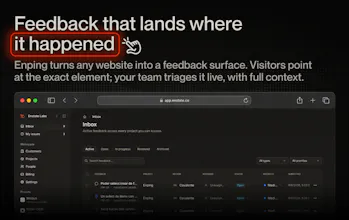
Enping turns any website into a feedback surface. Visitors point to the exact element, and every report includes the page, element, and state — no back-and-forth. Feedback lands on a real-time board, AI triage keeps it sorted, and confirmed bugs become GitHub issues automatically. One snippet, any framework. Safe on production: the widget loads only for people you allow.
intuitive, easy to handle, makes feedback faster and more on-point
What needs improvement
Tracking on given feedback, so clients see what feedbacks the developers are working on or what is already done.
vs Alternatives
Was there an alternative, that did it in a comprehensive way like Enping?
Ratings
Ease of use
Reliability
Value for money
Report
11 views
Thank you for the review :) Happy to hear more feature requests and enhancements
Report
Framer AI AgentsDesign and publish professional sites with AI
Promoted
Maker
📌
Hey Product Hunt — Dennis here, co-founder of Enping with Matias.
We've run client projects for years, and feedback was always the worst part. Cropped screenshots in WhatsApp. "The button doesn't work" — which button? Which page? Which browser? We spent more time reconstructing reports than fixing bugs.
Enping is the tool we wanted: one snippet on any site (React, Vue, Svelte, plain HTML — no build step). Clients and visitors point at the exact element, and the report lands on a real-time board with the full context attached. Confirmed bugs open as GitHub issues automatically, Slack and Linear are built in, and AI triage keeps the inbox sorted.
The part we're proudest of: it's safe on production. Most feedback widgets are built for staging. Enping loads only for the people you allow — authenticated reviewers, signed host identity, or time-boxed invite links you can hand a client for a week.
You can try it without signing up: the widget is live on enping.app itself. Point at anything on the landing page and watch it land on our board in real time.
There's a free sandbox for dev and staging projects, and Product Hunt gets 30% off the first 3 months with LAUNCHDAY (valid 7 days).
We're both here all day. Tell us what's missing — brutal feedback is literally the product.
Looking at the site, I can see why capturing the exact element and state matters, but I’m wondering where teams draw the line between feedback and noise.
If you make reporting frictionless, do people start reporting every tiny thing and overwhelm the team, or have you found the opposite happens?
Report
Maker
@josh_bennett1 Great question, Josh. We think about this as two separate problems: make it easy for the right person to report something, then make sure the team doesn’t receive raw noise.
So Enping doesn’t try to solve noise by making the reporter work harder. Access can still be controlled through authenticated reviewers or time-boxed reviewer links. Then the AI triage layer helps classify the report, clean up the language, detect likely duplicates, and either add new context to an existing issue or prepare a cleaner issue for the team or agent to act on.
That’s the agent-first part we care about: the report includes the exact element, page state, reproduction context, and structured metadata, so an agent can understand the work without a long back-and-forth. But teams still keep control over who can submit, what gets escalated, what gets merged, and what actually becomes implementation work.
So far, the bigger problem we see isn’t “too much feedback,” it’s vague feedback. Tiny issues are fine when they arrive with enough context to close, merge, assign, or fix quickly.
Report
🔌 Plugged in
We’ve had Enping running on BetterOEM (an auto-parts marketplace we’re building) for a while now, so this isn’t launch-day enthusiasm. The concrete change: testers used to send us [“search is broken” / a cropped screenshot] and we’d lose few minutes reconstructing which element, which filter state, which browser. Now the report lands with all of that attached and we can act on most of them without a single follow-up. The “stop reconstructing reports” promise in the post is the real thing,that’s exactly what it does.
Report
🔌 Plugged in
I've been lucky enough to work on several project with Dennis and Matias. I had access to Enping on various projects, where it felt like feedback on design, look&feel or actual functions was much easier and more intuitive for me to give. Doing screenshots, screen recordings, voice notes or even try to do a quick photoshop of what I would like to have fixed is definitely history!
Better for the devs, better for the clients - this looks like a win/win to me. Good job guys
No screenshot. No URL. No browser version. No steps to reproduce. Just that 😅
We spent more time trying to understand the report than fixing the actual issue.
how much time everyone here has spent playing detective before they could actually fix the bug.
Report
Maker
@isaiasuziel This is actually the main reason we've built the enping solution for ourselves - then we saw how happy our clients were and how much faster feedback loops become and here we are today.
Report
I'm building a cross-platform app and currently spending a lot of time refining the UI/UX to make it intuitive while avoiding that generic, cookie-cutter feel. This involves a lot of trial and error with several testers who closely match the profile of my target users.
Many of them have absolutely no familiarity with the terminology and jargon we commonly use in software development, yet their feedback often turns out to be far more valuable than anything we could get from our peers.
With all of that in mind, Enping arrived at exactly the right moment. The "Where?" and "How?" questions get answered almost instantly, and the automatic task writing makes working with agents significantly more efficient.
Thank you for the review :) Happy to hear more feature requests and enhancements