
Win+V makes you stop working. Edge-Drop doesn't. It lives on the edge of your Windows screen - invisible until you hover. Then a clipboard shelf springs open. Copy text, screenshots, files, or links and drag them straight into any app. Stack files, pin keepers, stay in flow. No shortcuts, no tray, no account. History never leaves your PC. Free and open source. Windows 10 and 11. GitHub or Microsoft Store.


What's great
I've had Win+V open more windows than I can count just to find something I copied two minutes ago. The hover-edge shelf is a genuinely different interaction, not just a reskin of clipboard history - it stays out of the way until you need it and then it's just a drag, not a search-and-paste. Being a real native Windows drag instead of a fake paste means it works into apps that don't play nice with clipboard managers.
What needs improvement
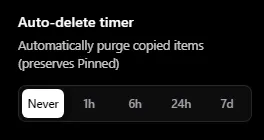
Someone in the comments (Lisa) asked whether pinned items survive a restart, and the maker confirmed they do plus there's an auto-delete timer for the rest. That's good, but none of that is visible anywhere on the product page itself - it only came out through a Q&A reply. A one-line mention of data retention and persistence in the description would save people the trip through the comments.
vs Alternatives
I also looked at Ditto (listed as similar), which is the classic clipboard history list you open with a hotkey and search through. Edge Drop's whole pitch is skipping that search step entirely - hover, see it, drag it. For a Windows-only tool that's a meaningfully different workflow, not just another history list with a different skin.
Ratings
Ease of use
Reliability
Value for money
Customization
Report
7 views




hi Gal
i would respectfully tell you that i think you haven't used the application as if would there is a setting button in the top right corner of the clipboard and all the customizations are there it self.
and i maybe wrong but your review is AI written and it feel very off kind of.
i am not saying this it in wrong way i am just presenting my thought's.