Hi everyone! I m Miguel, an indie Mac developer based in Toronto.
When I started distributing my first app outside the Mac App Store, I realised that finishing the app was only part of the job. There was still signing, notarization, stapling, creating the installer, and preparing updates.
I’m Miguel, an indie developer based in Toronto, Canada, and the maker of DMGKit. About a year ago, I released my first Mac app, Fuse Caption Studio. I initially distributed it through the Mac App Store, but after a few weeks, the downloads weren’t what I’d hoped for and I also wanted more freedom over how I sold and distributed my software, so I decided to distribute it directly. That’s when I discovered how much work comes after finishing the app.
Signing, notarization, stapling, packaging, updates… I wanted a reliable workflow I could repeat for every release without doing the same tasks manually. The tools I found didn’t quite offer the experience I was looking for and I wanted something modern, powerful, and comfortable to use on a Mac, which is why I built DMGKit.
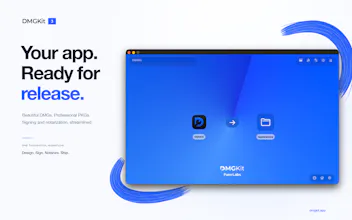
With DMGKit 3, it has grown into a complete distribution workflow:
Signing, notarization, and stapling: Prepare your app bundles and installers for distribution outside the Mac App Store, with reusable credential profiles.
Installer Designer: Create custom DMG layouts and save templates for future releases.
CLIKit: Use DMGKit’s engine from the terminal or integrate it into your CI workflow.
Kit: An on-device assistant that helps you understand release logs and troubleshoot problems, powered by Apple Intelligence or a local Qwen model.
Built-in Inspector: Check signatures, notarization status, and package details before sharing a release—or inspect an installer you’ve downloaded.
Sparkle 2 appcasts: Generate your appcast automatically when exporting, ready for your update workflow.
SLA injection: Add a licence agreement that users are asked to accept when opening your DMG.
DMGKit also supports apps built with Swift, Tauri, Python, and Electron, multiple packaging formats, and advanced signing and verification options.
I built it because I needed it for my own releases, and I still use it for them. Having other developers become customers and trust it with their apps has been one of the most rewarding parts of building DMGKit and I’m proud of how far it has come, and excited to share version 3 here.
You can take a look at dmgkit.app. I’d love to hear what you think, and I’m happy to answer questions about the app or how I built it.
If you distribute Mac apps directly, which part of releasing an update still takes more work than it should? How can I improve DMGKit for you to make it your go to tool?



Hi everyone!
I’m Miguel, an indie developer based in Toronto, Canada, and the maker of DMGKit. About a year ago, I released my first Mac app, Fuse Caption Studio. I initially distributed it through the Mac App Store, but after a few weeks, the downloads weren’t what I’d hoped for and I also wanted more freedom over how I sold and distributed my software, so I decided to distribute it directly. That’s when I discovered how much work comes after finishing the app.
Signing, notarization, stapling, packaging, updates… I wanted a reliable workflow I could repeat for every release without doing the same tasks manually. The tools I found didn’t quite offer the experience I was looking for and I wanted something modern, powerful, and comfortable to use on a Mac, which is why I built DMGKit.
With DMGKit 3, it has grown into a complete distribution workflow:
Signing, notarization, and stapling: Prepare your app bundles and installers for distribution outside the Mac App Store, with reusable credential profiles.
Installer Designer: Create custom DMG layouts and save templates for future releases.
CLIKit: Use DMGKit’s engine from the terminal or integrate it into your CI workflow.
Kit: An on-device assistant that helps you understand release logs and troubleshoot problems, powered by Apple Intelligence or a local Qwen model.
Built-in Inspector: Check signatures, notarization status, and package details before sharing a release—or inspect an installer you’ve downloaded.
Sparkle 2 appcasts: Generate your appcast automatically when exporting, ready for your update workflow.
SLA injection: Add a licence agreement that users are asked to accept when opening your DMG.
DMGKit also supports apps built with Swift, Tauri, Python, and Electron, multiple packaging formats, and advanced signing and verification options.
I built it because I needed it for my own releases, and I still use it for them. Having other developers become customers and trust it with their apps has been one of the most rewarding parts of building DMGKit and I’m proud of how far it has come, and excited to share version 3 here.
You can take a look at dmgkit.app. I’d love to hear what you think, and I’m happy to answer questions about the app or how I built it.
If you distribute Mac apps directly, which part of releasing an update still takes more work than it should? How can I improve DMGKit for you to make it your go to tool?