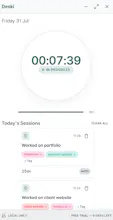
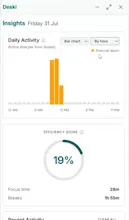
Most time trackers upload your workday to someone else's server. Deski keeps it on your machine. It runs on your desktop, tracks activity in the background, and writes everything to a SQLite file you own. Your time blocks never leave the device — that's enforced by the architecture, not a privacy policy. Keystrokes are counted, never recorded. No mouse coordinates. Clearing your data erases it from disk. Automatic tracking, time blocks, tags, insights, 8 themes. Windows, 14-day trial.
No reviews yetBe the first to leave a review for Deski
Maker
📌
Hey Product Hunt 👋
Deski tracks your work automatically. You don't start a timer, you don't stop one, and you don't sit down at 6pm trying to reconstruct where the day went. It notices when you're working, groups it into blocks, and gives you the day back as something you can read.
I built it for the freelancer problem — you finish a week, you know you worked hard, and you genuinely cannot say how many hours went to which client. Manual timers only work if you remember them, and nobody remembers them. But it's turned out to be just as useful for anyone who wants an honest picture of their own week rather than a guess.
Tag blocks by client or project, and the charts do the rest.
The part I care about most: it all stays on your computer. Nothing you track is uploaded anywhere — I never see it, and neither does anyone else.
And here's exactly what it watches, so there are no surprises: it counts your key presses and your mouse clicks. That's it. Not which keys you pressed, not what you typed, not where your cursor was on screen — just how many, and when, so it can tell working from idle. For a tool watching your workday, that felt non-negotiable.
Honest bit: I'm shipping without a code-signing certificate, so Windows will warn you it doesn't recognise the publisher. It's safe — that warning just means I haven't paid for a cert yet, and one's coming. Windows-only for now.
Ask me anything.