
Commandry
The AI CTO that tells you what to run, fix, and ship.
45 followers
The AI CTO that tells you what to run, fix, and ship.
45 followers
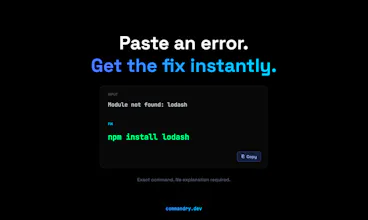
Commandry.dev is your AI CTO for vibe coders. Paste confusing errors like “Module not found” or blank screens and get exact terminal commands, structured prompts for Cursor/Replit, and clear validation steps you can run instantly. Run Ship Ready checks to test your app, verify environment setup, and catch issues before launch. Other AI tools explain. Commandry executes. Built for non-technical founders, vibe founders, and indie hackers—fix faster, stay in flow, and ship with confidence. 🚀





Free
Launch Team / Built With


Viktor.comAn AI coworker that actually does the work
Promoted
I have run into cases where I fix one error and something else breaks right after or the issue just doesn’t go away. That is usually where I lose time trying different things without knowing what is actually wrong.
What happens if the suggested fix doesn’t work does it try again with a different approach or just give one answer?
Sometimes errors don’t come from just one line they are connected to different parts of the project so fixing them isn’t always easy. That’s where things get confusing especially when working with a larger setup.
Can Commandry analyze a full repo or is it mostly based on pasted errors?
@johan_nystrom You’re completely right — most real issues aren’t isolated. They usually come from multiple parts of the app interacting in ways that aren’t obvious.
That’s why Commandry doesn’t just rely on a single error. It can also use repo-level context (via GitHub) alongside logs and descriptions to get a better picture of what’s going on.
Instead of giving one guess, it aims to:
surface multiple likely causes
map out a structured investigation path
and guide you toward isolating the real issue across the system
The goal is to make those “this could be coming from anywhere” problems a lot more traceable and less guesswork.
Has anyone tested this in a real production setup? Things often work locally but break after deployment. Logs on platforms like Vercel or Replit can get hard to read.
How well does this handle those cases?
@anders_dahl2 That’s exactly the scenario we had in mind.
A lot of issues only show up after deployment, and logs from platforms like Vercel or Replit can be hard to interpret.
Commandry is designed to work with those logs — you can paste them in or connect your repo, and it tries to:
interpret what the logs are actually saying
identify likely causes (like env issues, build mismatches, API failures)
and guide you on what to check next
It’s not perfect, but it definitely helps make production issues more readable and easier to trace.
Hey PH community 👋
I’m Curtis, founder of Commandry.
As AI coding tools like Replit, Cursor and v0 (Vercel) go mainstream, more non-technical founders are building real products.
But there’s a consistent gap: building is easy now — debugging and shipping are not.
When something breaks, most AI tools explain the issue… but they don’t tell you exactly what to do next.
That’s where people get stuck.
So we built Commandry as an AI CTO for AI-built apps — it turns errors into exact commands, structured prompts, and validation steps you can run immediately.
Commandry also includes built-in Ship Ready checks to test your app before launch—verifying environment setup, configs, and common production failures.
The goal is simple: move from “it’s broken” to “run this” to “it’s shipped.”
Curious — where do things usually break for you when building with AI? 👇
@riskycactus Congrats on the launch! I have a question, how accurate the fixes are here compared to asking ChatGPT directly does it take the project context into account before suggesting commands?
@mattias_blomqvist Appreciate that 🙌
The main difference vs ChatGPT is that Commandry is more constrained and context-aware specifically for debugging. Instead of open-ended answers, it focuses on:
identifying the likely root cause
generating exact commands or actions
and showing what to check after so you know the fix actually worked
Right now it uses what you provide (errors, logs, description), but we’re also moving toward deeper project-level context.
You’ll be able to connect your GitHub repo so Commandry can understand your setup (dependencies, structure, configs) and give more precise, situation-aware fixes instead of generic suggestions.
Thing that matters a lot while fixing issues is understanding whether the problem is just one error or something deeper in the setup. Fixing the surface issue doesn’t always solve everything.
Does this tool help identify the root cause as well or does it only address the first error it detects?
@m_qasim67 That’s a really important point — a lot of the time the visible error is just a symptom, not the actual problem.
Commandry tries to go beyond the first error by looking at the context (logs, repo, setup) and surfacing possible root causes, not just a single fix.
It also gives a step-by-step investigation path, so you can confirm whether the issue is actually resolved or if something deeper is going on.
The goal is to help you avoid that loop of fixing the surface issue while the real cause is still there.
I have run into version issues a few times where packages don’t match and things stop working. Its not always clear from the error what’s causing it.
How well this handles those cases, Can it detect things like version mismatches automatically or do you have to paste the error?
@henrik_falk Version mismatches are a big one — and you’re right, the error messages usually don’t make it obvious.
Commandry can pick up on those patterns when you paste errors or logs (things like dependency conflicts, Node version issues, etc.), and suggest fixes around that.
With repo context, it gets a bit stronger because it can see things like package versions and setup directly.
So you don’t always need to know exactly what to look for upfront — it helps surface those mismatches for you.